// File: +page.md
---
title: Introduction
slug: /
---
## What is middy
Middy is a very simple **middleware engine** that allows you to simplify your **AWS Lambda** code when using **Node.js**.
If you have used web frameworks like Express, then you will be familiar with the concepts adopted in Middy and you will be able to get started very quickly.
A middleware engine allows you to focus on the strict business logic of your Lambda and then attach additional common elements like authentication, authorization, validation, serialization, etc. in a modular and reusable way by decorating the main business logic.
## A quick example
Code is better than 10,000 words, so let's jump into an example.
Let's assume you are building a JSON API to process a payment:
```javascript title="handler.js"
// import core
import middy from '@middy/core' // esm Node v14+
//const middy = require('@middy/core') // cjs Node v12+
// import some middlewares
import jsonBodyParser from '@middy/http-json-body-parser'
import httpErrorHandler from '@middy/http-error-handler'
import validator from '@middy/validator'
import { transpileSchema } from '@middy/validator/transpile'
// This is your common handler, in no way different than what you are used to doing every day in AWS Lambda
const lambdaHandler = async (event, context) => {
// we don't need to deserialize the body ourself as a middleware will be used to do that
const { creditCardNumber, expiryMonth, expiryYear, cvc, nameOnCard, amount } =
event.body
// do stuff with this data
// ...
const response = { result: 'success', message: 'payment processed correctly' }
return { statusCode: 200, body: JSON.stringify(response) }
}
// Notice that in the handler you only added base business logic (no deserialization,
// validation or error handler), we will add the rest with middlewares
const schema = {
type: 'object',
properties: {
body: {
type: 'object',
properties: {
creditCardNumber: {
type: 'string',
minLength: 12,
maxLength: 19,
pattern: '\\d+'
},
expiryMonth: { type: 'integer', minimum: 1, maximum: 12 },
expiryYear: { type: 'integer', minimum: 2017, maximum: 2027 },
cvc: { type: 'string', minLength: 3, maxLength: 4, pattern: '\\d+' },
nameOnCard: { type: 'string' },
amount: { type: 'number' }
},
required: ['creditCardNumber'] // Insert here all required event properties
}
}
}
// Let's "middyfy" our handler, then we will be able to attach middlewares to it
export const handler = middy()
.use(jsonBodyParser()) // parses the request body when it's a JSON and converts it to an object
.use(validator({ eventSchema: transpileSchema(schema) })) // validates the input
.use(httpErrorHandler()) // handles common http errors and returns proper responses
.handler(lambdaHandler)
```
## Why?
One of the main strengths of serverless and AWS Lambda is that, from a developer
perspective, your focus is mostly shifted toward implementing business logic.
Anyway, when you are writing a handler, you still have to deal with some common technical concerns
outside business logic, like input parsing and validation, output serialization,
error handling, etc.
Very often, all this necessary code ends up polluting the pure business logic code in
your handlers, making the code harder to read and to maintain.
In other contexts, like generic web frameworks ([fastify](https://fastify.io), [hapi](https://hapijs.com/), [express](https://expressjs.com/), etc.), this
problem has been solved using the [middleware pattern](https://www.packtpub.com/mapt/book/web_development/9781783287314/4/ch04lvl1sec33/middleware).
This pattern allows developers to isolate these common technical concerns into
_"steps"_ that _decorate_ the main business logic code.
Middleware functions are generally written as independent modules and then plugged into
the application in a configuration step, thus not polluting the main business logic
code that remains clean, readable, and easy to maintain.
Since we couldn't find a similar approach for AWS Lambda handlers, we decided
to create middy, our own middleware framework for serverless in AWS land.
// File: best-practices/bundling/+page.md
---
title: Bundling Lambda packages
---
This page is a work in progress. If you want to help us to make this page better, please consider contributing on GitHub.
Always bundle the `@aws-sdk/*` with your project eventhough the Lambda runtime already includes it by default (Note: nodejs16.x does not have AWS SDK v3 included).
This gives you full control of when to update the SDK to prevent unexpected errors from a bad SDK version, allows you to ensure that you are running the latest version with the most up to date fixes and features, and has been shown to decrease cold start times.
## Compilers
### typescript
```bash
npm i -D typescript
node_modules/.bin/tsc
```
#### tsconfig.json
```json
{
"compilerOptions": {
"baseUrl": "./",
"esModuleInterop": true,
"preserveConstEnums": true,
"strictNullChecks": true,
"allowJs": false,
"target": "es2021",
"typeRoots": ["node_modules/@types"],
"resolveJsonModule": true,
"moduleResolution": "node"
}
}
```
## Bundlers
### esbuild
```bash
npm i -D esbuild
# --banner:js hack from https://github.com/evanw/esbuild/pull/2067
node_modules/.bin/esbuild index.js \
--platform=node --format=esm --target=node18 --bundle --minify \
--banner:js="import { createRequire } from 'module';const require = createRequire(import.meta.url);" \
--legal-comments=external --sourcemap=external \
--allow-overwrite --outfile=index.mjs
```
### rollup
```bash
npm i -D rollup @rollup/plugin-node-resolve @rollup/plugin-commonjs
node_modules/.bin/rollup --config
```
#### rollup.config.mjs
```javascript
import { nodeResolve } from '@rollup/plugin-node-resolve'
import commonjs from '@rollup/plugin-commonjs'
const plugins = [nodeResolve({ preferBuiltins: true }), commonjs()]
export default (input) => ({
input: 'index.js',
output: {
file: 'index.bundle.rollup.mjs',
format: 'es' // cjs, es
},
plugins,
external: [
// AWS SDK
'@aws-sdk/client-apigatewaymanagementapi', // @middy/ws-response
'@aws-sdk/client-rds', // @middy/rds-signer
'@aws-sdk/client-s3', // @middy/s3-object-response
'@aws-sdk/client-secretsmanager', // @middy/sercrets-manager
'@aws-sdk/client-servicediscovery', // @middy/service-discovery
'@aws-sdk/client-ssm', // @middy/ssm
'@aws-sdk/client-sts' // @middy/sts
]
})
```
### swc/pack
```bash
npm i -D @swc/cli @swc/core
node_modules/.bin/spack
```
Incomplete
### webpack
```bash
npm i -D webpack-cli webpack
node_modules/.bin/webpack
```
#### webpack.config.mjs
```javascript
import path from 'node:path'
import { fileURLToPath } from 'node:url'
const __filename = fileURLToPath(import.meta.url)
const __dirname = path.dirname(__filename)
export default {
mode: 'development',
entry: './index.js',
output: {
filename: 'index.bundle.webpack.mjs',
path: __dirname
},
experiments: {
outputModule: true
},
externals: [
// NodeJS modules
'events', // @middy/core
'https', // @middy/s3-object-response
'stream', // @middy/http-content-encoding @middy/s3-object-response
'util', // @middy/http-content-encoding
'zlib', // @middy/http-content-encoding
// AWS SDK
'@aws-sdk/client-apigatewaymanagementapi', // @middy/ws-response
'@aws-sdk/client-rds', // @middy/rds-signer
'@aws-sdk/client-s3', // @middy/s3-object-response
'@aws-sdk/client-secretsmanager', // @middy/sercrets-manager
'@aws-sdk/client-servicediscovery', // @middy/service-discovery
'@aws-sdk/client-ssm', // @middy/ssm
'@aws-sdk/client-sts' // @middy/sts
]
}
```
## Transpilers
### babel
```bash
npm i -D @babel/cli @babel/core @babel/preset-env
node_modules/.bin/babel index.js --out-file index.transpile.babel.cjs
```
#### babel.config.json
```json
{
"presets": [
[
"@babel/preset-env",
{
"targets": {
"node": "16"
}
}
]
]
}
```
### esbuild
```bash
npm i -D esbuild
node_modules/.bin/esbuild --platform=node --target=node16 --format=cjs index.js --outfile=index.cjs
```
### swc
```bash
npm i -D @swc/cli @swc/core
node_modules/.bin/swc index.js --out-file index.transpile.swc.cjs
```
#### .swcrc
```json
{
"jsc": {
"parser": {
"syntax": "ecmascript"
},
"target": "es2021"
},
"module": {
"type": "commonjs"
}
}
```
// File: best-practices/connection-reuse/+page.md
---
title: Connection reuse
---
Be sure to set the following environment variable when connecting to AWS services:
```plain
AWS_NODEJS_CONNECTION_REUSE_ENABLED=1
```
This allows you to reuse the first connection established across lambda invocations.
See [Reusing Connections with Keep-Alive in Node.js](https://docs.aws.amazon.com/sdk-for-javascript/v2/developer-guide/node-reusing-connections.html)
// File: best-practices/internal-context/+page.md
---
title: Internal Context
---
Middy is built to be async even at it's core. Middlewares can set promises to `internal`.
This approach allows them to be resolved together just when you need them.
```javascript
import middy from '@middy/core'
import {getInternal} from '@middy/util'
const lambdaHandler = async (event, context, { signal }) => {
}
const config = {
internal: new Proxy({}, {
get: (target, prop, receiver) => {
// ...
return Reflect.get(...arguments)
},
set: (obj, prop, value) => {
// ... ie if `prop` changes, trigger something
obj[prop] = value
return true
}
})
}
export const handler = middy(config)
// Incase you want to add values on to internal directly
.before((async (request) => {
request.internal = {
env: process.env.NODE_ENV
}
}))
.use(sts(...))
.use(ssm(...))
.use(rdsSigner(...))
.use(secretsManager(...))
.before(async (request) => {
// internal == { key: 'value' }
// Map with same name
Object.assign(request.context, await getInternal(['key'], request))
// -> context == { key: 'value'}
// Map to new name
Object.assign(request.context, await getInternal({'newKey':'key'}, request))
// -> context == { newKey: 'value'}
// get all the values, only if you really need to,
// but you should only request what you need for the handler
Object.assign(request.context, await getInternal(true, request))
// -> context == { key: 'value'}
})
.handler(lambdaHandler)
```
// File: best-practices/intro/+page.md
---
title: Intro
---
In this section you will find some common tips and tricks to ensure you don't hit any performance or security issues.
Did we miss something? Let us know.
// File: best-practices/profiling/+page.md
---
title: Profiling
---
Inside of `@middy/core` we've added some hook before and after every middleware called, the handler and from start to end of it's execution.
## Time
```javascript
const defaults = {
logger: console.log,
enabled: true
}
const timePlugin = (opts = {}) => {
const { logger, enabled } = { ...defaults, ...opts }
const store = {}
const start = (id) => {
store[id] = process.hrtime.bigint()
}
const stop = (id) => {
if (!enabled) return
logger(id, Number.parseInt((process.hrtime.bigint() - store[id]).toString(), 10) / 1000000, 'ms')
}
// Only run during cold start
const beforePrefetch = () => start('total')
const requestStart = () => {
if (!store.init) {
store.init = store.total
stop('init')
} else {
start('total')
}
}
const beforeMiddleware = start
const afterMiddleware = stop
const beforeHandler = () => start('handler')
const afterHandler = () => stop('handler')
const requestEnd = () => stop('total')
return {
beforePrefetch,
requestStart,
beforeMiddleware,
afterMiddleware,
beforeHandler,
afterHandler,
requestEnd
}
}
export const handler = middy(timePlugin())
.use(eventLogger())
.use(errorLogger())
.use(httpEventNormalizer())
.use(httpHeaderNormalizer())
.use(httpUrlencodePathParametersParser())
.use(httpUrlencodeBodyParser())
.use(httpJsonBodyParser())
.use(httpCors())
.use(httpSecurityHeaders())
.use(validator({eventSchema}))
.handler(()=>{})
await handler()
```
This will log out something this:
```shell
inputOutputLoggerMiddlewareBefore 0.156033 ms
httpEventNormalizerMiddlewareBefore 0.073921 ms
httpHeaderNormalizerMiddlewareBefore 0.095098 ms
httpUrlencodePathParserMiddlewareBefore 0.036255 ms
httpUrlencodeBodyParserMiddlewareBefore 0.038809 ms
httpJsonBodyParserMiddlewareBefore 0.048383 ms
httpContentNegotiationMiddlewareBefore 0.042311 ms
validatorMiddlewareBefore 0.083366 ms
handler 0.094875 ms
validatorMiddlewareAfter 0.083601 ms
httpSecurityHeadersMiddlewareAfter 0.19702 ms
httpCorsMiddlewareAfter 0.080532 ms
inputOutputLoggerMiddlewareAfter 0.066886 ms
lambda 66.141835 ms
```
From this everything looks good. Sub 1ms for every middleware and the handler. But wait, that `total` doesn't look right.
You're correct, `total` includes the initial setup time (or cold start time) for all middlewares. In this case `validator` is the culprit.
The Ajv constructor and compiler do a lot of magic when they first run to get ready for later schema validations.
This is why in the `validator` middleware we now support passing in complied schema and expose the default compiler in
case you want to use it in a build step. We hope this feature will help to you in identify slow middlewares and improve your development experience.
There is also a `beforeRequest` hook, but was left out of the example for dramatic effect.
Additionally, you'll notice that each middleware shows a descriptive name. This is printing out the function name passed into middy core.
If you've looked at the code for some the supported middlewares, you'll see these long descriptive variable names being set, then returned.
This is why.
## Memory
```javascript
import memwatch from '@airbnb/node-memwatch'
const defaults = {
logger: console.log
}
const memoryPlugin = (opts = {}) => {
const { logger } = { ...defaults, ...opts }
const store = {}
const start = (id) => {
store[id] = new memwatch.HeapDiff()
}
const stop = (id) => {
logger(id, store[id].end())
}
const beforePrefetch = () => start('total')
const requestStart = () => {
store.init = store.total
stop('init')
}
const beforeMiddleware = start
const afterMiddleware = stop
const beforeHandler = () => start('handler')
const afterHandler = () => stop('handler')
const requestEnd = () => stop('total')
return {
beforePrefetch,
requestStart,
beforeMiddleware,
afterMiddleware,
beforeHandler,
afterHandler,
requestEnd
}
}
export const handler = middy(memoryPlugin())
.use(eventLogger())
.use(errorLogger())
.use(httpEventNormalizer())
.use(httpHeaderNormalizer())
.use(httpUrlencodePathParametersParser())
.use(httpUrlencodeBodyParser())
.use(httpJsonBodyParser())
.use(httpCors())
.use(httpSecurityHeaders())
.use(validator({eventSchema}))
.handler(()=>{})
await handler()
```
// File: best-practices/small-node-modules/+page.md
---
title: Small node_modules
---
Using a bundler is the optimal solution, but can be complex depending on your setup.
In this case you should remove excess files from your `node_modules` directory to ensure it doesn't have anything excess shipped to AWS.
We put together a `.yarnclean` file you can check out and use as part of your CI/CD process:
```git title=".yarnclean"
# -- Middy.js --
# Dependencies
**/ajv/lib
**/ajv/.runkit_examples.js
**/ajv-errors/src
**/ajv-formats/src
**/@silverbucket/ajv-formats-draft2019/.github
**/@silverbucket/ajv-formats-draft2019/.prettierrc.js
**/@silverbucket/ajv-formats-draft2019/index.test.js
**/@silverbucket/ajv-i18n/localize/.eslintrc.yml
**/json-mask/bin
**/json-mask/build
**/qs/.github
**/qs/dist
**/qs/test
**/qs/.editorconfig
**/qs/.eslintrc
**/qs/.nycrc
**/qs/CHANGELOG.md
# DevDependencies
**/@types
**/@serverless/event-mocks
## Sub[/Sub] Dependencies
**/bowser/src
**/bowser/bundled.js
**/dicer/bench
**/dicer/test
**/inherits/inherits_browser.js
**/json-schema-traverse/.github
**/json-schema-traverse/spec
**/fast-deep-equal/es6
**/fast-deep-equal/react.js
**/querystring/test
**/react-native-get-random-values/android
**/react-native-get-random-values/ios
**/react-native-get-random-values/index.web.js
**/react-native-get-random-values/react-native-get-random-values.podspec
**/setprototypeof/test
**/tslib
**/uri-js/dist/esnext
**/url/.zuul.yml
**/url/test.js
**/uuid/bin
# Builds
*.ts
tsconfig.json
*.js.map
package-lock.json
yarn.lock
.travis.yml
# Common
.bin
.cache
.editorconfig
.eslintignore
.eslintrc
.eslintrc.yml
.gitattributes
.npmignore
AUTHORS
LICENSE
*.md
*.txt
```
// File: events/alexa/+page.md
---
title: Alexa
---
This page is a work in progress. If you want to help us to make this page better, please consider contributing on GitHub.
## AWS Documentation
- [Using AWS Lambda with Alexa](https://docs.aws.amazon.com/lambda/latest/dg/services-alexa.html)
## Example
```javascript
import middy from '@middy/core'
export const handler = middy()
.handler((event, context, {signal}) => {
// ...
})
```
// File: events/api-gateway-authorizer/+page.md
---
title: API Gateway Authorizer
---
This page is a work in progress. If you want to help us to make this page better, please consider contributing on GitHub.
## AWS Documentation
- [Working with AWS Lambda authorizers for HTTP APIs](https://docs.aws.amazon.com/apigateway/latest/developerguide/http-api-lambda-authorizer.html)
- [Input to an Amazon API Gateway Lambda authorizer](https://docs.aws.amazon.com/apigateway/latest/developerguide/api-gateway-lambda-authorizer-input.html)
## Example
```javascript
import middy from '@middy/core'
export const handler = middy().handler((event, context, { signal }) => {
// ...
})
```
// File: events/api-gateway-http/+page.md
---
title: API Gateway (HTTP)
---
This page is a work in progress. If you want to help us to make this page better, please consider contributing on GitHub.
## AWS Documentation
- [Using AWS Lambda with Amazon API Gateway](https://docs.aws.amazon.com/lambda/latest/dg/services-apigateway.html)
- [Working with HTTP APIs](https://docs.aws.amazon.com/apigateway/latest/developerguide/http-api.html)
## Example
```javascript
import middy from '@middy/core'
import errorLoggerMiddleware from '@middy/error-logger'
import inputOutputLoggerMiddleware from '@middy/input-output-logger'
import httpContentNegotiationMiddleware from '@middy/http-content-negotiation'
import httpContentEncodingMiddleware from '@middy/http-content-encoding'
import httpCorsMiddleware from '@middy/http-cors'
import httpErrorHandlerMiddleware from '@middy/http-error-handler'
import httpEventNormalizerMiddleware from '@middy/http-event-normalizer'
import httpHeaderNormalizerMiddleware from '@middy/http-header-normalizer'
import httpJsonBodyParserMiddleware from '@middy/http-json-body-parser'
import httpMultipartBodyParserMiddleware from '@middy/http-multipart-body-parser'
import httpPartialResponseMiddleware from '@middy/http-partial-response'
import httpResponseSerializerMiddleware from '@middy/http-response-serializer'
import httpSecurityHeadersMiddleware from '@middy/http-security-headers'
import httpUrlencodeBodyParserMiddleware from '@middy/http-urlencode-body-parser'
import httpUrlencodePathParametersParserMiddleware from '@middy/http-urlencode-path-parser'
import validatorMiddleware from 'validator'
import warmupMiddleware from 'warmup'
import eventSchema from './eventSchema.json' with { type: 'json' }
import responseSchema from './responseSchema.json' with { type: 'json' }
export const handler = middy({
timeoutEarlyResponse: () => {
return {
statusCode: 408
}
}
})
.use(warmupMiddleware())
.use(httpEventNormalizerMiddleware())
.use(httpHeaderNormalizerMiddleware())
.use(
httpContentNegotiationMiddleware({
availableLanguages: ['en-CA', 'fr-CA'],
availableMediaTypes: ['application/json']
})
)
.use(httpUrlencodePathParametersParserMiddleware())
// Start oneOf
.use(httpUrlencodeBodyParserMiddleware())
.use(httpJsonBodyParserMiddleware())
.use(httpMultipartBodyParserMiddleware())
// End oneOf
.use(httpSecurityHeadersMiddleware())
.use(httpCorsMiddleware())
.use(httpContentEncodingMiddleware())
.use(
httpResponseSerializerMiddleware({
serializers: [
{
regex: /^application\/json$/,
serializer: ({ body }) => JSON.stringify(body)
}
],
default: 'application/json'
})
)
.use(httpPartialResponseMiddleware())
.use(validatorMiddleware({ eventSchema, responseSchema }))
.use(httpErrorHandlerMiddleware())
.handler((event, context, { signal }) => {
// ...
})
```
// File: events/api-gateway-rest/+page.md
---
title: API Gateway (REST)
---
This page is a work in progress. If you want to help us to make this page better, please consider contributing on GitHub.
## AWS Documentation
- [Using AWS Lambda with Amazon API Gateway](https://docs.aws.amazon.com/lambda/latest/dg/services-apigateway.html)
- [Working with REST APIs](https://docs.aws.amazon.com/apigateway/latest/developerguide/apigateway-rest-api.html)
## Example
```javascript
import middy from '@middy/core'
import errorLoggerMiddleware from '@middy/error-logger'
import inputOutputLoggerMiddleware from '@middy/input-output-logger'
import httpContentNegotiationMiddleware from '@middy/http-content-negotiation'
import httpContentEncodingMiddleware from '@middy/http-content-encoding'
import httpCorsMiddleware from '@middy/http-cors'
import httpErrorHandlerMiddleware from '@middy/http-error-handler'
import httpEventNormalizerMiddleware from '@middy/http-event-normalizer'
import httpHeaderNormalizerMiddleware from '@middy/http-header-normalizer'
import httpJsonBodyParserMiddleware from '@middy/http-json-body-parser'
import httpMultipartBodyParserMiddleware from '@middy/http-multipart-body-parser'
import httpPartialResponseMiddleware from '@middy/http-partial-response'
import httpResponseSerializerMiddleware from '@middy/http-response-serializer'
import httpSecurityHeadersMiddleware from '@middy/http-security-headers'
import httpUrlencodeBodyParserMiddleware from '@middy/http-urlencode-body-parser'
import httpUrlencodePathParametersParserMiddleware from '@middy/http-urlencode-path-parser'
import validatorMiddleware from 'validator'
import warmupMiddleware from 'warmup'
import eventSchema from './eventSchema.json' with { type: 'json' }
import responseSchema from './responseSchema.json' with { type: 'json' }
export const handler = middy({
timeoutEarlyResponse: () => {
return {
statusCode: 408
}
}
})
.use(warmupMiddleware())
.use(httpEventNormalizerMiddleware())
.use(httpHeaderNormalizerMiddleware())
.use(
httpContentNegotiationMiddleware({
availableLanguages: ['en-CA', 'fr-CA'],
availableMediaTypes: ['application/json']
})
)
.use(httpUrlencodePathParametersParserMiddleware())
// Start oneOf
.use(httpUrlencodeBodyParserMiddleware())
.use(httpJsonBodyParserMiddleware())
.use(httpMultipartBodyParserMiddleware())
// End oneOf
.use(httpSecurityHeadersMiddleware())
.use(httpCorsMiddleware())
.use(httpContentEncodingMiddleware())
.use(
httpResponseSerializerMiddleware({
serializers: [
{
regex: /^application\/json$/,
serializer: ({ body }) => JSON.stringify(body)
}
],
defaultContentType: 'application/json'
})
)
.use(httpPartialResponseMiddleware())
.use(validatorMiddleware({ eventSchema, responseSchema }))
.use(httpErrorHandlerMiddleware())
.handler((event, context, { signal }) => {
// ...
})
```
// File: events/api-gateway-ws/+page.md
---
title: API Gateway (WebSocket)
---
This page is a work in progress. If you want to help us to make this page better, please consider contributing on GitHub.
## AWS Documentation
- [Using AWS Lambda with Amazon API Gateway](https://docs.aws.amazon.com/lambda/latest/dg/services-apigateway.html)
- [Working with WebSocket APIs](https://docs.aws.amazon.com/apigateway/latest/developerguide/apigateway-websocket-api.html)
## Example
```javascript
import middy from '@middy/core'
import wsJsonBodyParserMiddleware from '@middy/ws-json-body-parser'
import wsResponseMiddleware from '@middy/ws-response'
import wsRouterHandler from '@middy/ws-router'
import { handler as connectHandler } from './handlers/connect.js'
import { handler as disconnectHandler } from './handlers/disconnect.js'
import { handler as defaultHandler } from './handlers/default.js'
const routes = [
{
routeKey: '$connect',
handler: connectHandler
},
{
routeKey: '$disconnect',
handler: disconnectHandler
},
{
routeKey: 'default',
handler: defaultHandler
}
]
export const handler = middy()
.use(wsJsonBodyParserMiddleware())
.use(wsResponseMiddleware())
.handler(wsRouterHandler(routes))
```
// File: events/application-load-balancer/+page.md
---
title: Application Load Balancer
---
Same as API Gateway (REST)
This page is a work in progress. If you want to help us to make this page better, please consider contributing on GitHub.
## AWS Documentation
- [Using AWS Lambda with an Application Load Balancer](https://docs.aws.amazon.com/lambda/latest/dg/services-alb.html)
## Example
```javascript
import middy from '@middy/core'
import httpRouterHandler from '@middy/http-router'
import errorLoggerMiddleware from '@middy/error-logger'
import inputOutputLoggerMiddleware from '@middy/input-output-logger'
import httpContentNegotiationMiddleware from '@middy/http-content-negotiation'
import httpContentEncodingMiddleware from '@middy/http-content-encoding'
import httpCorsMiddleware from '@middy/http-cors'
import httpErrorHandlerMiddleware from '@middy/http-error-handler'
import httpEventNormalizerMiddleware from '@middy/http-event-normalizer'
import httpHeaderNormalizerMiddleware from '@middy/http-header-normalizer'
import httpJsonBodyParserMiddleware from '@middy/http-json-body-parser'
import httpMultipartBodyParserMiddleware from '@middy/http-multipart-body-parser'
import httpPartialResponseMiddleware from '@middy/http-partial-response'
import httpResponseSerializerMiddleware from '@middy/http-response-serializer'
import httpSecurityHeadersMiddleware from '@middy/http-security-headers'
import httpUrlencodeBodyParserMiddleware from '@middy/http-urlencode-body-parser'
import httpUrlencodePathParametersParserMiddleware from '@middy/http-urlencode-path-parser'
import warmupMiddleware from 'warmup'
import { handler as getHandler } from './handlers/get-user.js'
import { handler as postHandler } from './handlers/get-user.js'
const routes = [
{
method: 'GET',
path: '/user/{id}',
handler: getHandler
},
{
method: 'POST',
path: '/user',
handler: postHandler
}
]
export const handler = middy({
timeoutEarlyResponse: () => {
return {
statusCode: 408
}
}
})
.use(warmupMiddleware())
.use(httpEventNormalizerMiddleware())
.use(httpHeaderNormalizerMiddleware())
.use(
httpContentNegotiationMiddleware({
availableLanguages: ['en-CA', 'fr-CA'],
availableMediaTypes: ['application/json']
})
)
.use(httpUrlencodePathParametersParserMiddleware())
// Start oneOf
.use(httpUrlencodeBodyParserMiddleware())
.use(httpJsonBodyParserMiddleware())
.use(httpMultipartBodyParserMiddleware())
// End oneOf
.use(httpSecurityHeadersMiddleware())
.use(httpCorsMiddleware())
.use(httpContentEncodingMiddleware())
.use(
httpResponseSerializerMiddleware({
serializers: [
{
regex: /^application\/json$/,
serializer: ({ body }) => JSON.stringify(body)
}
],
default: 'application/json'
})
)
.use(httpPartialResponseMiddleware())
.use(httpErrorHandlerMiddleware())
.handler(httpRouterHandler(routes))
```
// File: events/appsync/+page.md
---
title: AppSync
---
This page is a work in progress. If you want to help us to make this page better, please consider contributing on GitHub.
## AWS Documentation
- [Using AWS Lambda with AppSync](https://docs.aws.amazon.com/appsync/latest/devguide/resolver-context-reference.html)
## Example
```javascript
import middy from '@middy/core'
export const handler = middy().handler((event, context, { signal }) => {
// ...
})
```
// File: events/cloud-formation/+page.md
---
title: CloudFormation
---
This page is a work in progress. If you want to help us to make this page better, please consider contributing on GitHub.
## AWS Documentation
- [Using AWS Lambda with AWS CloudFormation](https://docs.aws.amazon.com/lambda/latest/dg/services-cloudformation.html)
## Example
```javascript
import middy from '@middy/core'
import cloudformationRouterHandler from '@middy/cloudformation-router'
import cloudformationResponseMiddleware from '@middy/cloudformation-response'
import validatorMiddleware from '@middy/validator'
const createHandler = middy()
.use(validatorMiddleware({eventSchema: {...} }))
.handler((event, context) => {
return {
PhysicalResourceId: '...',
Data:{}
}
})
const updateHandler = middy()
.use(validatorMiddleware({eventSchema: {...} }))
.handler((event, context) => {
return {
PhysicalResourceId: '...',
Data: {}
}
})
const deleteHandler = middy()
.use(validatorMiddleware({eventSchema: {...} }))
.handler((event, context) => {
return {
PhysicalResourceId: '...'
}
})
const routes = [
{
requesType: 'Create',
handler: createHandler
},
{
requesType: 'Update',
handler: updateHandler
},
{
routeKey: 'Delete',
handler: deleteHandler
}
]
export const handler = middy()
.use(cloudformationResponseMiddleware())
.handler(cloudformationRouterHandler(routes))
```
// File: events/cloud-front/+page.md
---
title: CloudFront Lambda@Edge
---
This page is a work in progress. If you want to help us to make this page better, please consider contributing on GitHub.
## AWS Documentation
- [Using AWS Lambda with CloudFront Lambda@Edge](https://docs.aws.amazon.com/lambda/latest/dg/lambda-edge.html)
## Example
```javascript
import middy from '@middy/core'
export const handler = middy()
//.use(cfHeaderNormalizer()) // Let use know if this would have value
.handler((event, context, {signal}) => {
// ...
})
```
// File: events/cloud-trail/+page.md
---
title: CloudTrail
---
This page is a work in progress. If you want to help us to make this page better, please consider contributing on GitHub.
## AWS Documentation
- [Using AWS Lambda with AWS CloudTrail](https://docs.aws.amazon.com/lambda/latest/dg/with-cloudtrail.html)
## Example
```javascript
import middy from '@middy/core'
export const handler = middy()
.handler((event, context, {signal}) => {
// ...
})
```
// File: events/cloud-watch-alarm/+page.md
---
title: CloudWatch Alarm
---
This page is a work in progress. If you want to help us to make this page better, please consider contributing on GitHub.
## AWS Documentation
- [Using AWS Lambda with CloudWatch Alarm](https://docs.aws.amazon.com/AmazonCloudWatch/latest/monitoring/AlarmThatSendsEmail.html#alarms-and-actions)
## Example
```javascript
import middy from '@middy/core'
export const handler = middy().handler((event, context, { signal }) => {
// ...
})
```
// File: events/cloud-watch-logs/+page.md
---
title: CloudWatch Logs
---
This page is a work in progress. If you want to help us to make this page better, please consider contributing on GitHub.
## AWS Documentation
- [Using Lambda with CloudWatch Logs](https://docs.aws.amazon.com/lambda/latest/dg/services-cloudwatchlogs.html)
## Example
```javascript
import middy from '@middy/core'
import eventNormalizerMiddleware from '@middy/event-normalizer'
export const handler = middy()
.use(eventNormalizerMiddleware())
.handler((event, context, { signal }) => {
// ...
})
```
// File: events/code-commit/+page.md
---
title: Code Commit
---
This page is a work in progress. If you want to help us to make this page better, please consider contributing on GitHub.
## AWS Documentation
- [Using AWS Lambda with AWS CodeCommit](https://docs.aws.amazon.com/lambda/latest/dg/services-codecommit.html)
## Example
```javascript
import middy from '@middy/core'
export const handler = middy()
.handler((event, context, {signal}) => {
// ...
})
```
// File: events/code-pipeline/+page.md
---
title: CodePipeline
---
This page is a work in progress. If you want to help us to make this page better, please consider contributing on GitHub.
## AWS Documentation
- [Using AWS Lambda with AWS CodePipeline](https://docs.aws.amazon.com/lambda/latest/dg/services-codepipeline.html)
## Example
```javascript
import middy from '@middy/core'
import eventNormalizerMiddleware from '@middy/event-normalizer'
export const handler = middy()
.use(eventNormalizerMiddleware())
.handler((event, context, {signal}) => {
// ...
})
```
// File: events/cognito/+page.md
---
title: Cognito
---
This page is a work in progress. If you want to help us to make this page better, please consider contributing on GitHub.
## AWS Documentation
- [Using AWS Lambda with Amazon Cognito](https://docs.aws.amazon.com/lambda/latest/dg/services-cognito.html)
## Example
```javascript
import middy from '@middy/core'
export const handler = middy()
.handler((event, context, {signal}) => {
// ...
})
```
// File: events/config/+page.md
---
title: Config
---
This page is a work in progress. If you want to help us to make this page better, please consider contributing on GitHub.
## AWS Documentation
- [Using AWS Lambda with AWS Config](https://docs.aws.amazon.com/lambda/latest/dg/services-config.html)
## Example
```javascript
import middy from '@middy/core'
import eventNormalizerMiddleware from '@middy/event-normalizer'
export const handler = middy()
.use(eventNormalizerMiddleware())
.handler((event, context, {signal}) => {
// ...
})
```
// File: events/connect/+page.md
---
title: Connect
---
This page is a work in progress. If you want to help us to make this page better, please consider contributing on GitHub.
## AWS Documentation
- [Using Lambda with Amazon Connect](https://docs.aws.amazon.com/lambda/latest/dg/services-connect.html)
## Example
```javascript
import middy from '@middy/core'
export const handler = middy()
.handler((event, context, {signal}) => {
// ...
})
```
// File: events/documentdb/+page.md
---
title: DocumentDB
---
This page is a work in progress. If you want to help us to make this page better, please consider contributing on GitHub.
## AWS Documentation
- [Using AWS Lambda with Amazon DocumentDB](https://docs.aws.amazon.com/lambda/latest/dg/with-documentdb.html)
## Example
```javascript
import middy from '@middy/core'
export const handler = middy().handler((event, context, { signal }) => {
// ...
})
```
// File: events/dynamodb/+page.md
---
title: DynamoDB
---
This page is a work in progress. If you want to help us to make this page better, please consider contributing on GitHub.
## AWS Documentation
- [Using AWS Lambda with Amazon DynamoDB](https://docs.aws.amazon.com/lambda/latest/dg/with-ddb.html)
## Example
```javascript
import middy from '@middy/core'
import eventNormalizerMiddleware from '@middy/event-normalizer'
export const handler = middy()
.use(eventNormalizerMiddleware())
.handler((event, context, {signal}) => {
// ...
})
```
// File: events/ec2/+page.md
---
title: EC2
---
This page is a work in progress. If you want to help us to make this page better, please consider contributing on GitHub.
## AWS Documentation
- [Using AWS Lambda with Amazon EC2](https://docs.aws.amazon.com/lambda/latest/dg/services-ec2.html)
## Example
```javascript
import middy from '@middy/core'
export const handler = middy()
.handler((event, context, {signal}) => {
// ...
})
```
// File: events/event-bridge/+page.md
---
title: EventBridge
---
This page is a work in progress. If you want to help us to make this page better, please consider contributing on GitHub.
## AWS Documentation
- [Using AWS Lambda with Amazon EventBridge (CloudWatch Events)](https://docs.aws.amazon.com/lambda/latest/dg/services-cloudwatchevents.html)
## Example
```javascript
import middy from '@middy/core'
export const handler = middy().handler((event, context, { signal }) => {
// ...
})
```
// File: events/function-url/+page.md
---
title: Function URL
---
Same as API Gateway (HTTP), but with support for response streams.
## AWS Documentation
- [Using AWS Lambda with Amazon API Gateway](https://docs.aws.amazon.com/lambda/latest/dg/services-apigateway.html)
- [Working with HTTP APIs](https://docs.aws.amazon.com/apigateway/latest/developerguide/http-api.html)
## Example
```javascript
import middy from '@middy/core'
import { executionModeStreamifyResponse } from '@middy/core/StreamifyResponse'
import errorLoggerMiddleware from '@middy/error-logger'
import inputOutputLoggerMiddleware from '@middy/input-output-logger'
import httpContentNegotiationMiddleware from '@middy/http-content-negotiation'
import httpContentEncodingMiddleware from '@middy/http-content-encoding'
import httpCorsMiddleware from '@middy/http-cors'
import httpErrorHandlerMiddleware from '@middy/http-error-handler'
import httpEventNormalizerMiddleware from '@middy/http-event-normalizer'
import httpHeaderNormalizerMiddleware from '@middy/http-header-normalizer'
import httpJsonBodyParserMiddleware from '@middy/http-json-body-parser'
import httpMultipartBodyParserMiddleware from '@middy/http-multipart-body-parser'
import httpPartialResponseMiddleware from '@middy/http-partial-response'
import httpResponseSerializerMiddleware from '@middy/http-response-serializer'
import httpSecurityHeadersMiddleware from '@middy/http-security-headers'
import httpUrlencodeBodyParserMiddleware from '@middy/http-urlencode-body-parser'
import httpUrlencodePathParametersParserMiddleware from '@middy/http-urlencode-path-parser'
import validatorMiddleware from 'validator'
import warmupMiddleware from 'warmup'
import eventSchema from './eventSchema.json' with { type: 'json' }
import responseSchema from './responseSchema.json' with { type: 'json' }
export const handler = middy({
timeoutEarlyResponse: () => {
return {
statusCode: 408
}
},
executionMode:executionModeStreamifyResponse
})
.use(warmupMiddleware())
.use(httpEventNormalizerMiddleware())
.use(httpHeaderNormalizerMiddleware())
.use(
httpContentNegotiationMiddleware({
availableLanguages: ['en-CA', 'fr-CA'],
availableMediaTypes: ['application/json']
})
)
.use(httpUrlencodePathParametersParserMiddleware())
// Start oneOf
.use(httpUrlencodeBodyParserMiddleware())
.use(httpJsonBodyParserMiddleware())
.use(httpMultipartBodyParserMiddleware())
// End oneOf
.use(httpSecurityHeadersMiddleware())
.use(httpCorsMiddleware())
.use(httpContentEncodingMiddleware())
.use(
httpResponseSerializerMiddleware({
serializers: [
{
regex: /^application\/json$/,
serializer: ({ body }) => JSON.stringify(body)
}
],
default: 'application/json'
})
)
.use(httpPartialResponseMiddleware())
.use(validatorMiddleware({ eventSchema, responseSchema }))
.use(httpErrorHandlerMiddleware())
.handler((event, context, { signal }) => {
// ...
})
```
// File: events/intro/+page.md
---
title: All AWS Events
position: 1
---
Middy is built to help with all AWS Events that can connect with AWS Lambda.
## Middlewares that can benefit any Lambda
```javascript
import middy from '@middy/core'
import cloudWatchMetricsMiddleware from '@middy/cloudwatch-metrics'
import errorLoggerMiddleware from '@middy/error-logger'
import inputOutputLoggerMiddleware from '@middy/input-output-logger'
import validatorMiddleware from 'validator'
import warmupMiddleware from 'warmup'
import eventSchema from './eventSchema.json' with { type: 'json' }
import responseSchema from './responseSchema.json' with { type: 'json' }
const handler = middy()
.use(warmupMiddleware())
.use(cloudWatchMetricsMiddleware())
.use(inputOutputLoggerMiddleware())
.use(errorLoggerMiddleware())
.use(validatorMiddleware({ eventSchema, responseSchema }))
.handler(async (event, context, { signal }) => {
// ...
})
```
## Need secrets? We have you covered there too
```javascript
import middy from '@middy/core'
import { getInternal } from '@middy/util'
import rdsSignerMiddleware from '@middy/rds-signer'
import secretsManagerMiddleware from '@middy/secrets-manager'
import ssmMiddleware from '@middy/ssm'
import stsMiddleware from '@middy/sts'
export const handler = middy()
.use(
rdsSignerMiddleware({
fetchData: {
rdsSigner: {
region: process.env.AWS_REGION,
hostname: process.env.RDS_HOSTNAME,
username: 'iam_role',
port: 5555
}
}
})
)
.use(
secretsManagerMiddleware({
fetchData: {
secretsManager: '/dev/service_name/key_name'
}
})
)
.use(
ssmMiddleware({
fetchData: {
ssm: '/dev/service_name/key_name'
}
})
)
.use(
stsMiddleware({
fetchData: {
sts: {
RoleArn: '.../role'
}
}
})
)
.before(async (request) => {
request.context.secrets = await getInternal(true, request)
})
.handler(async (event, context, { signal }) => {
// context.secrets = { rdsSigner, secretsManager, ssm, sts }
})
```
## How about configs? We have you covered there as well
```javascript
import middy from '@middy/core'
import { getInternal } from '@middy/util'
import appConfigMiddleware from '@middy/appconfig'
import s3Middleware from '@middy/s3'
import dynamoDBMiddleware from '@middy/dynamodb'
import ssmMiddleware from '@middy/ssm'
export const handler = middy()
.use(
appConfigMiddleware({
fetchData: {
appConfig: {
Application: '...',
ClientId: '...',
Configuration: '...',
Environment: '...'
}
}
})
)
.use(
s3Middleware({
fetchData: {
s3: {
Bucket: '...',
Key: '...'
}
}
})
)
.use(
dynamoDBMiddleware({
fetchData: {
dynamodb: {
TableName: '...',
Key: { '...' }
}
}
})
)
.use(
ssmMiddleware({
fetchData: {
ssm: '/dev/service_name/key_name'
}
})
)
.before(async (request) => {
request.context.configs = await getInternal(true, request)
})
.handler(async (event, context, { signal }) => {
// context.configs = { appConfig, dynamodb, s3, ssm }
})
```
// File: events/iot-events/+page.md
---
title: IoT Events
---
This page is a work in progress. If you want to help us to make this page better, please consider contributing on GitHub.
## AWS Documentation
- [Using AWS Lambda with AWS IoT Events](https://docs.aws.amazon.com/lambda/latest/dg/services-iotevents.html)
## Example
```javascript
import middy from '@middy/core'
export const handler = middy()
.handler((event, context, {signal}) => {
// ...
})
```
// File: events/iot/+page.md
---
title: Internet of things (IoT)
---
This page is a work in progress. If you want to help us to make this page better, please consider contributing on GitHub.
## AWS Documentation
- [Using AWS Lambda with AWS IoT](https://docs.aws.amazon.com/lambda/latest/dg/services-iot.html)
## Example
```javascript
import middy from '@middy/core'
export const handler = middy()
.handler((event, context, {signal}) => {
// ...
})
```
// File: events/kafka-managed-streaming/+page.md
---
title: Kafka, Managed Streaming (MSK)
---
This page is a work in progress. If you want to help us to make this page better, please consider contributing on GitHub.
## AWS Documentation
- [Using Lambda with Amazon MSK](https://docs.aws.amazon.com/lambda/latest/dg/with-msk.html)
## Example
```javascript
import middy from '@middy/core'
import eventNormalizerMiddleware from '@middy/event-normalizer'
export const handler = middy()
.use(eventNormalizerMiddleware())
.handler((event, context, {signal}) => {
// ...
})
```
// File: events/kafka-self-managed/+page.md
---
title: Kafka, Self-Managed
---
This page is a work in progress. If you want to help us to make this page better, please consider contributing on GitHub.
## AWS Documentation
- [Using Lambda with self-managed Apache Kafka](https://docs.aws.amazon.com/lambda/latest/dg/with-kafka.html)
## Example
```javascript
import middy from '@middy/core'
import eventNormalizerMiddleware from '@middy/event-normalizer'
export const handler = middy()
.use(eventNormalizerMiddleware())
.handler((event, context, {signal}) => {
// ...
})
```
// File: events/kinesis-firehose/+page.md
---
title: Kinesis Firehose
---
This page is a work in progress. If you want to help us to make this page better, please consider contributing on GitHub.
## AWS Documentation
- [Using AWS Lambda with Amazon Kinesis Data Firehose](https://docs.aws.amazon.com/lambda/latest/dg/services-kinesisfirehose.html)
## Example
```javascript
import middy from '@middy/core'
import eventNormalizerMiddleware from '@middy/event-normalizer'
export const handler = middy()
.use(eventNormalizerMiddleware())
.handler((event, context, {signal}) => {
// ...
})
```
// File: events/kinesis-streams/+page.md
---
title: Kinesis Streams
---
This page is a work in progress. If you want to help us to make this page better, please consider contributing on GitHub.
## AWS Documentation
- [Using AWS Lambda with Amazon Kinesis](https://docs.aws.amazon.com/lambda/latest/dg/with-kinesis.html)
## Example
```javascript
import middy from '@middy/core'
import eventNormalizerMiddleware from '@middy/event-normalizer'
export const handler = middy()
.use(eventNormalizerMiddleware())
.handler((event, context, {signal}) => {
// ...
})
```
// File: events/lex/+page.md
---
title: Lex
---
This page is a work in progress. If you want to help us to make this page better, please consider contributing on GitHub.
## AWS Documentation
- [Using AWS Lambda with Amazon Lex](https://docs.aws.amazon.com/lambda/latest/dg/services-lex.html)
- [Using an AWS Lambda function](https://docs.aws.amazon.com/lexv2/latest/dg/lambda.html) with Amazon Lex V2
## Example
```javascript
import middy from '@middy/core'
export const handler = middy()
.handler((event, context, {signal}) => {
// ...
})
```
// File: events/mq/+page.md
---
title: MQ
---
This page is a work in progress. If you want to help us to make this page better, please consider contributing on GitHub.
## AWS Documentation
- [Using Lambda with Amazon MQ](https://docs.aws.amazon.com/lambda/latest/dg/with-mq.html)
## Example
```javascript
import middy from '@middy/core'
import eventNormalizerMiddleware from '@middy/event-normalizer'
export const handler = middy()
.use(eventNormalizerMiddleware())
.handler((event, context, {signal}) => {
// ...
})
```
// File: events/rds/+page.md
---
title: RDS
---
This page is a work in progress. If you want to help us to make this page better, please consider contributing on GitHub.
## AWS Documentation
- [Using AWS Lambda with Amazon RDS](https://docs.aws.amazon.com/lambda/latest/dg/services-rds.html)
## Example
```javascript
import middy from '@middy/core'
import eventNormalizerMiddleware from '@middy/event-normalizer'
export const handler = middy()
.use(eventNormalizerMiddleware()) // RDS -> SNS -> Lambda
.handler((event, context, {signal}) => {
// ...
})
```
// File: events/s3-batch/+page.md
---
title: S3 Batch
---
This page is a work in progress. If you want to help us to make this page better, please consider contributing on GitHub.
## AWS Documentation
- [Using AWS Lambda with Amazon S3 batch operations](https://docs.aws.amazon.com/lambda/latest/dg/services-s3-batch.html)
## Example
```javascript
import middy from '@middy/core'
import eventNormalizerMiddleware from '@middy/event-normalizer'
export const handler = middy()
.use(eventNormalizerMiddleware())
.handler((event, context, {signal}) => {
// ...
})
```
// File: events/s3-object/+page.md
---
title: S3 Object
---
This page is a work in progress. If you want to help us to make this page better, please consider contributing on GitHub.
## AWS Documentation
- [Transforming S3 Objects with S3 Object Lambda](https://docs.aws.amazon.com/lambda/latest/dg/with-s3.html)
- [Transforming objects with S3 Object Lambda](https://docs.aws.amazon.com/AmazonS3/latest/userguide/transforming-objects.html)
## Example
```javascript
import middy from '@middy/core'
import s3ObjectResponseMiddleware from '@middy/s3-object-response'
import {captureAWSv3Client} from 'aws-xray-sdk-core'
import {captureFetchGlobal} from 'aws-xray-sdk-fetch'
captureFetchGlobal()
export const handler = middy()
.use(s3ObjectResponseMiddleware({
awsClientCapture: captureAWSv3Client,
bodyType: 'promise'
}))
.handler((event, context, {signal}) => {
// ...
})
```
// File: events/s3/+page.md
---
title: S3
---
This page is a work in progress. If you want to help us to make this page better, please consider contributing on GitHub.
## AWS Documentation
- [Using AWS Lambda with Amazon S3](https://docs.aws.amazon.com/lambda/latest/dg/with-s3.html)
## Example
```javascript
import middy from '@middy/core'
import eventNormalizerMiddleware from '@middy/event-normalizer'
export const handler = middy()
.use(eventNormalizerMiddleware()) // S3 -> SNS -> SQS -> Lambda
.handler((event, context, {signal}) => {
// ...
})
```
// File: events/secrets-manager/+page.md
---
title: Secrets Manager
---
This page is a work in progress. If you want to help us to make this page better, please consider contributing on GitHub.
## AWS Documentation
- [Using AWS Lambda with Secrets Manager](https://docs.aws.amazon.com/lambda/latest/dg/with-secrets-manager.html)
## Example
```javascript
import middy from '@middy/core'
export const handler = middy()
.handler((event, context, {signal}) => {
// ...
})
```
// File: events/ses/+page.md
---
title: SES
---
This page is a work in progress. If you want to help us to make this page better, please consider contributing on GitHub.
## AWS Documentation
- [Using AWS Lambda with Amazon SES](https://docs.aws.amazon.com/lambda/latest/dg/services-ses.html)
## Example
```javascript
import middy from '@middy/core'
export const handler = middy()
.handler((event, context, {signal}) => {
// ...
})
```
// File: events/sns/+page.md
---
title: SNS
---
This page is a work in progress. If you want to help us to make this page better, please consider contributing on GitHub.
## AWS Documentation
- [Using AWS Lambda with Amazon SNS](https://docs.aws.amazon.com/lambda/latest/dg/with-sns.html)
## Example
```javascript
import middy from '@middy/core'
import eventNormalizerMiddleware from '@middy/event-normalizer'
export const handler = middy()
.use(eventNormalizerMiddleware())
.handler((event, context, {signal}) => {
// ...
})
```
// File: events/sqs/+page.md
---
title: SQS
---
This page is a work in progress. If you want to help us to make this page better, please consider contributing on GitHub.
## AWS Documentation
- [Using AWS Lambda with Amazon SQS](https://docs.aws.amazon.com/lambda/latest/dg/with-sqs.html)
## Example
```javascript
import middy from '@middy/core'
import eventNormalizerMiddleware from '@middy/event-normalizer'
import sqsPartialBatchFailure from '@middy/sqs-partial-batch-failure'
export const handler = middy()
.use(eventNormalizerMiddleware())
.use(sqsPartialBatchFailure())
.handler((event, context, {signal}) => {
// ...
})
```
// File: events/vpc-lattice/+page.md
---
title: VPC Lattice
---
This page is a work in progress. If you want to help us to make this page better, please consider contributing on GitHub.
We recommend using `@middy/http-event-normalizer` if you place to use any of the following: `@middy/http-json-body-parser`, `@middy/http-multipart-body-parser`, `@middy/http-urlencode-body-parser`, `@middy/http-partial-response`
## AWS Documentation
- [Using AWS Lambda with Amazon VPC Lattice](https://docs.aws.amazon.com/lambda/latest/dg/services-vpc-lattice.html)
## Example
```javascript
import middy from '@middy/core'
import errorLoggerMiddleware from '@middy/error-logger'
import inputOutputLoggerMiddleware from '@middy/input-output-logger'
import httpContentNegotiationMiddleware from '@middy/http-content-negotiation'
import httpContentEncodingMiddleware from '@middy/http-content-encoding'
import httpCorsMiddleware from '@middy/http-cors'
import httpErrorHandlerMiddleware from '@middy/http-error-handler'
import httpEventNormalizerMiddleware from '@middy/http-event-normalizer' // required
import httpHeaderNormalizerMiddleware from '@middy/http-header-normalizer'
import httpJsonBodyParserMiddleware from '@middy/http-json-body-parser'
import httpMultipartBodyParserMiddleware from '@middy/http-multipart-body-parser'
import httpPartialResponseMiddleware from '@middy/http-partial-response'
import httpResponseSerializerMiddleware from '@middy/http-response-serializer'
import httpSecurityHeadersMiddleware from '@middy/http-security-headers'
import httpUrlencodeBodyParserMiddleware from '@middy/http-urlencode-body-parser'
import httpUrlencodePathParametersParserMiddleware from '@middy/http-urlencode-path-parser'
import validatorMiddleware from 'validator'
import warmupMiddleware from 'warmup'
import eventSchema from './eventSchema.json' with { type: 'json' }
import responseSchema from './responseSchema.json' with { type: 'json' }
export const handler = middy({
timeoutEarlyResponse: () => {
return {
statusCode: 408
}
}
})
.use(warmupMiddleware())
.use(httpEventNormalizerMiddleware())
.use(httpHeaderNormalizerMiddleware())
.use(
httpContentNegotiationMiddleware({
availableLanguages: ['en-CA', 'fr-CA'],
availableMediaTypes: ['application/json']
})
)
.use(httpUrlencodePathParametersParserMiddleware())
// Start oneOf
.use(httpUrlencodeBodyParserMiddleware())
.use(httpJsonBodyParserMiddleware())
.use(httpMultipartBodyParserMiddleware())
// End oneOf
.use(httpSecurityHeadersMiddleware())
.use(httpCorsMiddleware())
.use(httpContentEncodingMiddleware())
.use(
httpResponseSerializerMiddleware({
serializers: [
{
regex: /^application\/json$/,
serializer: ({ body }) => JSON.stringify(body)
}
],
default: 'application/json'
})
)
.use(httpPartialResponseMiddleware())
.use(validatorMiddleware({ eventSchema, responseSchema }))
.use(httpErrorHandlerMiddleware())
.handler((event, context, { signal }) => {
// ...
})
```
// File: events/workmail/+page.md
---
title: WorkMail
---
This page is a work in progress. If you want to help us to make this page better, please consider contributing on GitHub.
## AWS Documentation
- [Configuring AWS Lambda for Amazon WorkMail](https://docs.aws.amazon.com/workmail/latest/adminguide/lambda.html)
## Example
```javascript
import middy from '@middy/core'
export const handler = middy()
.handler((event, context, {signal}) => {
// ...
})
```
// File: faq/+page.md
---
title: FAQ
---
### My lambda keep timing out without responding, what do I do?
Likely your event loop is not empty. This happens when you have a database connect still open for example. Checkout `@middy/do-not-wait-for-empty-event-loop`.
// File: integrations/RDS/+page.md
---
title: AWS Relational Database Service (RDS)
---
This page is a work in progress. If you want to help us to make this page better, please consider contributing on GitHub.
First, you need to pass in a password. In order from most secure to least: `RDS.Signer`, `SecretsManager`, `SSM` using SecureString.
`SSM` can be considered equally secure to `SecretsManager` if you have your own password rotation system.
Additionally, you will want to verify the RDS certificate and the domain of your connection. You can use this sudo code to get you started:
```javascript
import tls from 'tls'
// https://docs.aws.amazon.com/AmazonRDS/latest/UserGuide/UsingWithRDS.SSL.html
const ca = `-----BEGIN CERTIFICATE----- ...`
connectionOptions = {
...,
ssl: {
rejectUnauthorized: true,
ca,
checkServerIdentity: (host, cert) => {
const error = tls.checkServerIdentity(host, cert)
if (
error &&
!cert.subject.CN.endsWith('.rds.amazonaws.com')
) {
return error
}
}
}
}
```
Corresponding `RDS.ParameterGroups` values should be set to enforce TLS connections.
// File: integrations/apollo-server/+page.md
---
title: Apollo Server
---
This page is a work in progress. If you want to help us to make this page better, please consider contributing on GitHub.
```javascript
import middy from '@middy/core'
import { ApolloServer, gql } from 'apollo-server-lambda'
import { buildFederatedSchema } from '@apollo/federation'
import { resolvers } from './graphql/resolvers.js'
import { graphqlFileToStr } from './graphql/schema.js'
const graphQL = new ApolloServer({
schema: buildFederatedSchema({
typeDefs: gql(graphqlFileToStr),
resolvers
})
})
// Do not use: `@middy/http-json-body-parser` it is already handled within apollo
export const handler = middy().handler(graphQL.createHandler())
```
// File: integrations/intro/+page.md
---
title: Integrations
position: 1
---
This page is a work in progress. If you want to help us to make this page better, please consider contributing on GitHub.
// File: integrations/lambda-powertools/+page.md
---
title: Powertools for AWS Lambda
---
Powertools for AWS is a developer toolkit to implement Serverless [best practices and increase developer velocity](https://s12d.com/middy-intro).
You can use Powertools for AWS in both TypeScript and JavaScript code bases.
Powertools officially supports `@middy/core` both v4.x - v7.x.
## Intro
Powertools is a collection of utilities that can be used independently or together to help you build production-ready serverless applications. Currently, Powertools provides the following utilities that are compatible with Middy:
- [**Logger**](https://s12d.com/middy-logger) - Structured logging made easier with a middleware to capture key fields from the Lambda context, cold starts, and more. Compatible with Amazon CloudWatch, Datadog, and more.
- [**Tracer**](https://s12d.com/middy-tracer) - An opinionated wrapper around AWS X-Ray SDK for Node.js with a middleware to automatically capture traces for function invocations, HTTP requests, and AWS SDK calls, and more.
- [**Metrics**](https://s12d.com/middy-metrics) - Create Amazon CloudWatch custom metrics asynchronously with a middleware that takes care of capturing cold starts, and flushes metrics to CloudWatch in [EMF-formatted](https://docs.aws.amazon.com/AmazonCloudWatch/latest/monitoring/CloudWatch_Embedded_Metric_Format.html) batches.
- [**Idempotency**](https://s12d.com/middy-idempotency) - Middleware to make your Lambda functions idempotent and prevent duplicate execution based on payload content.
- [**Parser**](https://s12d.com/middy-parser) - Data validation and parsing using Zod, a TypeScript-first schema declaration and validation library.
Powertools also provides other utilities that can be used independently of Middy:
- [**Parameters**](https://s12d.com/middy-batch-processing) - Handle partial failures when processing batches of records from Amazon SQS, Amazon Kinesis Data Streams, and Amazon DynamoDB Streams.
- [**Batch Processing**](https://s12d.com/middy-parameters) - Handle partial failures when processing batches of records from Amazon SQS, Amazon Kinesis Data Streams, and Amazon DynamoDB Streams.
## Logger
Key features:
- Capturing key fields from the Lambda context, cold starts, and structure logging output as JSON.
- Logging Lambda invocation events when instructed (disabled by default).
- Printing all the logs only for a percentage of invocations via log sampling (disabled by default).
- Appending additional keys to structured logs at any point in time.
- Providing a custom log formatter (Bring Your Own Formatter) to output logs in a structure compatible with your organization’s Logging RFC.
### Install
```bash npm2yarn
npm install --save @aws-lambda-powertools/logger
```
### Options
Class constructor accepts the following options, which are all optional:
- `logLevel` (string|LogLevel): Log level to use. Defaults to `INFO`, but you can use any of the following values: `SILENT`, `DEBUG`, `INFO`, `WARN`, `ERROR`, `CRITICAL`.
- `serviceName` (string): Service name to use that will be used in all log statements. Defaults to `service_undefined`.
- `sampleRateValue` (number): number between `0.0` and `1` to determine the sample rate for debug logging. Defaults to `0` (no debub logging).
Middleware accepts the following options:
- `logger` (Logger) (required): An instance of the Logger class.
- `option` (object) (optional): An object with the following keys:
- `logEvent` (boolean) (optional): Whether to log the Lambda invocation event. Defaults to `false`.
- `clearState` (boolean) (optional): Whether to clear the logger state after each invocation. Defaults to `false`.
### Sample usage
```javascript
import middy from '@middy/core';
import { Logger } from '@aws-lambda-powertools/logger';
import { injectLambdaContext } from '@aws-lambda-powertools/logger/middleware';
const logger = new Logger({ serviceName: 'serverlessAirline' });
const lambdaHandler = async (event, context) => {
logger.info('This is an INFO log with some context', {
foo: {
bar: 'baz'
}
});
};
export const handler = middy(lambdaHandler)
.use(injectLambdaContext(logger));
```
The above code will output the following log:
```json
{
"cold_start": true,
"function_arn": "arn:aws:lambda:eu-west-1:123456789012:function:shopping-cart-api-lambda-prod-eu-west-1",
"function_memory_size": 128,
"function_request_id": "c6af9ac6-7b61-11e6-9a41-93e812345678",
"function_name": "shopping-cart-api-lambda-prod-eu-west-1",
"level": "INFO",
"message": "This is an INFO log with some context",
"foo": {
"bar": "baz"
},
"service": "serverlessAirline",
"timestamp": "2021-12-12T21:21:08.921Z",
"xray_trace_id": "abcdef123456abcdef123456abcdef123456"
}
```
As you can see, the log entry includes several fields that are automatically captured by the Logger utility, and that can help you better understand the context of the log entry. For example, the `cold_start` field indicates whether the Lambda function was cold started or not, and the `xray_trace_id` field contains the AWS X-Ray trace ID for the Lambda invocation. This is useful when you're troubleshooting a problem and want to correlate the logs with the traces.
The Logger utility also allows you to append arbitary keys to the log entry at both [the global level](https://docs.powertools.aws.dev/lambda/typescript/latest/core/logger/#appending-persistent-additional-log-keys-and-values), at the [invocation level](https://docs.powertools.aws.dev/lambda/typescript/latest/core/logger/#clearing-all-state), and at the [single log level](https://docs.powertools.aws.dev/lambda/typescript/latest/core/logger/#appending-additional-data-to-a-single-log-item). For example, there might be some keys that you want to include in all log entries, such as the `environment` key to differentiate between the `prod` and `dev` environments, or in other cases you might want to include some keys only for a specific log entry, such as the `customer_id` key to identify the customer that triggered the Lambda invocation.
Additionally, you can also configure Logger to [log the Lambda invocation event](https://docs.powertools.aws.dev/lambda/typescript/latest/core/logger/#log-incoming-event), which can be useful when you're troubleshooting a problem and want to see the event that triggered the Lambda invocation. Finally, Logger allows you to [define a custom log formatter](https://docs.powertools.aws.dev/lambda/typescript/latest/core/logger/#custom-log-formatter-bring-your-own-formatter) to output logs in a different JSON structure from the default one. This is useful when you want to output logs in a structure that is compatible with your organization's requirements.
## Tracer
Key features:
- Auto-capturing cold start and service name as annotations, and responses or full exceptions as metadata.
- Automatically tracing HTTP(S) clients and generating segments for each request.
- Supporting tracing functions via decorators, middleware, and manual instrumentation.
- Supporting tracing AWS SDK v2 and v3 via AWS X-Ray SDK for Node.js.
- Auto-disable tracing when not running in the Lambda environment.
### Install
```bash npm2yarn
npm install --save @aws-lambda-powertools/tracer
```
### Options
Class constructor accepts the following options, which are all optional:
- `serviceName` (string): Service name to use that will be used in all log statements. Defaults to `service_undefined`.
- `enabled` (boolean): Whether to enable tracing. Defaults to `true`.
- `captureHTTPsRequests` (boolean): Whether to capture outgoing HTTP(S) requests as segment metadata. Defaults to `true`.
Middleware accepts the following options:
- `tracer` (Tracer) (required): An instance of the Tracer class.
- `option` (object) (optional): An object with the following keys:
- `captureResponse` (boolean) (optional): Whether to capture the Lambda invocation result as segment metadata. Defaults to `true`.
### Sample usage
```javascript
import middy from '@middy/core';
import { Tracer } from '@aws-lambda-powertools/tracer';
import { captureLambdaHandler } from '@aws-lambda-powertools/tracer/middleware';
import { SecretsManagerClient } from '@aws-sdk/client-secrets-manager';
const tracer = new Tracer({
serviceName: 'serverlessAirline'
});
const client = tracer.captureAWSv3Client(
new SecretsManagerClient({})
);
const lambdaHandler = async (event, context) => {
tracer.putAnnotation('successfulBooking', true);
};
export const handler = middy(lambdaHandler)
.use(captureLambdaHandler(tracer));
```
The above code instructs the Tracer utility to create a custom segment named `## index.handler` and to add an annotation to it with the key `successfulBooking` and the value `true`. The segment name is automatically generated based on the handler name, and the `##` prefix is used to indicate that this is a custom segment. The Tracer utility also automatically captures the cold start and service name as annotations, and the Lambda invocation result or any error thrown [as metadata](https://docs.powertools.aws.dev/lambda/typescript/latest/core/tracer/#annotations-metadata). The segment data will be automatically sent to AWS X-Ray when the Lambda function completes its execution.
Tracer also automatically [captures and traces any outgoing HTTP(S) requests](https://docs.powertools.aws.dev/lambda/typescript/latest/core/tracer/#tracing-http-requests) made by the Lambda function. For example, if your function makes a request to a custom API, the Tracer utility will automatically create a segment for that request which will appear in your trace data and service map. Additionally, it will also [capture any AWS SDK calls](https://docs.powertools.aws.dev/lambda/typescript/latest/core/tracer/#patching-aws-sdk-clients) made by the function, and do the same for them.
## Metrics
Key features:
- Aggregating up to 100 metrics using a single [CloudWatch EMF](https://docs.aws.amazon.com/AmazonCloudWatch/latest/monitoring/CloudWatch_Embedded_Metric_Format.html) object.
- Validating your metrics against common metric definitions mistakes (for example, metric unit, values, max dimensions, max metrics).
- Metrics are created asynchronously by the CloudWatch service. You do not need any custom stacks, and there is no impact to Lambda function latency.
- Creating a one-off metric with different dimensions.
If you're new to Amazon CloudWatch, there are a few terms like `Namespace`, `Dimensions`, `Unit`, etc, that you must be aware of before you start using the Metrics utility. To learn more about these terms, see the [documentation on PowerTools Metrics](https://docs.powertools.aws.dev/lambda/typescript/latest/core/metrics/#terminologies).
### Install
```bash npm2yarn
npm install --save @aws-lambda-powertools/metrics
```
### Options
Class constructor accepts the following options, which are all optional:
- `serviceName` (string): Service name to use that will be used in all log statements. Defaults to `service_undefined`.
- `defaultNamespace` (string): Default namespace to use for all metrics. Defaults to `default_namespace`.
Middleware accepts the following options:
- `metrics` (Metric) (required): An instance of the Metrics class.
- `option` (object) (optional): An object with the following keys:
- `throwOnEmptyMetrics` (boolean) (optional): Whether to throw an error if no metrics were added. Defaults to `false`.
- `captureColdStartMetric` (boolean) (optional): Whether to capture the cold start metric. Defaults to `true`.
### Sample usage
```javascript
import middy from '@middy/core';
import { Metrics, MetricUnit } from '@aws-lambda-powertools/metrics';
import { logMetrics } from '@aws-lambda-powertools/metrics/middleware';
const metrics = new Metrics({
namespace: 'serverlessAirline',
serviceName: 'orders'
});
const lambdaHandler = async (event: unknown, context: unknown): Promise => {
metrics.addMetric('successfulBooking', MetricUnits.Count, 1);
};
export const handler = middy(lambdaHandler)
.use(logMetrics(metrics));
```
The above code will output a CloudWatch EMF object similar to the following:
```json
{
"successfulBooking": 1.0,
"_aws": {
"Timestamp": 1592234975665,
"CloudWatchMetrics": [{
"Namespace": "successfulBooking",
"Dimensions": [
[ "service" ]
],
"Metrics": [{
"Name": "successfulBooking",
"Unit": "Count"
}]
}],
"service": "orders"
}
}
```
This EMF object will be sent to CloudWatch asynchronously by the CloudWatch service. You do not need any custom stacks, and there is no impact to Lambda function latency.
The Metrics utility supports [high-resolution metrics](https://docs.powertools.aws.dev/lambda/typescript/latest/core/metrics/#adding-high-resolution-metrics) as well as [multi-value metrics](https://docs.powertools.aws.dev/lambda/typescript/latest/core/metrics/#adding-multi-value-metrics). It also allows you to add [default dimensions](https://docs.powertools.aws.dev/lambda/typescript/latest/core/metrics/#adding-default-dimensions) that are used in all the metrics emitted by your application or [create a one-off metric](https://docs.powertools.aws.dev/lambda/typescript/latest/core/metrics/#single-metric-with-different-dimensions) with different dimensions.
## Idempotency
Key features:
- Prevent Lambda handler from executing more than once on the same event payload during a time window
- Ensure Lambda handler returns the same result when called with the same payload
- Select a subset of the event as the idempotency key using JMESPath expressions
- Set a time window in which records with the same payload should be considered duplicates
- Expires in-progress executions if the Lambda function times out halfway through
The property of idempotency means that an operation does not cause additional side effects if it is called more than once with the same input parameters. Idempotent operations will return the same result when they are called multiple times with the same parameters. This makes idempotent operations safe to retry.
### Install
```bash npm2yarn
npm install --save @aws-lambda-powertools/idempotency @aws-sdk/client-dynamodb @aws-sdk/lib-dynamodb
```
### Options
Middleware accepts the following options:
- `persistenceStore` ([`BasePersistenceLayer`](https://docs.powertools.aws.dev/lambda/typescript/latest/api/classes/_aws_lambda_powertools_idempotency.persistence.BasePersistenceLayer.html)): Class used to interact with a [persistence store](https://docs.powertools.aws.dev/lambda/typescript/latest/utilities/idempotency/#persistence-layers).
- `config` ([`IdempotencyConfig`](https://docs.powertools.aws.dev/lambda/typescript/latest/api/classes/_aws_lambda_powertools_idempotency.index.IdempotencyConfig.html)) (optional): Configuration object to customize the [default behavior](https://docs.powertools.aws.dev/lambda/typescript/latest/utilities/idempotency/#customizing-the-default-behavior) of the idempotency feature.
### Sample usage
```javascript
import middy from '@middy/core';
import { randomUUID } from 'node:crypto';
import { makeHandlerIdempotent } from '@aws-lambda-powertools/idempotency/middleware';
import { DynamoDBPersistenceLayer } from '@aws-lambda-powertools/idempotency/dynamodb';
const persistenceStore = new DynamoDBPersistenceLayer({
tableName: 'idempotencyTableName',
});
const createSubscriptionPayment = async (
event
) => {
// ... create payment
return {
id: randomUUID(),
productId: event.productId,
};
};
export const handler = middy(
async (event, context) => {
try {
const payment = await createSubscriptionPayment(event);
return {
paymentId: payment.id,
message: 'success',
statusCode: 200,
};
} catch (error) {
throw new Error('Error creating payment');
}
}
).use(
makeHandlerIdempotent({
persistenceStore,
})
);
```
## Best practices
### Using multiple utilities
You can use multiple Powertools utilities in your Lambda function by chaining the respective middlewares together. When doing so the Powertools team recommends that you place the Tracer middleware at the top of the middleware chain, followed by the Logger and any other middlewares.
This is because the Tracer middleware will create a new segment for each Lambda invocation, and the Logger might want to log the event that triggered the Lambda invocation. With this placement you will be able to have a segment that closely matches the actual duration of your Lambda function, and you will be able to see the event that triggered the function invocation before it's potentially modified by other middlewares.
```javascript
export const handler = middy(() => { /* ... */ })
.use(captureLambdaHandler(tracer))
.use(injectLambdaContext(logger, { logEvent: true }))
.use(logMetrics(metrics, { captureColdStartMetric: true }));
```
### Cleaning up on early returns
As discussed in the [early return section](/docs/intro/early-interrupt), some middlewares might need to stop the whole execution flow and return a response immediately. In this case, if you are writing your own middleware that will work with the Powertools utilities, you must make sure to clean up the utilities before returning.
For example, if you are using the Tracer utility, you must make sure to call the `close` method so that the Tracer can properly close the current segment and send it to X-Ray. Likewise, if you are using the Metrics utility, it's a good practice to call the `clearMetrics` method so that the Metrics utility can emit the metrics that were stored in the buffer and avoid you losing any data.
Following the example described in the linked section, you can clean up all the utilities by doing the following:
```javascript
import { cleanupMiddlewares } from '@aws-lambda-powertools/commons';
// some function that calculates the cache id based on the current event
const calculateCacheId = (event) => {
/* ... */
}
const storage = {}
// middleware
const cacheMiddleware = (options) => {
let cacheKey
const cacheMiddlewareBefore = async (request) => {
cacheKey = options.calculateCacheId(request.event)
if (Object.hasOwnProperty.call(options.storage, cacheKey)) {
// clean up the Powertools utilities before returning
cleanupMiddlewares()
// exits early and returns the value from the cache if it's already there
return options.storage[cacheKey]
}
}
const cacheMiddlewareAfter = async (request) => {
// stores the calculated response in the cache
options.storage[cacheKey] = request.response
}
return {
before: cacheMiddlewareBefore,
after: cacheMiddlewareAfter
}
}
// sample usage
const handler = middy((event, context) => {
/* ... */
})
.use(captureLambdaHandler(tracer))
.use(injectLambdaContext(logger, { logEvent: true }))
.use(logMetrics(metrics, { captureColdStartMetric: true }))
.use(
cacheMiddleware({
calculateCacheId,
storage
})
);
```
// File: integrations/pino/+page.md
---
title: Pino
---
This page is a work in progress. If you want to help us to make this page better, please consider contributing on GitHub.
// File: integrations/serverless-framework/+page.md
---
title: Serverless Framework
---
This page is a work in progress. If you want to help us to make this page better, please consider contributing on GitHub.
TODO comment about serverless-warmup
// File: integrations/serverless-stack/+page.md
---
title: Serverless Stack
---
This page is a work in progress. If you want to help us to make this page better, please consider contributing on GitHub.
// File: intro/contributing/+page.md
---
title: Contributing
---
In the spirit of Open Source Software, everyone is very welcome to contribute to this repository. Feel free to [raise issues](https://github.com/middyjs/middy/issues) or to [submit Pull Requests](https://github.com/middyjs/middy/pulls).
Before contributing to the project, make sure to have a look at our [Code of Conduct](https://github.com/middyjs/middy/blob/main/.github/CONTRIBUTING.md).
// File: intro/durable-functions/+page.md
---
title: Durable functions
position: 5
---
Middy also supports durable functions.
1. Set `executionMode: executionModeDurableContext` into middy options
2. Configure durable function in AWS console
## Lambda Durable Function Example
```bash npm2yarn
npm install --save @middy/core @aws/durable-execution-sdk-js
```
```javascript
import middy from '@middy/core'
import { executionModeDurableContext } from '@middy/core/DurableContext'
import { createReadableStream } from '@datastream/core'
const lambdaHandler = (event, context, {signal}) => {
const response = await context.step(async()=>{
return fetch(..., {..., signal}).then(...)
})
return response
}
export const handler = middy({ executionMode: executionModeDurableContext }).handler(lambdaHandler)
```
// File: intro/early-interrupt/+page.md
---
title: Early Response
position: 4
---
Some middlewares might need to stop the whole execution flow and return a response immediately.
**Note**: this will totally stop the execution of successive middlewares in any phase (`before`, `after`, `onError`) and returns
an early response (or an error) directly at the Lambda level. If your middlewares do a specific task on every request
like output serialization, error handling or clean, these won't be invoked in this case. They will have to be handled before the return.
In this example, we can use this capability for building a sample caching middleware:
```javascript
// some function that calculates the cache id based on the current event
const calculateCacheId = (event) => {
/* ... */
}
const storage = {}
// middleware
const cacheMiddleware = (options) => {
let cacheKey
const cacheMiddlewareBefore = async (request) => {
cacheKey = options.calculateCacheId(request.event)
if (Object.hasOwnProperty.call(options.storage, cacheKey)) {
// if the value can be `undefined` use this line
request.earlyResponse = options.storage[cacheKey]
// exits early and returns the value from the cache if it's already there
return options.storage[cacheKey]
}
}
const cacheMiddlewareAfter = async (request) => {
// stores the calculated response in the cache
options.storage[cacheKey] = request.response
}
const cacheMiddlewareOnError = async (request) => {
// Note: onError cannot earlyResonse with undefined
}
return {
before: cacheMiddlewareBefore,
after: cacheMiddlewareAfter
}
}
// sample usage
const lambdaHandler = (event, context) => {
/* ... */
}
export const handler = middy()
.use(
cacheMiddleware({
calculateCacheId,
storage
})
)
.handler(lambdaHandler)
```
// File: intro/getting-started/+page.md
---
title: Getting started
position: 2
---
## Install
To install middy, you can use NPM:
```bash npm2yarn
npm install --save @middy/core
```
If you are using TypeScript, you will also want to make sure that you have installed the `@types/aws-lambda` peer-dependency:
```bash npm2yarn
npm install --save-dev @types/aws-lambda
```
## Usage
As you will see in the next example, using middy is very
simple and requires just few steps:
1. Write your Lambda handlers as usual, focusing mostly on implementing the bare
business logic for them.
2. Import `middy` and all the middlewares you want to use.
3. Wrap your handler in the `middy()` factory function. This will return a new
enhanced instance of your original handler, to which you will be able to attach
the middlewares you need.
4. Attach all the middlewares you need using the function `.use(somemiddleware())`
## Example
```javascript
import middy from '@middy/core'
import middleware1 from 'sample-middleware1'
import middleware2 from 'sample-middleware2'
import middleware3 from 'sample-middleware3'
const lambdaHandler = (event, context) => {
/* your business logic */
}
export const handler = middy()
.use(middleware1())
.use(middleware2())
.use(middleware3())
.handler(lambdaHandler)
```
`.use()` takes a single middleware or an array of middlewares, so you can attach multiple middlewares in a single call:
```javascript
import middy from '@middy/core'
import middleware1 from 'sample-middleware1'
import middleware2 from 'sample-middleware2'
import middleware3 from 'sample-middleware3'
const lambdaHandler = (event, context) => {
/* your business logic */
}
export const handler = middy()
.use([middleware1(), middleware2(), middleware3()])
.handler(lambdaHandler)
```
You can also attach [inline middlewares](/docs/writing-middlewares/inline-middlewares) by using the functions `.before`, `.after` and `.onError`.
For a more detailed use case and examples check the [Writing a middleware section](/docs/category/writing-middlewares).
// File: intro/handling-errors/+page.md
---
title: Handling Errors
position: 5
---
But, what happens when there is an error?
When there is an error, the regular control flow is stopped and the execution is
moved back to all the middlewares that implemented a special phase called `onError`, following
the same order as `after`.
Every `onError` middleware can decide to handle the error and create a proper response or
to delegate the error to the next middleware.
When a middleware handles the error and creates a response, the execution is still propagated to all the other
error middlewares and they have a chance to update or replace the response as
needed. At the end of the error middlewares sequence, the response is returned
to the user.
If no middleware manages the error, the Lambda execution fails reporting the unmanaged error.
```javascript
// Initialize response
request.response = request.response ?? {}
// Add to response
request.response.add = 'more'
// Override an error
request.error = new Error('...')
// handle the error
return request.response
```
// File: intro/history/+page.md
---
title: History
---
## A brief history of Middy
- Middy was started in the early days of AWS Lambda (~2016) and it was initially only used to remove duplication in a big serverless project with tons of lambdas. Only in August 2017 Middy's source code was released on GitHub making it an open source project.
- 2017-08-03: First commit
- 2017-09-04: v0.2.1 First release
- 2020-04-25: [v1.0.0](https://loige.co/middy-1-is-here/) Released
- [2020 Review](https://loige.co/2020-a-year-in-review/#middy) by [@lmammino](https://github.com/lmammino)
- [2020 Review](https://github.com/middyjs/middy/issues/590) by [@willfarrell](https://github.com/willfarrell)
- 2021: [v2.0.0 Coming soon](https://github.com/middyjs/middy/issues/585)
- 2021-04-01: v2.0.0 Released
- 2021-02-02: [2021 Review](https://loige.co/2021-a-year-in-review#middy) from [@lmammino](https://github.com/lmammino)
- 2022-05-12: v3.0.0 Released
- 2022-11-24: v4.0.0 Released
- 2023-08-22: [JSAwardsIE 2023 Most valued JavaScript open source project](https://www.linkedin.com/posts/jsdayie_javascript-nodejs-activity-7099445347520757760-hsUQ)
- 2023-11-15: v5.0.0 Released
- 2024-11-23: v6.0.0 Released
**Fun Fact**: The adding of the emoji-icon was the [2nd commit](https://github.com/middyjs/middy/commit/a0acf430bb72f6f6f604e38cfd8a571912b6b4d7) to the project.
// File: intro/hooks/+page.md
---
title: Hooks
position: 2
---
Middy provides hooks into it's core to allow for monitoring, setup, and cleaning that may not be possible within a middleware.
In order of execution
- `beforePrefetch`(): Triggered once before middlewares are attached and prefetches are executed.
- `requestStart`(): Triggered on every request before the first middleware.
- `beforeMiddleware`/`afterMiddleware`(fctName): Triggered before/after every `before`, `after`, and `onError` middleware function. The function name is passed in, this is why all middlewares use a verbose naming pattern.
- `beforeHandler`/`afterHandler`(): Triggered before/after the handler.
- `requestEnd`(request): Triggered right before the response is returned, including thrown errors.
See [Profiling](https://middy.js.org/docs/best-practices/profiling) for example usage.
// File: intro/how-it-works/+page.md
---
title: How it works
position: 3
---
Middy implements the classic _onion-like_ middleware pattern, with some peculiar details.
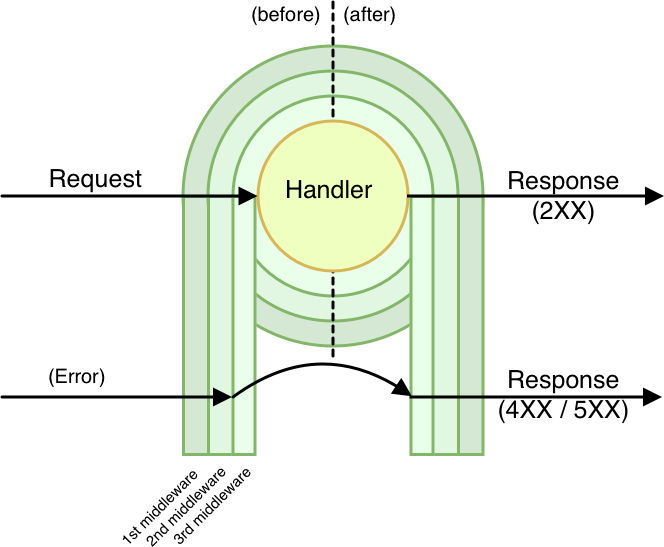
When you attach a new middleware this will wrap the business logic contained in the handler
in two separate steps.
When another middleware is attached this will wrap the handler again and it will be wrapped by
all the previously added middlewares in order, creating multiple layers for interacting with
the _request_ (event) and the _response_.
This way the _request-response cycle_ flows through all the middlewares, the
handler and all the middlewares again, giving the opportunity within every step to
modify or enrich the current request, context, or the response.
## Execution order
Middlewares have two phases: `before` and `after`.
The `before` phase, happens _before_ the handler is executed. In this code the
response is not created yet, so you will have access only to the request.
The `after` phase, happens _after_ the handler is executed. In this code you will
have access to both the request and the response.
If you have three middlewares attached (as in the image above), this is the expected
order of execution:
- `middleware1` (before)
- `middleware2` (before)
- `middleware3` (before)
- `handler`
- `middleware3` (after)
- `middleware2` (after)
- `middleware1` (after)
Notice that in the `after` phase, middlewares are executed in inverted order,
this way the first handler attached is the one with the highest priority as it will
be the first able to change the request and last able to modify the response before
it gets sent to the user.
// File: intro/influence/+page.md
---
title: Influence
---
Middy has been one of the first projects to encourage the adoption of middlewares to simplify code reuse and best practices within the context of Lambda.
Since middy started to gain popularity in the Node.js ecosystem, we have seen some independent projects taking the same ideas to other ecosystems:
- .Net port [Voxel.MiddyNet](https://github.com/VoxelGroup/Voxel.MiddyNet) [@vgaltes](https://twitter.com/vgaltes/status/1366371605337825284)
- GoLang port [Vesper](https://github.com/mefellows/vesper)
Do you have a similar project? Let us know.
// File: intro/release-cycle/+page.md
---
title: Release Cycle
---
Each major release has a two (2) month `Alpha` period, one (1) month `Beta`, before a full release and becomes `Stable`.
Each release goes into `Maintenance` after nine (9) months, as the next release enters `Alpha`.
This time period is chosen for alignment with AWS Lambda `nodejs` runtime releases.
All Node.js Long-Term Support (LTS) releases that have AWS Lambda runtimes are supported.
| Version | Status | Alpha Release | Stable Release | End-of-Life |
| ------- | ---------- | ------------- | -------------- | ----------- |
| v8 | Scoping | 2026-??-?? | 2026-??-?? | 2028-04-30 |
| v7 | Stable | 2025-10-21 | 2026-01-04 | 2027-04-30 |
| v6 | Deprecated | 2024-10-16 | 2024-11-23 | 2026-04-30 |
| v5 | Deprecated | 2023-06-01 | 2023-11-15 | 2025-04-30 |
| v4 | Deprecated | 2022-10-17 | 2022-11-24 | 2023-11-15 |
| v3 | Deprecated | 2022-01-04 | 2022-05-12 | 2022-12-31 |
| v2 | Deprecated | 2021-01-24 | 2021-04-01 | 2022-05-12 |
| v1 | Deprecated | 2018-05-20 | 2020-04-25 | 2021-04-01 |
| v0 | Deprecated | 2017-08-03 | 2017-09-04 | 2020-04-25 |
Dates are subject to change.
If your organization requires a longer maintenance period of Middy, please reach out.
// File: intro/sponsoring/+page.md
---
title: Sponsoring
---
If Middy is adding value to your project or organization and you would like to support its long term maintenance, becoming a sponsor is a great way to do that.
[GitHub Sponsors](https://github.com/sponsors/willfarrell)
// File: intro/streamify-response/+page.md
---
title: Streamify Response
position: 5
---
Middy also supports streamed responses.
> You can progressively stream response payloads through Lambda function URLs, including as an Amazon CloudFront origin, along with using the AWS SDK or using Lambda’s invoke API. You can not use Amazon API Gateway and Application Load Balancer to progressively stream response payloads, but you can use the functionality to return larger payloads. (https://aws.amazon.com/blogs/compute/introducing-aws-lambda-response-streaming/)
1. Set `executionMode: executionModeStreamifyResponse` into middy options
2. a. For HTTP Events return using an HTTP event response with the body as a string or ReadableStream.
b. For InvokeWithResponseStream Events return a response with a string or ReadableStream.
- API Gateway: If you're getting a `500` status code. Be sure to set your integration to `HTTP_PROXY` over `LAMBDA_PROXY` and enable Function URL on the lambda.
- Function URLs: If receiving no content and non-200 status code are being converted to `200`. Be sure to set `Invoke Mode` to `RESPONSE_STREAM` over `BUFFERED`.
## Lambda Function URL Example
```javascript
import middy from '@middy/core'
import { executionModeStreamifyResponse } from '@middy/core/StreamifyResponse'
import { createReadableStream } from '@datastream/core'
const lambdaHandler = (event, context) => {
return {
statusCode: 200,
headers: {
'Content-Type': 'text/csv'
},
body: createReadableStream('...') // or string
}
}
export const handler = middy({ executionMode: executionModeStreamifyResponse }).handler(lambdaHandler)
```
## Lambda InvokeWithResponseStream Example
```javascript
import middy from '@middy/core'
import { executionModeStreamifyResponse } from '@middy/core/StreamifyResponse'
import { createReadableStream } from '@datastream/core'
const lambdaHandler = (event, context) => {
return createReadableStream('...') // or string
}
export const handler = middy({ executionMode: executionModeStreamifyResponse }).handler(lambdaHandler)
```
### Requesting Lambda
```javascript
import {
LambdaClient,
InvokeWithResponseStreamCommand
} from '@aws-sdk/client-lambda'
const lambda = new LambdaClient()
const res = await lambda.send(
new InvokeWithResponseStreamCommand({
FunctionName: 'function-name',
Payload: JSON.stringify({...})
})
)
const decoder = new TextDecoder('utf-8')
let body = ''
for await (const chunk of res.EventStream) {
if (chunk?.PayloadChunk?.Payload) {
body += decoder.decode(Buffer.from(chunk.PayloadChunk.Payload))
}
}
```
// File: intro/testing/+page.md
---
title: Testing
position: 5
---
This page is a work in progress. If you want to help us to make this page better, please consider contributing on GitHub.
As of Middy v3, by default it will trigger an Abort signal shortly before a lambda times out to allow your handler to safely stop up and middleware to clean before the lambda terminates.
When writing tests for lambda handlers wrapped with middy you'll need to account for this. There are a few approaches:
1. Set `middy(handler, { timeoutEarlyInMillis: 0 })` to alternatively disable the creation of the AbortController.
2. Set `middy(handler, { timeoutEarlyResponse: () => {} })` to disable the timeout error from being thrown using a no-op.
3. Set `context.getRemainingTimeInMillis = falsy` to disable the creation of the AbortController.
When using Middy `cache` and `cacheExpiry` in unit tests for functions in your code, it is important to conditionally disable them for test cases by setting both Middy `options` fields as follows:
```
{
cache: false,
cacheExpiry: 0,
...
}
```
Failing to do so may make the tests end with unfinished worker processes. Although they may still succeed, this can cause issues and timeout errors, namely in CI/CD environments.
An example of a message generated by Jest unit tests and which signals the need for this is as follows:
```
A worker process has failed to exit gracefully and has been force exited. This is likely caused by tests leaking due to improper teardown. Try running with --detectOpenHandles to find leaks. Active timers can also cause this, ensure that .unref() was called on them.
```
## jest and typescript
If you use middy v5+, jest and typescript, and use ts-jest as a transformer, then you need to ensure that middy modules are not transformed. Use this in your jest.config.ts file
```
const esModules = ["@middy"].join("|")
const jestConfig: JestConfigWithTsJest = {
...
transform: {
"^.+\\.ts?$": [
"ts-jest",
{
useESM: true
}
]
},
transformIgnorePatterns: [`node_modules/(?!${esModules})`],
...
}
export default jestConfig
```
You must also use the flag `--experimental-vm-modules` when running jest - eg have this in your package.json file
```
{
...
"scripts": {
...
"test": "NODE_OPTIONS=--experimental-vm-modules jest",
...
},
...
}
```
See https://kulshekhar.github.io/ts-jest/docs/guides/esm-support/ and https://jestjs.io/docs/ecmascript-modules for more details
// File: intro/typescript/+page.md
---
title: Use with TypeScript
position: 6
---
Middy can be used with TypeScript with typings built in in every official package.
You may need to install additional types for AWS Lambda events.
```bash
npm i -D @types/aws-lambda
```
Here's an example of how you might be using Middy with TypeScript for a Lambda receiving events from API Gateway and fetching secrets from Secrets Manager:
```typescript
import middy from '@middy/core'
import secretsManager from '@middy/secrets-manager'
import type { APIGatewayProxyEvent, APIGatewayProxyResult } from 'aws-lambda'
export const handler = middy()
.use(
secretsManager({
fetchData: {
apiToken: 'dev/api_token'
},
awsClientOptions: {
region: 'us-east-1'
},
setToContext: true
})
)
.handler(async (req, context) => {
// The context type gets augmented here by the secretsManager middleware.
// This is just an example, obviously don't ever log your secret in real life!
console.log(context.apiToken)
return {
statusCode: 200,
body: JSON.stringify({
message: `Hello from ${req.path}`,
req
})
}
})
```
Note that when using TypeScript, you should use what we call the _Middleware-first, Handler-last_ approach, which means that you should always call the `handler` method last, after you have attached all the middlewares you need.
This approach makes sure that, as you attach middlewares, the type system understands how the `event` and the `context` arguments are augmented by the various middlewares and inside your handler code you can have a nice type-checking and auto-completion experience.
You can also [write custom middlewares with TypeScript](/docs/writing-middlewares/intro).
This is an example tsconfig.json file that can be used for typescript projects
```
{
"compilerOptions": {
"incremental": true,
"target": "es2020",
"module": "es2020",
"declaration": true,
"sourceMap": true,
"composite": true,
"strict": true,
"moduleResolution": "node",
"esModuleInterop": true,
"skipLibCheck": true,
"forceConsistentCasingInFileNames": true,
"preserveConstEnums": true,
"resolveJsonModule": true,
"allowJs": true,
"rootDir": ".",
"outDir": "lib"
},
"include": ["src/**/*", "tests/**/*"],
"exclude": ["node_modules"]
}
```
// File: intro/utilities/+page.md
---
title: Utilities
---
This page is a work in progress. If you want to help us to make this page better, please consider contributing on GitHub.
// File: middlewares/appconfig/+page.md
---
title: appconfig
---
Fetches AppConfig stored configuration and parses out JSON.
## Install
To install this middleware you can use NPM:
```bash npm2yarn
npm install --save @middy/appconfig
npm install --save-dev @aws-sdk/client-appconfigdata
```
## Options
- `AwsClient` (object) (default `AppConfigClient`): AppConfigClient class constructor (i.e. that has been instrumented with AWS XRay). Must be from `@aws-sdk/client-appconfig`.
- `awsClientOptions` (object) (default `undefined`): Options to pass to AppConfigClient class constructor.
- `awsClientAssumeRole` (string) (default `undefined`): Internal key where secrets are stored. See [@middy/sts](/docs/middlewares/sts) on to set this.
- `awsClientCapture` (function) (default `undefined`): Enable XRay by passing `captureAWSv3Client` from `aws-xray-sdk` in.
- `fetchData` (object) (required): Mapping of internal key name to API request parameters.
- `disablePrefetch` (boolean) (default `false`): On cold start requests will trigger early if they can. Setting `awsClientAssumeRole` disables prefetch.
- `cacheKey` (string) (default `appconfig`): Cache key for the fetched data responses. Must be unique across all middleware.
- `cacheExpiry` (number) (default `-1`): How long fetch data responses should be cached for. `-1`: cache forever, `0`: never cache, `n`: cache for n ms.
- `setToContext` (boolean) (default `false`): Store credentials to `request.context`.
NOTES:
- Lambda is required to have IAM permission for `appconfig:StartConfigurationSession` and `appconfig:GetLatestConfiguration`
## Sample usage
```javascript
import middy from '@middy/core'
import appConfig from '@middy/appconfig'
const handler = middy()
.use(
appConfig({
fetchData: {
config: {
Application: '...',
ClientId: '...',
Configuration: '...',
Environment: '...'
}
}
})
)
.handler((event, context) => {
const response = {
statusCode: 200,
headers: {},
body: JSON.stringify({ message: 'hello world' })
}
return response
})
```
## Bundling
To exclude `@aws-sdk` add `@aws-sdk/client-appconfig` to the exclude list.
## Usage with TypeScript
Data in AppConfig can be stored as arbitrary structured data. It's not possible to know in advance what shape the fetched data will have, so by default the fetched parameters will have type `unknown`.
You can provide some type hints by leveraging the `appConfigParam` utility function. This function allows you to specify what's the expected type that will be fetched for every AppConfig request.
The idea is that, for every request specified in the `fetchData` option, rather than just providing the parameter path as a string, you can wrap it in a `appConfigParam(config)` call. Internally, `appConfigParam` is a function that will return `config` as received, but it allows you to use generics to provide type hints for the expected type for that parameter.
This way TypeScript can understand how to treat the additional data attached to the context and stored in the internal storage.
The following example illustrates how to use `appConfigParam`:
```typescript
import middy from '@middy/core'
import appConfig, { appConfigParam } from '@middy/appconfig'
const lambdaHandler = (event, context) => {
return {
statusCode: 200,
headers: {},
body: JSON.stringify({ message: 'hello world' })
}
})
export const handler = middy()
.use(
appConfig({
fetchData: {
config: {
Application: '...',
ClientId: '...',
Configuration: '...',
Environment: '...'
}
}
})
)
.before(async (request) => {
const data = await getInternal('config', request)
// data.config.field1 (string)
// data.config.field2 (string)
// data.config.field3 (number)
})
.handler(lambdaHandler)
```
// File: middlewares/cloudformation-response/+page.md
---
title: cloudformation-response
---
Manage CloudFormation Custom Resource responses.
## Install
To install this middleware you can use NPM:
```bash npm2yarn
npm install --save @middy/cloudformation-response
```
## Options
None
## Sample usage
### General
```javascript
import middy from '@middy/core'
import cloudformationResponse from '@middy/cloudformation-response'
export const handler = middy((event, context) => {
return {
PhysicalResourceId:'...'
}
})
handler.use(cloudformationResponse())
```
// File: middlewares/cloudwatch-metrics/+page.md
---
title: cloudwatch-metrics
---
This middleware hydrates lambda's `context.metrics` property with an instance of [MetricLogger](https://github.com/awslabs/aws-embedded-metrics-node#metriclogger). This instance can be used to easily generate custom metrics from Lambda functions without requiring custom batching code, making blocking network requests or relying on 3rd party software.
Metrics collected with this logger are then available for querying within [AWS CloudWatch Log Insights](https://docs.aws.amazon.com/AmazonCloudWatch/latest/logs/AnalyzingLogData.html)
You can explore all the MetricLogger APIs following [aws-embedded-metrics](https://github.com/awslabs/aws-embedded-metrics-node) documentation.
## Install
To install this middleware you can use NPM:
```bash npm2yarn
npm install --save @middy/cloudwatch-metrics
```
## Options
- `namespace` (`string`) (optional): Defaults to `aws-embedded-metrics`. Sets the CloudWatch [namespace](https://docs.aws.amazon.com/AmazonCloudWatch/latest/monitoring/cloudwatch_concepts.html#Namespace) that extracted metrics should be published to.
- `dimensions` (`Record | Record[]`) (optional): Explicitly overrides all dimensions. This will remove the default dimensions. You can provide an empty array to record all metrics without dimensions. For dimensions defaults and configuration see the [aws-embedded-metrics docs](https://github.com/awslabs/aws-embedded-metrics-node/tree/v4.1.0#configuration).
## Sample usage
```javascript
const middy = require('@middy/core')
const cloudwatchMetrics = require('@middy/cloudwatch-metrics')
const lambdaHandler = (event, context) => {
context.metrics.putMetric('ProcessingLatency', 100, 'Milliseconds')
context.metrics.setProperty(
'RequestId',
'422b1569-16f6-4a03-b8f0-fe3fd9b100f8'
)
}
export const handler = middy()
.use(
cloudwatchMetrics({
namespace: 'myAppliction',
dimensions: [{ Action: 'Buy' }]
})
)
.handler(lambdaHandler)
```
// File: middlewares/do-not-wait-for-empty-event-loop/+page.md
---
title: do-not-wait-for-empty-event-loop
---
This middleware sets `context.callbackWaitsForEmptyEventLoop` property to `false`.
This will prevent Lambda from timing out because of open database connections, etc.
## Install
To install this middleware you can use NPM:
```bash npm2yarn
npm install --save @middy/do-not-wait-for-empty-event-loop
```
## Options
By default the middleware sets the `callbackWaitsForEmptyEventLoop` property to `false` only in the `before` phase,
meaning you can override it in handler to `true` if needed. You can set it in all steps with the options:
- `runOnBefore` (defaults to `true`) - sets property before running your handler
- `runOnAfter` (defaults to `false`)
- `runOnError` (defaults to `false`)
## Sample usage
```javascript
import middy from '@middy/core'
import doNotWaitForEmptyEventLoop from '@middy/do-not-wait-for-empty-event-loop'
const lambdaHandler = (event, context) => {
return {}
}
export const handler = middy()
.use(doNotWaitForEmptyEventLoop({ runOnError: true }))
.handler(lambdaHandler)
```
// File: middlewares/dynamodb/+page.md
---
title: dynamodb
---
Fetches DynamoDB stored configuration and parses out JSON.
## Install
To install this middleware you can use NPM:
```bash npm2yarn
npm install --save @middy/dynamodb
npm install --save-dev @aws-sdk/client-dynamodb @aws-sdk/util-dynamodb
```
## Options
- `AwsClient` (object) (default `DynamoDBClient`): DynamoDBClient class constructor (i.e. that has been instrumented with AWS XRay). Must be from `@aws-sdk/client-dynamodb`.
- `awsClientOptions` (object) (default `undefined`): Options to pass to DynamoDBClient class constructor.
- `awsClientAssumeRole` (string) (default `undefined`): Internal key where secrets are stored. See [@middy/sts](/docs/middlewares/sts) on to set this.
- `awsClientCapture` (function) (default `undefined`): Enable XRay by passing `captureAWSv3Client` from `aws-xray-sdk` in.
- `fetchData` (object) (required): Mapping of internal key name to API request parameters.
- `disablePrefetch` (boolean) (default `false`): On cold start requests will trigger early if they can. Setting `awsClientAssumeRole` disables prefetch.
- `cacheKey` (string) (default `dynamodb`): Cache key for the fetched data responses. Must be unique across all middleware.
- `cacheExpiry` (number) (default `-1`): How long fetch data responses should be cached for. `-1`: cache forever, `0`: never cache, `n`: cache for n ms.
- `setToContext` (boolean) (default `false`): Store credentials to `request.context`.
NOTES:
- Lambda is required to have IAM permission for `dynamodb:BatchGetItemCommand`
## Sample usage
```javascript
import middy from '@middy/core'
import dynamodb from '@middy/dynamodb'
const lambdaHandler = (event, context) => {
const response = {
statusCode: 200,
headers: {},
body: JSON.stringify({ message: 'hello world' })
}
return response
}
export const handler = middy()
.use(
dynamodb({
fetchData: {
config: {
TableName: '...',
Key: {
pk: '0000'
}
}
}
})
)
.handler(lambdaHandler)
```
## Bundling
To exclude `@aws-sdk` add `@aws-sdk/client-dynamodb` to the exclude list.
## Usage with TypeScript
Data in DynamoDB can be stored as arbitrary structured data. It's not possible to know in advance what shape the fetched data will have, so by default the fetched parameters will have type `Record`.
You can provide some type hints by leveraging the `dynamoDbParam` utility function. This function allows you to specify what's the expected type that will be fetched for every DynamoDB request.
The idea is that, for every request specified in the `fetchData` option, rather than just providing the parameter configuration as an object, you can wrap it in a `dynamoDbParam(config)` call. Internally, `dynamoDbParam` is a function that will return `config` as received, but it allows you to use generics to provide type hints for the expected fetched value type for that request.
This way TypeScript can understand how to treat the additional data attached to the context and stored in the internal storage.
The following example illustrates how to use `dynamoDbParam`:
```typescript
import middy from '@middy/core'
import dynamodb, { dynamoDbParam } from '@middy/dynamodb'
const handler = middy((event, context) => {
const response = {
statusCode: 200,
headers: {},
body: JSON.stringify({ message: 'hello world' })
}
return response
})
handler.use(
dynamodb({
fetchData: {
config: dynamoDbParam<{field1: string, field2: string, field3: number}>({
TableName: '...'
Key: {
pk: '0000'
}
})
}
})
)
.before(async (request) => {
const data = await getInternal('config', request)
// data.config.field1 (string)
// data.config.field2 (string)
// data.config.field3 (number)
})
```
// File: middlewares/error-logger/+page.md
---
title: error-logger
---
Logs the error and propagates it to the next middleware.
By default AWS Lambda does not print errors in the CloudWatch logs. If you want to make sure that you don't miss error logs, you would have to catch any error and pass it through `console.error` yourself.
This middleware will take care to intercept any error and log it for you. The middleware is not going to interfere with other error handlers because it will propagate the error to the next error handler middleware without handling it. You just have to make sure to attach this middleware before any other error handling middleware.
By default, the logging operate by using the `console.error` function. You can pass as a parameter a custom logger with additional logic if you need. It can be useful if you want to process the log by doing a http call or anything else.
## Install
To install this middleware you can use NPM:
```bash npm2yarn
npm install --save @middy/error-logger
```
## Options
- `logger` property: a function (default `(request) => console.error(request.error)`) that is used to define the logging logic. It receives the Error object as first and only parameter.
## Sample usage
```javascript
import middy from '@middy/core'
import errorLogger from '@middy/error-logger'
const lambdaHandler = (event, context) => {
// your handler logic
}
export const handler = middy().use(errorLogger()).handler(lambdaHandler)
```
// File: middlewares/event-normalizer/+page.md
---
title: event-normalizer
---
Middleware for iterating through an AWS event records, parsing and normalizing nested events.
**AWS Events Transformations:**
https://docs.aws.amazon.com/lambda/latest/dg/lambda-services.html
| Event Source | Included | Comments |
| ------------------ | -------- | ----------------------------------------------- |
| Alexa | No | Normalization not required |
| API Gateway (HTTP) | No \* | See middleware prefixed with `@middy/http-` |
| API Gateway (REST) | No \* | See middleware prefixed with `@middy/http-` |
| API Gateway (WS) | No \* | See middleware `@middy/ws-json-body-parser` |
| Application LB | No \* | See middleware prefixed with `@middy/http-` |
| CloudFormation | No | Normalization not required |
| CloudFront | No | Normalization not required |
| CloudTrail | No | Normalization not required |
| CloudWatch Alarm | No | Normalization not required |
| CloudWatch Logs | Yes | Base64 decode and JSON parse `data` |
| CodeCommit | No | Normalization not required |
| CodePipeline | Yes | JSON parse `UserParameters` |
| Cognito | No | Normalization not required |
| Config | Yes | JSON parse `invokingEvent` and `ruleParameters` |
| Connect | No | Normalization not required |
| DocumentDB | No | Normalization not required |
| DynamoDB | Yes | Unmarshall `Keys`, `OldImage`, and `NewImage` |
| EC2 | No | Normalization not required |
| EventBridge | No | Normalization not required |
| IoT | No | Normalization not required |
| IoT Event | No | Normalization not required |
| Kafka | Yes | Base64 decode and JSON parse `value` |
| Kafka (MSK) | Yes | Base64 decode and JSON parse `value` |
| Kinesis Firehose | Yes | Base64 decode and JSON parse `data` |
| Kinesis Stream | Yes | Base64 decode and JSON parse `data` |
| Lex | No | Normalization not required |
| MQ | Yes | Base64 decode and JSON parse `data` |
| RDS | No | Normalization not required |
| S3 | Yes | URI decode `key` |
| S3 Batch | Yes | URI decode `s3Key` |
| S3 Object Lambda | No \* | See middleware `@middy/s3-object-response` |
| Secrets Manager | No | Normalization not required |
| SES | No | Normalization not required |
| SNS | Yes | JSON parse `Message` |
| SQS | Yes | JSON parse `body` |
| VPC Lattice | No \* | See middleware prefixed with `@middy/http-` |
\* Handled in another dedicated middleware(s)
**Test Events**
Some events send test events after set, you will need to handle these.
```js
// S3 Test Event
{
Service: 'Amazon S3',
Event: 's3:TestEvent',
Time: '2020-01-01T00:00:00.000Z',
Bucket: 'bucket-name',
RequestId: '***********',
HostId: '***/***/***='
}
```
## Install
To install this middleware you can use NPM:
```bash npm2yarn
npm install --save @middy/event-normalizer
```
## Options
- `wrapNumbers` (boolean) (default `undefined`): Whether to return numbers as a string instead of converting them to native JavaScript numbers. This allows for the safe round-trip transport of numbers of arbitrary size. For DynamoDB Events only.
## Sample usage
```javascript
import middy from '@middy/core'
import eventNormalizer from '@middy/event-normalizer'
const lambdaHandler = (event, context) => {
const { Records } = event
for (const record of Records) {
// ...
}
}
export const handler = middy().use(eventNormalizer()).handler(lambdaHandler)
```
// File: middlewares/http-content-encoding/+page.md
---
title: http-content-encoding
---
This middleware take the `preferredEncoding` output from `@middy/http-content-negotiation` and applies the encoding to `response.body` when a string.
## Install
To install this middleware you can use NPM:
```bash npm2yarn
npm install --save @middy/http-content-encoding
```
## Options
- `br` (object) (default `{}`): `zlib.createBrotliCompress` [brotliOptions](https://nodejs.org/api/zlib.html#zlib_class_brotlioptions)
- `gzip` (object) (default `{}`): `zlib.createGzip` [gzipOptions](https://nodejs.org/api/zlib.html#zlib_class_options)
- `deflate` (object) (default `{}`): `zlib.createDeflate` [deflateOptions](https://nodejs.org/api/zlib.html#zlib_class_options)
- `overridePreferredEncoding` (array[string]) (optional): Override the preferred encoding order, most browsers prefer `gzip` over `br`, even though `br` has higher compression. Default: `[]`
NOTES:
- **Important** For `br` encoding NodeJS defaults to `11`. Levels `10` & `11` have been shown to have lower performance for the level of compression they apply. Testing is recommended to ensure the right balance of compression & performance.
## Sample usage
```javascript
import middy from '@middy/core'
import httpContentNegotiation from '@middy/http-content-negotiation'
import httpContentEncoding from '@middy/http-content-encoding'
import { constants } from 'node:zlib'
export const handler = middy()
.use(httpContentNegotiation())
.use(httpContentEncoding({
br: {
params: {
[constants.BROTLI_PARAM_MODE]: constants.BROTLI_MODE_TEXT, // adjusted for UTF-8 text
[constants.BROTLI_PARAM_QUALITY]: 7
}
},
overridePreferredEncoding: ['br', 'gzip', 'deflate']
})
.handler((event, context) => {
return {
statusCode: 200,
body: '{...}'
}
})
```
### Using streams
```javascript
import middy from '@middy/core'
import { executionModeStreamifyResponse } from '@middy/core/StreamifyResponse'
import httpContentNegotiation from '@middy/http-content-negotiation'
import httpContentEncoding from '@middy/http-content-encoding'
import { constants } from 'node:zlib'
import { createReadableStream } from '@datastream/core'
const lambdaHandler = (event, context) => {
return {
statusCode: 200,
body: createReadableStream('{...}')
}
}
export const handler = middy({ executionMode:executionModeStreamifyResponse })
.use(httpContentNegotiation())
.use(httpContentEncoding({
br: {
params: {
[constants.BROTLI_PARAM_MODE]: constants.BROTLI_MODE_TEXT, // adjusted for UTF-8 text
[constants.BROTLI_PARAM_QUALITY]: 7
}
},
overridePreferredEncoding: ['br', 'gzip', 'deflate']
})
.handler(lambdaHandler)
```
// File: middlewares/http-content-negotiation/+page.md
---
title: http-content-negotiation
---
This middleware parses `Accept-*` headers and provides utilities for [HTTP content negotiation](https://tools.ietf.org/html/rfc7231#section-5.3) (charset, encoding, language and media type).
By default the middleware parses charsets (`Accept-Charset`), languages (`Accept-Language`), encodings (`Accept-Encoding`) and media types (`Accept`) during the
`before` phase and expands the `context` object by adding the following properties:
- `preferredCharsets` (`array`) - The list of charsets that can be safely used by the app (as the result of the negotiation)
- `preferredCharset` (`string`) - The preferred charset (as the result of the negotiation)
- `preferredEncodings` (`array`) - The list of encodings that can be safely used by the app (as the result of the negotiation)
- `preferredEncoding` (`string`) - The preferred encoding (as the result of the negotiation)
- `preferredLanguages` (`array`) - The list of languages that can be safely used by the app (as the result of the negotiation)
- `preferredLanguage` (`string`) - The preferred language (as the result of the negotiation)
- `preferredMediaTypes` (`array`) - The list of media types that can be safely used by the app (as the result of the negotiation)
- `preferredMediaType` (`string`) - The preferred media types (as the result of the negotiation)
This middleware expects the headers in canonical format, so it should be attached after the [`httpHeaderNormalizer`](#httpheadernormalizer) middleware.
It also can throw an HTTP exception, so it can be convenient to use it in combination with the [`httpErrorHandler`](#httperrorhandler).
## Install
To install this middleware you can use NPM:
```bash npm2yarn
npm install --save @middy/http-content-negotiation
```
## Options
- `parseCharsets` (defaults to `true`) - Allows enabling/disabling the charsets parsing
- `availableCharsets` (defaults to `undefined`) - Allows defining the list of charsets supported by the Lambda function
- `parseEncodings` (defaults to `true`) - Allows enabling/disabling the encodings parsing
- `availableEncodings` (defaults to `undefined`) - Allows defining the list of encodings supported by the Lambda function
- `parseLanguages` (defaults to `true`) - Allows enabling/disabling the languages parsing
- `availableLanguages` (defaults to `undefined`) - Allows defining the list of languages supported by the Lambda function. Setting to `en` will match with locales like `en-*`. Setting to `en-US` will match with language `en`.
- `parseMediaTypes` (defaults to `true`) - Allows enabling/disabling the media types parsing
- `availableMediaTypes` (defaults to `undefined`) - Allows defining the list of media types supported by the Lambda function
- `failOnMismatch` (defaults to `true`) - If set to true it will throw an HTTP `NotAcceptable` (406) exception when the negotiation fails for one of the headers (e.g. none of the languages requested are supported by the app)
## Sample usage
```javascript
import middy from '@middy/core'
import httpContentNegotiation from '@middy/http-content-negotiation'
import httpHeaderNormalizer from '@middy/http-header-normalizer'
import httpErrorHandler from '@middy/http-error-handler'
const lambdaHandler = (event, context) => {
let message, body
switch (context.preferredLanguage) {
case 'it-it':
message = 'Ciao Mondo'
break
case 'fr-fr':
message = 'Bonjour le monde'
break
default:
message = 'Hello world'
}
switch (context.preferredMediaType) {
case 'application/xml':
body = `${message}`
break
case 'application/yaml':
body = `---\nmessage: ${message}`
break
case 'application/json':
body = JSON.stringify({ message })
break
default:
body = message
}
return {
statusCode: 200,
body
}
}
export const handler = middy()
.use(httpHeaderNormalizer())
.use(
httpContentNegotiation({
parseCharsets: false,
parseEncodings: false,
availableLanguages: ['it-it', 'fr-fr', 'en'],
availableMediaTypes: [
'application/xml',
'application/yaml',
'application/json',
'text/plain'
]
})
)
.use(httpErrorHandler())
.handler(lambdaHandler)
```
// File: middlewares/http-cors/+page.md
---
title: http-cors
---
This middleware sets HTTP CORS headers (`Access-Control-Allow-Origin`, `Access-Control-Allow-Headers`, `Access-Control-Allow-Credentials`), necessary for making cross-origin requests, to the response object.
Sets headers in `after` and `onError` phases.
## Install
To install this middleware you can use NPM:
```bash npm2yarn
npm install --save @middy/http-cors
```
## Options
- `credentials` (bool) (optional): if true, sets `Access-Control-Allow-Credentials` (default `false`)
- `disableBeforePreflightResponse` (bool) (optional): if false, replies automatically to cors preflight requests. Set to true if handling the response in a custom way (default `true`)
- `headers` (string) (optional): value to put in `Access-Control-Allow-Headers` (default: `false`)
- `methods` (string) (optional): value to put in `Access-Control-Allow-Methods` (default: `false`)
- `getOrigin` (function(incomingOrigin:string, options)) (optional): take full control of the generating the returned origin. Defaults to using the origin or origins option.
- `origin` (string) (optional): default origin to put in the header (default: `null`, will exclude this header).
- `origins` (array) (optional): An array of allowed origins. The incoming origin is matched against the list and is returned if present. If the incoming origin is not found, the header will not be returned. Wildcards can be used within the origin to match multiple origins.
- `exposeHeaders` (string) (optional): value to put in `Access-Control-Expose-Headers` (default: `false`)
- `maxAge` (string) (optional): value to put in Access-Control-Max-Age header (default: `null`)
- `requestHeaders` (string) (optional): value to put in `Access-Control-Request-Headers` (default: `false`)
- `requestMethods` (string) (optional): value to put in `Access-Control-Request-Methods` (default: `false`)
- `cacheControl` (string) (optional): value to put in Cache-Control header on pre-flight (OPTIONS) requests (default: `null`)
```javascript
import middy from '@middy/core'
import httpErrorHandler from '@middy/http-error-handler'
import cors from '@middy/http-cors'
const lambdaHandler = (event, context) => {
throw new createError.UnprocessableEntity()
}
export const handler = middy()
.use(httpErrorHandler())
.use(cors())
.handler(lambdaHandler)
// when Lambda runs the handler...
handler({}, {}, (_, response) => {
strictEqual(response.headers['Access-Control-Allow-Origin'], '*')
deepStrictEqual(response, {
statusCode: 422,
body: 'Unprocessable Entity'
})
})
```
## Sample usage
```javascript
import middy from '@middy/core'
import cors from '@middy/http-cors'
const lambdaHandler = (event, context) => {
return {}
}
export const handler = middy().use(cors()).handler(lambdaHandler)
// when Lambda runs the handler...
handler({}, {}, (_, response) => {
strictEqual(response.headers['Access-Control-Allow-Origin'], '*')
})
```
// File: middlewares/http-error-handler/+page.md
---
title: http-error-handler
---
Automatically handles uncaught errors that contain the properties `statusCode` (number) and `message` (string) and creates a proper HTTP response
for them (using the message and the status code provided by the error object). Additionally, support for the property `expose` is included with a default value of `statusCode < 500`.
We recommend generating these HTTP errors with the npm module [`http-errors`](https://npm.im/http-errors). When manually catching and setting errors with `statusCode >= 500` setting `{expose: true}`
is needed for them to be handled.
This middleware should be set as the last error handler attached, first to execute. When non-http errors (those without `statusCode`) occur they will be returned with a 500 status code.
## Install
To install this middleware you can use NPM:
```bash npm2yarn
npm install --save @middy/http-error-handler
```
## Options
- `logger` (defaults to `console.error`) - a logging function that is invoked with the current error as an argument. You can pass `false` if you don't want the logging to happen.
- `fallbackMessage` (default `undefined`) - When non-http errors (those without `statusCode`) occur you can set a fallback message to be used. These will be returned with a 500 status code.
## Sample usage
```javascript
import middy from '@middy/core'
import httpErrorHandler from '@middy/http-error-handler'
import createError from 'http-errors'
const lambdaHandler = (event, context) => {
throw new createError.UnprocessableEntity()
}
export const handler = middy().use(httpErrorHandler()).handler(lambdaHandler)
// when Lambda runs the handler...
handler({}, {}, (_, response) => {
deepStrictEqual(response, {
statusCode: 422,
body: 'Unprocessable Entity'
})
})
```
// File: middlewares/http-event-normalizer/+page.md
---
title: http-event-normalizer
---
If you need to access the query string or path parameters in an API Gateway event you
can do so by reading the attributes in `event.queryStringParameters`, `event.multiValueQueryStringParameters` and
`event.pathParameters`, for example: `event.pathParameters.userId`. Unfortunately
if there are no parameters for these parameter holders, the relevant key `queryStringParameters`, `multiValueQueryStringParameters` or `pathParameters` won't be available in the object, causing an expression like `event.pathParameters.userId`
to fail with the error: `TypeError: Cannot read property 'userId' of undefined`.
A simple solution would be to add an `if` statement to verify if the `pathParameters` (or `queryStringParameters`/`multiValueQueryStringParameters`)
exists before accessing one of its parameters, but this approach is very verbose and error prone.
This middleware normalizes the API Gateway, ALB, Function URLs, and VPC Lattice events, making sure that an object for `queryStringParameters`, `multiValueQueryStringParameters`, `pathParameters`, and `isBase64Encoded` is always available (resulting in empty objects when no parameter is available), this way you don't have to worry about adding extra `if` statements before trying to read a property and calling `event.pathParameters.userId` will result in `undefined` when no path parameter is available, but not in an error.
> Important note : API Gateway HTTP API format 2.0 doesn't have `multiValueQueryStringParameters` fields. Duplicate query strings are combined with commas and included in the `queryStringParameters` field.
## Install
To install this middleware you can use NPM:
```bash npm2yarn
npm install --save @middy/http-event-normalizer
```
## Sample usage
```javascript
import middy from '@middy/core'
import httpEventNormalizer from '@middy/http-event-normalizer'
const lambdaHander = (event, context) => {
console.log(`Hello user ${event.pathParameters.userId}`)
// might produce `Hello user undefined`, but not an error
return {}
}
export const handler = middy().use(httpEventNormalizer()).handler(lambdaHander)
```
// File: middlewares/http-header-normalizer/+page.md
---
title: http-header-normalizer
---
This middleware normalizes HTTP header names. By default, it normalizes to lowercase. It
can also normalize to canonical form.
API Gateway does not perform any normalization, so without this middleware headers
are propagated to Lambda exactly as they were sent by the client. Headers names are
case insensitive, so normalization allows code reading header values to be simplified.
Other middlewares like [`jsonBodyParser`](#jsonbodyparser) or [`urlEncodeBodyParser`](#urlencodebodyparser)
will rely on headers to be one of the normalized formats, so if you want to support non-normalized headers in your
app you have to use this middleware before those ones.
## Install
To install this middleware you can use NPM:
```bash npm2yarn
npm install --save @middy/http-header-normalizer
```
## Options
- `canonical` (bool) (optional): if true, modifies the headers to canonical format, otherwise the headers are normalized to lowercase (default `false`)
- `defaultHeaders` (object) (optional): Default headers to used if any are missing. i.e. `Content-Type` (default `{}`)
- `normalizeHeaderKey` (function) (optional): a function that accepts an header name as a parameter and returns its
canonical representation.
## Sample usage
```javascript
import middy from '@middy/core'
import httpHeaderNormalizer from '@middy/http-header-normalizer'
const lambdaHandler = (event, context) => {
return {}
}
export const handler = middy()
.use(httpHeaderNormalizer())
.handler(lambdaHandler)
```
// File: middlewares/http-json-body-parser/+page.md
---
title: http-json-body-parser
---
This middleware automatically parses HTTP requests with a JSON body and converts the body into an
object. Also handles gracefully broken JSON as _Unsupported Media Type_ (415 errors)
if used in combination with `httpErrorHandler`.
It can also be used in combination with validator as a prior step to normalize the
event body input as an object so that the content can be validated.
## Install
To install this middleware you can use NPM:
```bash npm2yarn
npm install --save @middy/http-json-body-parser
```
## Options
- `reviver` (`function`) (optional): A [reviver](https://developer.mozilla.org/en-US/docs/Web/JavaScript/Reference/Global_Objects/JSON/parse#Parameters) parameter may be passed which will be used `JSON.parse`ing the body.
- `disableContentTypeCheck` (`boolean`) (optional): Skip `Content-Type` check for JSON. Default: `false`.
- `disableContentTypeError` (`boolean`) (optional): Skip throwing 415 when `Content-Type` is invalid. Default: `false`.
## Sample usage
```javascript
import middy from '@middy/core'
import httpHeaderNormalizer from '@middy/http-header-normalizer'
import httpJsonBodyParser from '@middy/http-json-body-parser'
const lambdaHandler = (event, context) => {
return {}
}
export const handler = middy()
.use(httpHeaderNormalizer())
.use(httpJsonBodyParser())
.handler(lambdaHandler)
// invokes the handler
const event = {
headers: {
'Content-Type': 'application/json'
// It is important that the request has the proper content type.
},
body: JSON.stringify({ foo: 'bar' })
}
handler(event, {}, (_, body) => {
strictEqual(body, { foo: 'bar' })
})
```
// File: middlewares/http-multipart-body-parser/+page.md
---
title: http-multipart-body-parser
---
Automatically parses HTTP requests with content type `multipart/form-data` and converts the body into an
object. Also handles gracefully broken JSON as _Unsupported Media Type_ (415 errors)
if used in combination with `httpErrorHandler`.
It can also be used in combination with validator so that the content can be validated.
**Note**: by default this is going to parse only events that contain the header `Content-Type` (or `content-type`) set to `multipart/form-data`. If you want to support different casing for the header name (e.g. `Content-type`) then you should use the [`httpHeaderNormalizer`](#httpheadernormalizer) middleware before this middleware.
## Install
To install this middleware you can use NPM:
```bash npm2yarn
npm install --save @middy/http-multipart-body-parser
```
## Options
- `busboy` (`object`) (optional): defaults to `{}` and it can be used to pass extraparameters to the internal `busboy` instance at creation time. Checkout [the official documentation](https://www.npmjs.com/package/busboy#busboy-methods) for more information on the supported options.
- `charset` (string) (default `utf8`): it can be used to change default charset. Set to `binary` when recieving images.
- `disableContentTypeError` (`boolean`) (optional): Skip throwing 415 when `Content-Type` is invalid. Default: `false`.
**Note**: this middleware will buffer all the data as it is processed internally by `busboy`, so, if you are using this approach to parse significantly big volumes of data, keep in mind that all the data will be allocated in memory. This is somewhat inevitable with Lambdas (as the data is already encoded into the JSON in memory as Base64), but it's good to keep this in mind and evaluate the impact on you application.
If you really have to deal with big files, then you might also want to consider to allowing your users to [directly upload files to S3](https://docs.aws.amazon.com/AmazonS3/latest/API/sigv4-UsingHTTPPOST.html)
## Sample usage
```javascript
import middy from '@middy/core'
import httpHeaderNormalizer from '@middy/http-header-normalizer'
import httpMultipartBodyParser from '@middy/http-multipart-body-parser'
const lambdaHandler = (event, context) => {
return {}
}
export const handler = middy()
.use(httpHeaderNormalizer())
.use(httpMultipartBodyParser())
.handler(lambdaHandler)
// invokes the handler
const event = {
headers: {
'Content-Type':
'multipart/form-data; boundary=----WebKitFormBoundaryppsQEwf2BVJeCe0M'
},
body: 'LS0tLS0tV2ViS2l0Rm9ybUJvdW5kYXJ5cHBzUUV3ZjJCVkplQ2UwTQ0KQ29udGVudC1EaXNwb3NpdGlvbjogZm9ybS1kYXRhOyBuYW1lPSJmb28iDQoNCmJhcg0KLS0tLS0tV2ViS2l0Rm9ybUJvdW5kYXJ5cHBzUUV3ZjJCVkplQ2UwTS0t',
isBase64Encoded: true
}
handler(event, {}, (_, body) => {
strictEqual(body, { foo: 'bar' })
})
```
// File: middlewares/http-partial-response/+page.md
---
title: http-partial-response
---
Filtering the data returned in an object or JSON stringified response has never been so easy. Add the `httpPartialResponse` middleware to your middleware chain, specify a custom `filteringKeyName` if you want to and that's it. Any consumer of your API will be able to filter your JSON response by adding a querystring key with the fields to filter such as `fields=firstname,lastname`.
This middleware is based on the awesome `json-mask` package written by [Yuriy Nemtsov](https://github.com/nemtsov)
## Install
To install this middleware you can use NPM:
```bash npm2yarn
npm install --save @middy/http-partial-response
```
## Options
- `filteringKeyName` (`string`) (optional): defaults to `fields` the querystring key that will be used to filter the response.
## Sample usage
```javascript
import middy from '@middy/core'
import httpPartialResponse from '@middy/http-partial-response'
const lambdaHandler = (event, context) => {
const response = {
statusCode: 200,
body: {
firstname: 'John',
lastname: 'Doe',
gender: 'male',
age: 30,
address: {
street: 'Avenue des Champs-Élysées',
city: 'Paris'
}
}
}
return response
}
export const handler = middy().use(httpPartialResponse()).handler(lambdaHandler)
const event = {
queryStringParameters: {
fields: 'firstname,lastname'
}
}
handler(event, {}, (_, response) => {
expect(response.body).toEqual({
firstname: 'John',
lastname: 'Doe'
})
})
```
// File: middlewares/http-response-serializer/+page.md
---
title: http-response-serializer
---
The Http Serializer middleware lets you define serialization mechanisms based on the current content negotiation.
## Install
To install this middleware you can use NPM:
```bash npm2yarn
npm install --save @middy/http-response-serializer
```
## Options
- `defaultContentType` (optional): used if the request and handler don't specify what type is wanted.
- `serializers` (array): Array for regex and serializer function.
```javascript
{
serializers: [
{
regex: /^application\/xml$/,
serializer: ({ body }) => `${body}`,
},
{
regex: /^application\/json$/,
serializer: ({ body }) => JSON.stringify(body)
},
{
regex: /^text\/plain$/,
serializer: ({ body }) => body
}
],
defaultContentType: 'application/json'
}
```
## Serializer Functions
When a matching serializer is found, the `Content-Type` header is set and the serializer function is run.
The function is passed the entire `response` object, and should return either a string or an object.
If a string is returned, the `body` attribute of the response is updated.
If an object with a `body` attribute is returned, the entire response object is replaced. This is useful if you want to manipulate headers or add additional attributes in the Lambda response.
## Content Type Negotiation
The header is not the only way the middleware decides which serializer to execute.
The content type is determined in the following order:
- `event.requiredContentType` -- allows the handler to override everything else (legacy, will be deprecated in v6)
- `context.preferredMediaTypes` -- allows the handler to override the default, but lets the request ask first
- `defaultContentType` middleware configuration
All options allow for multiple types to be specified in your order of preference, and the first matching serializer will be executed.
When planning to use `Accept`, an external input, it is recommended to validate that it is an expected value.
## Sample usage
```javascript
import middy from '@middy/core'
import httpContentNegotiation from '@middy/http-content-negotiation'
import httpResponseSerializer from '@middy/http-response-serializer'
const lambdaHandler = (event, context) => {
const body = 'Hello World'
return {
statusCode: 200,
body
}
}
export const handler = middy()
.use(httpContentNegotiation()) // Creates `context.preferredMediaTypes`
.use(
httpResponseSerializer({
serializers: [
{
regex: /^application\/xml$/,
serializer: ({ body }) => `${body}`
},
{
regex: /^application\/json$/,
serializer: ({ body }) => JSON.stringify(body)
},
{
regex: /^text\/plain$/,
serializer: ({ body }) => body
}
],
defaultContentType: 'application/json'
})
)
.handler(lambdaHandler)
const event = {
headers: {
Accept: 'application/xml;q=0.9, text/x-dvi; q=0.8, text/x-c'
}
}
handler(event, {}, (_, response) => {
strictEqual(response.body, 'Hello World')
})
```
// File: middlewares/http-security-headers/+page.md
---
title: http-security-headers
---
Applies best practice security headers to responses. It's a simplified port of HelmetJS. See [HelmetJS](https://helmetjs.github.io/) documentation for more details.
## Install
To install this middleware you can use NPM:
```bash npm2yarn
npm install --save @middy/http-security-headers
```
## Features
- `dnsPrefetchControl` controls browser DNS prefetching
- `frameguard` to prevent clickjacking
- `hidePoweredBy` to remove the Server/X-Powered-By header
- `hsts` for HTTP Strict Transport Security
- `ieNoOpen` sets X-Download-Options for IE8+
- `noSniff` to keep clients from sniffing the MIME type
- `referrerPolicy` to hide the Referer header
- `xssFilter` adds some small XSS protections
## Options
There are a lot, see [source](https://github.com/middyjs/middy/blob/main/packages/http-security-headers/index.js#L5)
## Sample usage
```javascript
import middy from '@middy/core'
import httpSecurityHeaders from '@middy/http-security-headers'
const lambdaHandler = (event, context) => {
return {}
}
export const handler = middy().use(httpSecurityHeaders()).handler(lambdaHandler)
```
// File: middlewares/http-urlencode-body-parser/+page.md
---
title: http-urlencode-body-parser
---
This middleware automatically parses HTTP requests with URL-encoded body (typically the result
of a form submit). Also handles gracefully broken URL encoding as _Unsupported Media Type_ (415 errors)
## Install
To install this middleware you can use NPM:
```bash npm2yarn
npm install --save @middy/http-urlencode-body-parser
```
## Options
- `disableContentTypeError` (`boolean`) (optional): Skip throwing 415 when `Content-Type` is invalid. Default: `false`.
## Sample usage
```javascript
import middy from '@middy/core'
import httpHeaderNormalizer from '@middy/http-header-normalizer'
import httpUrlEncodeBodyParser from '@middy/http-urlencode-body-parser'
const lambdaHandler = (event, context) => {
return event.body // propagates the body as response
}
export const handler = middy()
.use(httpHeaderNormalizer())
.use(httpUrlEncodeBodyParser())
.handler(lambdaHandler)
// When Lambda runs the handler with a sample event...
const event = {
headers: {
'Content-Type': 'application/x-www-form-urlencoded'
},
body: 'frappucino=muffin&goat%5B%5D=scone&pond=moose'
}
handler(event, {}, (_, body) => {
deepStrictEqual(body, {
frappucino: 'muffin',
'goat[]': 'scone',
pond: 'moose'
})
})
```
// File: middlewares/http-urlencode-path-parser/+page.md
---
title: http-urlencode-path-parser
---
This middleware automatically parses HTTP requests with URL-encoded paths. This can happen when using path variables (ie `/{name}/`) for an endpoint and the UI `encodeURIComponent` the values before making the request.
## Install
To install this middleware you can use NPM:
```bash npm2yarn
npm install --save @middy/http-urlencode-path-parser
```
## Options
None
## Sample usage
```javascript
import middy from '@middy/core'
import httpUrlEncodePathParser from '@middy/http-urlencode-path-parser'
const handler = middy((event, context) => {
return event.body // propagates the body as response
})
handler.use(httpUrlEncodePathParser())
// When Lambda runs the handler with a sample event...
const event = {
pathParameters: {
name: encodeURIComponent('Mîddy')
}
}
handler(event, {}, (_, body) => {
deepStrictEqual(body, {
name: 'Mîddy'
})
})
```
// File: middlewares/input-output-logger/+page.md
---
title: 'input-output-logger'
---
Logs the incoming request (input) and the response (output).
By default, the logging operate by using the `console.log` function. You can pass as a parameter a custom logger with additional logic if you need. It can be useful if you want to process the log by doing a http call or anything else.
## Install
To install this middleware you can use NPM:
```bash npm2yarn
npm install --save @middy/input-output-logger
```
## Options
- `logger` function (default `console.log`): logging function that accepts an object
- `executionContext` boolean (default `false`): Include `tenantId` to the logger
- `lambdaContext` boolean (default `false`): Include [AWS Lambda context object](https://docs.aws.amazon.com/lambda/latest/dg/nodejs-context.html) to the logger
- `omitPaths` string[] (default `[]`): property accepts an array of paths that will be used to remove particular fields import the logged objects. This could serve as a simple way to redact sensitive data from logs (default []). Examples: `name`, `user.name`, `users.[].name`
- `mask` string: String to replace omitted values with. Example: `***omitted***`
Note: If using with `{ executionMode:executionModeStreamifyResponse }`, your ReadableStream must be of type `string`.
## Sample usage
```javascript
import middy from '@middy/core'
import inputOutputLogger from '@middy/input-output-logger'
const lambdaHandler = (event, context) => {
const response = {
statusCode: 200,
headers: {},
body: JSON.stringify({ message: 'hello world' })
}
return response
}
export const handler = middy().use(inputOutputLogger()).handler(lambdaHandler)
```
```javascript
import middy from '@middy/core'
import inputOutputLogger from '@middy/input-output-logger'
import pino from 'pino'
const logger = pino()
const lambdaHandler = (event, context) => {
// ...
return response
}
export const handler = middy()
.use(
inputOutputLogger({
logger: (request) => {
const child = logger.child(request.context)
child.info(request.event ?? request.response)
},
executionContext: true,
lambdaContext: true,
})
)
.handler(lambdaHandler)
```
// File: middlewares/intro/+page.md
---
title: Official middlewares
---
Middy comes with a series of additional (opt-in) plugins that are officially maintained by the core team and kept in sync with every release of the core package.
These middleware focus on common use cases when using Lambda with other AWS services.
Each middleware should do a single task. We try to balance each to be as performant as possible while meeting the majority of developer needs.
## Misc
- [`cloudwatch-metrics`](/docs/middlewares/cloudwatch-metrics): Hydrates lambda's `context.metrics` property with an instance of AWS MetricLogger
- [`do-not-wait-for-empty-event-loop`](/docs/middlewares/do-not-wait-for-empty-event-loop): Sets callbackWaitsForEmptyEventLoop property to false
- [`error-logger`](/docs/middlewares/error-logger): Logs errors
- [`input-output-logger`](/docs/middlewares/input-output-logger): Logs request and response
- [`warmup`](/docs/middlewares/warmup): Used to pre-warm a lambda function
## Request Transformation
- [`event-normalizer`](/docs/middlewares/event-normalizer): Middleware for iterating through an AWS event records, parsing and normalizing nested events.
- [`http-content-negotiation`](/docs/middlewares/http-content-negotiation): Parses `Accept-*` headers and provides utilities for content negotiation (charset, encoding, language and media type) for HTTP requests
- [`http-event-normalizer`](/docs/middlewares/http-event-normalizer): Normalizes HTTP events by adding an empty object for `queryStringParameters`, `multiValueQueryStringParameters` or `pathParameters` if they are missing.
- [`http-header-normalizer`](/docs/middlewares/http-header-normalizer): Normalizes HTTP header names to their canonical format
- [`http-json-body-parser`](/docs/middlewares/http-json-body-parser): Automatically parses HTTP requests with JSON body and converts the body into an object. Also handles gracefully broken JSON if used in combination of
`httpErrorHandler`.
- [`http-multipart-body-parser`](/docs/middlewares/http-multipart-body-parser): Automatically parses HTTP requests with content type `multipart/form-data` and converts the body into an object.
- [`http-urlencode-body-parser`](/docs/middlewares/http-urlencode-body-parser): Automatically parses HTTP requests with URL encoded body (typically the result of a form submit).
- [`http-urlencode-path-parser`](/docs/middlewares/http-urlencode-path-parser): Automatically parses HTTP requests with URL encoded path.
- [`validator`](/docs/middlewares/validator): Automatically validates incoming events and outgoing responses against custom schemas.
- [`ws-json-body-parser`](/docs/middlewares/ws-json-body-parser): Automatically parses WebSocket requests with JSON message and converts the message into an object.
## Response Transformation
- [`http-content-encoding`](/docs/middlewares/http-content-encoding): Sets HTTP Content-Encoding header on response and compresses response body
- [`http-cors`](/docs/middlewares/http-cors): Sets HTTP CORS headers on response
- [`http-error-handler`](/docs/middlewares/http-error-handler): Creates a proper HTTP response for errors that are created with the [http-errors](https://www.npmjs.com/package/http-errors) module and represents proper HTTP errors.
- [`http-security-headers`](/docs/middlewares/http-security-headers): Applies best practice security headers to responses. It's a simplified port of HelmetJS.
- [`http-partial-response`](/docs/middlewares/http-partial-response): Filter response objects attributes based on query string parameters.
- [`http-response-serializer`](/docs/middlewares/http-response-serializer): HTTP response serializer.
- [`sqs-partial-batch-failure`](/docs/middlewares/sqs-partial-batch-failure): Handles partially failed SQS batches.
- [`ws-response`](/docs/middlewares/ws-response): Forwards response to WebSocket endpoint.
## Fetch Data
- [`appconfig`](/docs/middlewares/appconfig): Fetch JSON configurations from AppConfig.
- [`dynamodb`](/docs/middlewares/dynamodb): Fetch configurations from DynamoDB.
- [`rds-signer`](/docs/middlewares/rds-signer): Fetches token for connecting to RDS with IAM users.
- [`s3`](/docs/middlewares/s3): Fetch JSON configurations from S3.
- [`s3-object-response`](/docs/middlewares/s3-object-response): Gets and write S3 object response.
- [`secrets-manager`](/docs/middlewares/secrets-manager): Fetches parameters from [AWS Secrets Manager](https://docs.aws.amazon.com/secretsmanager/latest/userguide/intro.html).
- [`service-discovery`](/docs/middlewares/service-discovery): Fetches Service Discovery instances to be used when connecting to other AWS services.
- [`ssm`](/docs/middlewares/ssm): Fetches parameters from [AWS Systems Manager Parameter Store](https://docs.aws.amazon.com/systems-manager/latest/userguide/systems-manager-paramstore.html).
- [`sts`](/docs/middlewares/sts): Fetches credentials to assumes IAM roles for connection to other AWS services.
// File: middlewares/rds-signer/+page.md
---
title: rds-signer
---
Fetches RDS credentials to be used when connecting to RDS with IAM roles.
## Install
To install this middleware you can use NPM:
```bash npm2yarn
npm install --save @middy/rds-signer
npm install --save-dev @aws-sdk/rds-signer
```
## Options
- `AwsClient` (object) (default `Signer`): Signer class constructor (i.e. that has been instrumented with AWS XRay). Must be from `@aws-sdk/rds-signer`.
- `awsClientOptions` (object) (optional): Options to pass to Signer class constructor.
- `fetchData` (object) (required): Mapping of internal key name to API request parameters.
- `disablePrefetch` (boolean) (default `false`): On cold start requests will trigger early if they can. Setting `awsClientAssumeRole` disables prefetch.
- `cacheKey` (string) (default `rds-signer`): Cache key for the fetched data responses. Must be unique across all middleware.
- `cacheExpiry` (number) (default `-1`): How long fetch data responses should be cached for. `-1`: cache forever, `0`: never cache, `n`: cache for n ms.
- `setToContext` (boolean) (default `false`): Store role tokens to `request.context`.
NOTES:
- Lambda is required to have IAM permission for `rds-db:connect` with a resource like `arn:aws:rds-db:#{AWS::Region}:#{AWS::AccountId}:dbuser:${database_resource}/${iam_role}`
## Sample usage
```javascript
import middy from '@middy/core'
import rdsSigner from '@middy/rds-signer'
const lambdaHandler = (event, context) => {
const response = {
statusCode: 200,
headers: {},
body: JSON.stringify({ message: 'hello world' })
}
return response
}
export const handler = middy()
.use(
rdsSigner({
fetchData: {
rdsToken: {
region: 'ca-central-1',
hostname: '***.rds.amazonaws.com',
username: 'iam_role',
port: 5432
}
}
})
)
.handler(lambdaHandler)
```
## Bundling
To exclude `@aws-sdk` add `@aws-sdk/rds-signer` to the exclude list.
// File: middlewares/s3-object-response/+page.md
---
title: s3-object-response
---
** This middleware is a Proof of Concept and requires real world testing before use, not recommended for production **
Fetches S3 object as a stream and writes back to s3 object response.
## Install
To install this middleware you can use NPM:
```bash npm2yarn
npm install --save @middy/s3-object-response
npm install --save-dev @aws-sdk/client-s3
```
## Options
- `AwsClient` (object) (default `S3Client`): S3Client class constructor (i.e. that has been instrumented with AWS XRay). Must be from `@aws-sdk/client-s3`.
- `awsClientOptions` (object) (optional): Options to pass to S3Client class constructor.
- `awsClientCapture` (function) (optional): Enable XRay by passing `captureAWSv3Client` from `aws-xray-sdk` in.
- `disablePrefetch` (boolean) (default `false`): On cold start requests will trigger early if they can. Setting `awsClientAssumeRole` disables prefetch.
NOTES:
- The response from the handler must match the allowed parameters for [`S3.writeGetObjectResponse`](https://docs.aws.amazon.com/AWSJavaScriptSDK/latest/AWS/S3.html#writeGetObjectResponse-property), excluding `RequestRoute` and `RequestToken`.
- XRay doesn't support tracing of `fetch`, you will need a workaround, see https://github.com/aws/aws-xray-sdk-node/issues/531#issuecomment-1378562164
- Lambda is required to have IAM permission for `s3-object-lambda:WriteGetObjectResponse`
## Sample usage
### Stream
```javascript
import zlib from 'zlib'
import middy from '@middy/core'
import s3ObjectResponse from '@middy/s3-object-response'
import {captureFetchGlobal} from 'aws-xray-sdk-fetch'
captureFetchGlobal(true) // Enable XRay
const lambdaHandler = (event, context) => {
const readStream = await context.s3ObjectFetch.then(res => res.body)
const transformStream = zlib.createBrotliCompress()
return {
Body: readStream.pipe(transformStream)
}
}
export const handler = middy().use(s3ObjectResponse()).handler(lambdaHandler)
```
### JSON
```javascript
import zlib from 'zlib'
import middy from '@middy/core'
import s3ObjectResponse from '@middy/s3-object-response'
const lambdaHandler = async (event, context) => {
let body = await context.s3ObjectFetch.then((res) => res.json())
// change body
return {
Body: JSON.stringify(body)
}
}
export const handler = middy().use(s3ObjectResponse()).handler(lambdaHandler)
```
## Bundling
To exclude `@aws-sdk` add `@aws-sdk/client-s3` to the exclude list.
// File: middlewares/s3/+page.md
---
title: s3
---
Fetches S3 stored configuration and parses out JSON.
## Install
To install this middleware you can use NPM:
```bash npm2yarn
npm install --save @middy/s3
npm install --save-dev @aws-sdk/client-s3
```
## Options
- `AwsClient` (object) (default `S3Client`): S3Client class constructor (i.e. that has been instrumented with AWS XRay). Must be from `@aws-sdk/client-appconfig`.
- `awsClientOptions` (object) (default `undefined`): Options to pass to S3Client class constructor.
- `awsClientAssumeRole` (string) (default `undefined`): Internal key where secrets are stored. See [@middy/sts](/docs/middlewares/sts) on to set this.
- `awsClientCapture` (function) (default `undefined`): Enable XRay by passing `captureAWSv3Client` from `aws-xray-sdk` in.
- `fetchData` (object) (required): Mapping of internal key name to API request parameters.
- `disablePrefetch` (boolean) (default `false`): On cold start requests will trigger early if they can. Setting `awsClientAssumeRole` disables prefetch.
- `cacheKey` (string) (default `s3`): Cache key for the fetched data responses. Must be unique across all middleware.
- `cacheExpiry` (number) (default `-1`): How long fetch data responses should be cached for. `-1`: cache forever, `0`: never cache, `n`: cache for n ms.
- `setToContext` (boolean) (default `false`): Store credentials to `request.context`.
NOTES:
- Lambda is required to have IAM permission for `s3:GetObject`
- If the file is stored without `ContentType`, you can set it on the response using `ResponseContentType` as part of the input
## Sample usage
```javascript
import middy from '@middy/core'
import s3 from '@middy/s3'
const lambdaHandler = (event, context) => {
console.log(context.config)
const response = {
statusCode: 200,
headers: {},
body: JSON.stringify({ message: 'hello world' })
}
return response
}
export const handler = middy()
.use(
s3({
fetchData: {
config: {
Bucket: '...',
Key: '...'
}
},
setToContext: true
})
)
.handler(lambdaHandler)
```
## Bundling
To exclude `@aws-sdk` add `@aws-sdk/client-s3` to the exclude list.
## Usage with TypeScript
Data in an S3 object can be stored as arbitrary structured data. It's not possible to know in advance what shape the fetched data will have, so by default the fetched parameters will have type `unknown`.
You can provide some type hints by leveraging the `s3Param` utility function. This function allows you to specify what's the expected type that will be fetched for every S3 request.
The idea is that, for every request specified in the `fetchData` option, rather than just providing the parameter configuration as an object, you can wrap it in a `s3Param(config)` call. Internally, `s3Param` is a function that will return `config` as received, but it allows you to use generics to provide type hints for the expected fetched value type for that request.
This way TypeScript can understand how to treat the additional data attached to the context and stored in the internal storage.
The following example illustrates how to use `s3Param`:
```typescript
import middy from '@middy/core'
import s3, { s3Param } from '@middy/s3'
const handler = middy((event, context) => {
console.log(context.config)
const response = {
statusCode: 200,
headers: {},
body: JSON.stringify({ message: 'hello world' })
}
return response
})
handler.use(
s3({
fetchData: {
config: s3Param<{field1: string, field2: string, field3: number}>({
Bucket: '...',
Key: '...'
}
}),
setToContext: true
})
)
.before(async (request) => {
const data = await getInternal('config', request)
// data.config.field1 (string)
// data.config.field2 (string)
// data.config.field3 (number)
})
```
// File: middlewares/secrets-manager/+page.md
---
title: secrets-manager
---
This middleware fetches secrets from [AWS Secrets Manager](https://docs.aws.amazon.com/secretsmanager/latest/userguide/intro.html).
Secrets to fetch can be defined by by name. See AWS docs [here](https://docs.aws.amazon.com/secretsmanager/latest/userguide/tutorials_basic.html).
Secrets are assigned to the function handler's `context` object.
The Middleware makes a single [API request](https://docs.aws.amazon.com/secretsmanager/latest/apireference/API_GetSecretValue.html) for each secret as Secrets Manager does not support batch get.
For each secret, you also provide the name under which its value should be added to `context`.
## Install
To install this middleware you can use NPM:
```bash npm2yarn
npm install --save @middy/secrets-manager
npm install --save-dev @aws-sdk/client-secrets-manager
```
## Options
- `AwsClient` (object) (default `SecretsManagerClient`): SecretsManagerClient class constructor (i.e. that has been instrumented with AWS XRay). Must be from `@aws-sdk/client-secrets-manager`.
- `awsClientOptions` (object) (optional): Options to pass to SecretsManagerClient class constructor.
- `awsClientAssumeRole` (string) (optional): Internal key where secrets are stored. See [@middy/sts](/docs/middlewares/sts) on to set this.
- `awsClientCapture` (function) (optional): Enable XRay by passing `captureAWSv3Client` from `aws-xray-sdk` in.
- `fetchData` (object) (required): Mapping of internal key name to API request parameter `SecretId`.
- `fetchRotationDate` (boolean|object) (default `false`): Boolean to apply to all or mapping of internal key name to boolean. This indicates what secrets should fetch and cached based on `NextRotationDate`/`LastRotationDate`/`LastChangedDate`. `cacheExpiry` of `-1` will use `NextRotationDate`, while any other value will be added to the `LastRotationDate` or `LastChangedDate`, whichever is more recent. If secrets have different rotation schedules, use multiple instances of this middleware.
- `disablePrefetch` (boolean) (default `false`): On cold start requests will trigger early if they can. Setting `awsClientAssumeRole` disables prefetch.
- `cacheKey` (string) (default `secrets-manager`): Cache key for the fetched data responses. Must be unique across all middleware.
- `cacheExpiry` (number) (default `-1`): How long fetch data responses should be cached for. `-1`: cache forever, `0`: never cache, `n`: cache for n ms.
- `setToContext` (boolean) (default `false`): Store secrets to `request.context`.
NOTES:
- Lambda is required to have IAM permission for `secretsmanager:GetSecretValue`. If using `fetchRotationDate` add `secretsmanager:DescribeSecret` in as well.
## Sample usage
```javascript
import middy from '@middy/core'
import secretsManager from '@middy/secrets-manager'
const lambdaHandler = (event, context) => {
return {}
}
export const handler = middy()
.use(
secretsManager({
fetchData: {
apiToken: 'dev/api_token'
},
awsClientOptions: {
region: 'us-east-1'
},
setToContext: true
})
)
.handler(lambdaHandler)
// Before running the function handler, the middleware will fetch from Secrets Manager
handler(event, context, (_, response) => {
// assuming the dev/api_token has two keys, 'Username' and 'Password'
strictEqual(context.apiToken.Username, 'username')
strictEqual(context.apiToken.Password, 'password')
})
```
## Bundling
To exclude `@aws-sdk` add `@aws-sdk/client-secrets-manager` to the exclude list.
## Usage with TypeScript
Data stored in SecretsManager can be stored as arbitrary structured data. It's not possible to know in advance what shape the fetched data will have, so by default the fetched secrets will have type `unknown`.
You can provide some type hints by leveraging the `secret` utility function. This function allows you to specify what's the expected type that will be fetched for every SecretsManager request.
The idea is that, for every request specified in the `fetchData` option, rather than just providing the parameter configuration as an object, you can wrap it in a `secret(key)` call. Internally, `secret` is a function that will return `key` as received, but it allows you to use generics to provide type hints for the expected fetched value type for that request.
This way TypeScript can understand how to treat the additional data attached to the context and stored in the internal storage.
The following example illustrates how to use `secret`:
```typescript
import middy from '@middy/core'
import secretsManager, { secret } from '@middy/secrets-manager'
const lambdaHandler = (event, context) => {
console.log(context.config)
const response = {
statusCode: 200,
headers: {},
body: JSON.stringify({ message: 'hello world' })
}
return response
}
export const handler = middy()
.use(
secretsManager({
fetchData: {
someSecret: secret<{User: string, Password: string}>('someHiddenSecret')
}),
setToContext: true
})
)
.before(async (request) => {
const data = await getInternal('someSecret', request)
// data.someSecret.User (string)
// data.someSecret.Password (string)
// or, since we have `setToContext: true`
// request.context.someSecret.User (string)
// request.context.someSecret.Password (string)
})
.handler(lambdaHandler)
```
// File: middlewares/service-discovery/+page.md
---
title: service-discovery
---
Fetches Service Discovery instances to be used when connecting to other AWS services.
## Install
To install this middleware you can use NPM:
```bash npm2yarn
npm install --save @middy/service-discovery
npm install --save-dev @aws-sdk/client-servicediscovery
```
## Options
- `AwsClient` (object) (default `ServiceDiscoveryClient`): ServiceDiscoveryClient class constructor (i.e. that has been instrumented with AWS XRay). Must be from `@aws-sdk/client-servicediscovery`.
- `awsClientOptions` (object) (default `undefined`): Options to pass to ServiceDiscoveryClient class constructor.
- `awsClientAssumeRole` (string) (default `undefined`): Internal key where secrets are stored. See [@middy/sts](/docs/middlewares/sts) on to set this.
- `awsClientCapture` (function) (default `undefined`): Enable XRay by passing `captureAWSv3Client` from `aws-xray-sdk` in.
- `fetchData` (object) (required): Mapping of internal key name to API request parameters.
- `disablePrefetch` (boolean) (default `false`): On cold start requests will trigger early if they can. Setting `awsClientAssumeRole` disables prefetch.
- `cacheKey` (string) (default `sts`): Cache key for the fetched data responses. Must be unique across all middleware.
- `cacheExpiry` (number) (default `-1`): How long fetch data responses should be cached for. `-1`: cache forever, `0`: never cache, `n`: cache for n ms.
- `setToContext` (boolean) (default `false`): Store credentials to `request.context`.
NOTES:
- Lambda is required to have IAM permission for `servicediscovery:DiscoverInstances`
## Sample usage
```javascript
import middy from '@middy/core'
import serviceDiscovery from '@middy/service-discovery'
const lambdaHandler = (event, context) => {
const response = {
statusCode: 200,
headers: {},
body: JSON.stringify({ message: 'hello world' })
}
return response
}
export const handler = middy()
.use(
serviceDiscovery({
fetchData: {
instances: {
NamespaceName: '...',
ServiceName: '...'
}
}
})
)
.handler(lambdaHandler)
```
## Bundling
To exclude `@aws-sdk` add `@aws-sdk/client-servicediscovery` to the exclude list.
// File: middlewares/sqs-partial-batch-failure/+page.md
---
title: sqs-partial-batch-failure
---
Middleware for handling partially failed SQS batches.
## Install
To install this middleware, you can use NPM:
```bash npm2yarn
npm install --save @middy/sqs-partial-batch-failure
# Required for types only
npm install --save-dev @aws-sdk/client-sqs
```
## Options
- `logger` (function) (optional): A function that will be called when a record fails to be processed. Default: `console.error`
## Sample usage
Parallel processing example (works for Standard queues and FIFO queues _when ordering of side‑effects is not required_):
```javascript
import middy from '@middy/core'
import sqsBatch from '@middy/sqs-partial-batch-failure'
const lambdaHandler = async (event) => {
return Promise.allSettled(
event.Records.map(async (record) => {
await processMessageAsync(record);
})
);
};
export const handler = middy().use(sqsBatch()).handler(lambdaHandler);
```
With TypeScript:
```typescript
import middy from '@middy/core'
import sqsBatch from '@middy/sqs-partial-batch-failure'
const lambdaHandler = async (event: SQSEvent): Promise[]> => {
return Promise.allSettled(
event.Records.map(async (record) => {
await processMessageAsync(record);
})
);
};
export const handler = middy().use(sqsBatch()).handler(lambdaHandler);
```
FIFO queue example (preserves processing order):
```javascript
import middy from '@middy/core'
import sqsBatch from '@middy/sqs-partial-batch-failure'
const lambdaHandler = (event, context) => {
const statusPromises = [];
for (const [idx, record] of Object.entries(Records)) {
try {
await processMessageAsync(record)
statusPromises.push(Promise.resolve());
} catch (error) {
statusPromises.push(Promise.reject(error));
}
}
return Promise.allSettled(statusPromises);
}
export const handler = middy().use(sqsBatch()).handler(lambdaHandler)
```
## Important
This middleware only works if the handler returns an array of `PromiseSettledResult`s (typically from `Promise.allSettled()` or a sequential loop that builds the same structure).
If you manually return `{ batchItemFailures }`, do not use this middleware.
The value `ReportBatchItemFailures` must be added to your Lambda's `FunctionResponseTypes` in the `EventSourceMapping` configuration.
See [Reporting batch item failures](https://docs.aws.amazon.com/lambda/latest/dg/example_serverless_SQS_Lambda_batch_item_failures_section.html) and [Lambda EventSourceMapping](https://docs.aws.amazon.com/AWSCloudFormation/latest/UserGuide/aws-resource-lambda-eventsourcemapping.html)
// File: middlewares/ssm/+page.md
---
title: ssm
---
This middleware fetches parameters from [AWS Systems Manager Parameter Store](https://docs.aws.amazon.com/systems-manager/latest/userguide/systems-manager-paramstore.html).
Parameters to fetch can be defined by path and by name (not mutually exclusive). See AWS docs [here](https://aws.amazon.com/blogs/mt/organize-parameters-by-hierarchy-tags-or-amazon-cloudwatch-events-with-amazon-ec2-systems-manager-parameter-store/).
Parameters can be assigned to the function handler's `context` object by setting the `setToContext` flag to `true`. By default all parameters are added with uppercase names.
The Middleware makes a single API request to fetch all the parameters defined by name, but must make an additional request per specified path. This is because the AWS SDK currently doesn't expose a method to retrieve parameters from multiple paths.
For each parameter defined by name, you also provide the name under which its value should be added to `context`. For each path, you instead provide a prefix, and by default the value import each parameter returned from that path will be added to `context` with a name equal to what's left of the parameter's full name _after_ the defined path, with the prefix prepended. If the prefix is an empty string, nothing is prepended. You can override this behaviour by providing your own mapping function with the `getParamNameFromPath` config option.
## Install
To install this middleware you can use NPM:
```bash npm2yarn
npm install --save @middy/ssm
npm install --save-dev @aws-sdk/client-ssm
```
## Options
- `AwsClient` (object) (default `SSMClient`): SSMClient class constructor (i.e. that has been instrumented with AWS X-Ray). Must be from `@aws-sdk/client-ssm`.
- `awsClientOptions` (object) (optional): Options to pass to SSMClient class constructor.
- `awsClientAssumeRole` (string) (optional): Internal key where role tokens are stored. See [@middy/sts](/docs/middlewares/sts) on to set this.
- `awsClientCapture` (function) (optional): Enable AWS X-Ray by passing `captureAWSv3Client` from `aws-xray-sdk` in.
- `fetchData` (object) (required): Mapping of internal key name to API request parameter `Names`/`Path`. `SecureString` are automatically decrypted.
- `disablePrefetch` (boolean) (default `false`): On cold start requests will trigger early if they can. Setting `awsClientAssumeRole` disables prefetch.
- `cacheKey` (string) (default `ssm`): Cache key for the fetched data responses. Must be unique across all middleware.
- `cacheExpiry` (number) (default `-1`): How long fetch data responses should be cached for. `-1`: cache forever, `0`: never cache, `n`: cache for n ms.
- `setToContext` (boolean) (default `false`): Store role tokens to `request.context`.
NOTES:
- Lambda is required to have IAM permission for `ssm:GetParameters` and/or `ssm:GetParametersByPath` depending on what you're requesting, along with `kms:Decrypt`.
- `SSM` has [throughput limitations](https://docs.aws.amazon.com/general/latest/gr/ssm.html). Switching to Advanced Parameter type or increasing `maxRetries` and `retryDelayOptions.base` in `awsClientOptions` may be required.
## Sample usage
```javascript
import middy from '@middy/core'
import ssm from '@middy/ssm'
const lambdaHandler = (event, context) => {
return {}
}
let globalDefaults = {}
export const handler = middy()
.use(
ssm({
fetchData: {
accessToken: '/dev/service_name/access_token', // single value
dbParams: '/dev/service_name/database/', // object of values, key for each path
defaults: '/dev/defaults'
},
setToContext: true
})
)
.before((request) => {
globalDefaults = request.context.defaults.global
})
.handler(lambdaHandler)
```
```javascript
import middy from '@middy/core'
import { getInternal } from '@middy/util'
import ssm from '@middy/ssm'
const lambdaHandler = (event, context) => {
return {}
}
let globalDefaults = {}
export const handler = middy()
.use(
ssm({
fetchData: {
defaults: '/dev/defaults'
},
cacheKey: 'ssm-defaults'
})
)
.use(
ssm({
fetchData: {
accessToken: '/dev/service_name/access_token', // single value
dbParams: '/dev/service_name/database/' // object of values, key for each path
},
cacheExpiry: 15 * 60 * 1000,
cacheKey: 'ssm-secrets'
})
)
// ... other middleware that fetch
.before(async (request) => {
const data = await getInternal(
['accessToken', 'dbParams', 'defaults'],
request
)
Object.assign(request.context, data)
})
.handler(lambdaHandler)
```
## Bundling
To exclude `@aws-sdk` add `@aws-sdk/client-ssm` to the exclude list.
## Usage with TypeScript
Data in SSM can be stored as arbitrary JSON values. It's not possible to know in advance what shape the fetched SSM parameters will have, so by default the fetched parameters will have type `unknown`.
You can provide some type hints by leveraging the `ssmParam` utility function. This function allows you to specify what's the expected type that will be fetched for every parameter.
The idea is that, for every parameter specified in the `fetchData` option, rather than just providing the parameter path as a string, you can wrap it in a `ssmParam(parameterPath)` call. Internally, `ssmParam` is a function that will return `parameterPath` as received, but it allows you to use generics to provide type hints for the expected type for that parameter.
This way TypeScript can understand how to treat the additional data attached to the context and stored in the internal storage.
The following example illustrates how to use `ssmParam`:
```typescript
import middy from '@middy/core'
import { getInternal } from '@middy/util'
import ssm, { ssmParam } from '@middy/ssm'
const lambdaHandler = (event, context) => {
return {}
}
let globalDefaults = {}
export const handler = middy()
.use(
ssm({
fetchData: {
accessToken: ssmParam('/dev/service_name/access_token'), // single value (will be typed as string)
dbParams: ssmParam<{ user: string; pass: string }>(
'/dev/service_name/database/'
) // object of values (typed as {user: string, pass: string})
},
cacheExpiry: 15 * 60 * 1000,
cacheKey: 'ssm-secrets'
})
)
// ... other middleware that fetch
.before(async (request) => {
const data = await getInternal(['accessToken', 'dbParams'], request)
// data.accessToken (string)
// data.dbParams ({user: string, pass: string})
})
.handler(lambdaHandler)
```
// File: middlewares/sts/+page.md
---
title: sts
---
Fetches STS credentials to be used when connecting to other AWS services.
## Install
To install this middleware you can use NPM:
```bash npm2yarn
npm install --save @middy/sts
npm install --save-dev @aws-sdk/client-sts
```
## Options
- `AwsClient` (object) (default `STSClient`): STSClient class constructor (i.e. that has been instrumented with AWS XRay). Must be from `@aws-sdk/client-sts`.
- `awsClientOptions` (object) (optional): Options to pass to STSClient class constructor.
- `awsClientCapture` (function) (optional): Enable XRay by passing `captureAWSv3Client` from `aws-xray-sdk` in.
- `fetchData` (object) (required): Mapping of internal key name to API request parameters.
- `disablePrefetch` (boolean) (default `false`): On cold start requests will trigger early if they can. Setting `awsClientAssumeRole` disables prefetch.
- `cacheKey` (string) (default `sts`): Cache key for the fetched data responses. Must be unique across all middleware.
- `cacheExpiry` (number) (default `-1`): How long fetch data responses should be cached for. `-1`: cache forever, `0`: never cache, `n`: cache for n ms.
- `setToContext` (boolean) (default `false`): Store credentials to `request.context`.
NOTES:
- Lambda is required to have IAM permission for `sts:AssumeRole`
- `setToContext` are included for legacy support and should be avoided for performance and security reasons. See main documentation for best practices.
## Sample usage
```javascript
import middy from '@middy/core'
import sts from '@middy/sts'
const lambdaHandler = (event, context) => {
const response = {
statusCode: 200,
headers: {},
body: JSON.stringify({ message: 'hello world' })
}
return response
}
export const handler = middy()
.use(
sts({
fetchData: {
assumeRole: {
RoleArn: '...',
RoleSessionName: '' // optional
}
}
})
)
.handler(lambdaHandler)
```
## Bundling
To exclude `@aws-sdk` add `@aws-sdk/client-sts` to the exclude list.
// File: middlewares/third-party/+page.md
---
title: Third-party middlewares
---
The following middlewares are created and maintained outside this project. We cannot guarantee for its functionality.
If your middleware is missing, feel free to [open a Pull Request](https://github.com/middyjs/middy/pulls).
## Version 2.x - 5.x
- [dazn-lambda-powertools](https://github.com/getndazn/dazn-lambda-powertools): A collection of middlewares, AWS clients and helper libraries that make working with lambda easier.
- [middy-ajv](https://www.npmjs.com/package/middy-ajv): AJV validator optimized for performance
- [middy-console-logger](https://github.com/serkan-ozal/middy-console-logger): Middleware for filtering logs printed over console logging methods. If the level of the console logging method is equal or bigger than configured level, the log is printed, Otherwise, it is ignored.
- [middy-event-loop-tracer](https://github.com/serkan-ozal/middy-event-loop-tracer): Middleware for dumping active tasks with their stacktraces in the event queue just before AWS Lambda function timeouts. So you can understand what was going on in the function when timeout happens.
- [middy-idempotent](https://www.npmjs.com/package/middy-idempotent): idempotency middleware for middy
- [middy-invocation](https://github.com/serkan-ozal/middy-invocation): Middleware for accessing current AWS Lambda invocation event and context from anywhere without need to passing event and context as arguments through your code.- [middy-lesslog](https://www.npmjs.com/package/middy-lesslog): Middleware for `lesslog`, a teeny-tiny and severless-ready logging utility
- [middy-jsonapi](https://www.npmjs.com/package/middy-jsonapi): JSONAPI middleware for middy
- [middy-lesslog](https://www.npmjs.com/package/middy-lesslog): Middleware for `lesslog`, a teeny-tiny and severless-ready logging utility
- [middy-profiler](https://github.com/serkan-ozal/middy-profiler): Middleware for profiling CPU on AWS Lambda during invocation and shows what methods/modules consume what percent of CPU time
- [middy-rds](https://www.npmjs.com/package/middy-rds): Creates RDS connection using `knex` or `pg`
- [middy-recaptcha](https://www.npmjs.com/package/middy-recaptcha): reCAPTCHA validation middleware
- [middy-standard-schema](https://github.com/flubber2077/middy-standard-schema): Standard Schema based validator, e.g., Zod, Arktype, Valibot, Joi, Yup
- [middy-sparks-joi](https://www.npmjs.com/package/middy-sparks-joi): Joi validator
- [middy-store](https://github.com/zirkelc/middy-store): Middleware to automatically store and load payloads from S3 in an AWS Step Functions state machine
- [middy-mcp](https://github.com/fredericbarthelet/middy-mcp): Middleware for Model Context Protocol (MCP) server integration with AWS Lambda functions
- [@iress/middy-http-path-router](https://www.npmjs.com/package/@iress/middy-http-path-router): Routes AWS API Gateway events to handlers based on static and dynamic paths
- [@nhs/fhir-middy-error-handler](https://www.npmjs.com/package/@nhs/fhir-middy-error-handler): An error handler for use in an AWS Lambda returning FHIR compliant error messages as OperationOutcome resources. Used as part of the [Prescriptions for Patients FHIR API](https://digital.nhs.uk/developer/api-catalogue/prescriptions-for-patients).
## Version 2.x - 3.x
- [aws-lambda-powertools-typescript](https://github.com/awslabs/aws-lambda-powertools-typescript): A suite of utilities for AWS Lambda Functions that makes structured logging, creating custom metrics asynchronously and tracing with AWS X-Ray easier
- [logger](https://awslabs.github.io/aws-lambda-powertools-typescript/latest/core/logger/#capturing-lambda-context-info): Structured logging made easier, and a middleware to enrich log items with key details of the Lambda context
- [metrics](https://awslabs.github.io/aws-lambda-powertools-typescript/latest/core/metrics/#middy-middleware): Custom Metrics created asynchronously via CloudWatch Embedded Metric Format (EMF)
- [parameters](https://awslabs.github.io/aws-lambda-powertools-typescript/latest/utilities/parameters/): The Parameters utility provides high-level functions to retrieve one or multiple parameter values from AWS Systems Manager Parameter Store, AWS Secrets Manager, AWS AppConfig, Amazon DynamoDB, or your own parameter store.
- [tracer](https://awslabs.github.io/aws-lambda-powertools-typescript/latest/core/tracer/#lambda-handler): Utilities to trace Lambda function handlers, and both synchronous and asynchronous functions
## Version 1.x
- [middy-redis](https://www.npmjs.com/package/middy-redis): Redis connection middleware
- [middy-extractor](https://www.npmjs.com/package/middy-extractor): Extracts data from events using expressions
- [@keboola/middy-error-logger](https://www.npmjs.com/package/@keboola/middy-error-logger): middleware that catches thrown exceptions and rejected promises and logs them comprehensibly to the console
- [@keboola/middy-event-validator](https://www.npmjs.com/package/@keboola/middy-event-validator): Joi powered event validation middleware
- [middy-reroute](https://www.npmjs.com/package/middy-reroute): provides complex redirect, rewrite and proxying capabilities by simply placing a rules file into your S3 bucket
- [middytohof](https://www.npmjs.com/package/middytohof): Convert Middy middleware plugins to higher-order functions returning lambda handlers
- [wrap-ware](https://www.npmjs.com/package/wrap-ware): A middleware wrapper which works with promises / async
- [middy-middleware-warmup](https://www.npmjs.com/package/middy-middleware-warmup): A middy plugin to help keep your Lambdas warm during Winter
- [@sharecover-co/middy-aws-xray-tracing](https://www.npmjs.com/package/@sharecover-co/middy-aws-xray-tracing): AWS X-Ray Tracing Middleware
- [@sharecover-co/middy-http-response-serializer](https://www.npmjs.com/package/@sharecover-co/middy-http-response-serializer): This middleware serializes the response to JSON and wraps it in a 200 HTTP response
- [@seedrs/middyjs-middleware](https://www.npmjs.com/package/@seedrs/middyjs-middleware): Collection of useful middlewares
- [middy-autoproxyresponse](https://www.npmjs.com/package/middy-autoproxyresponse): A middleware that lets you return simple JavaScript objects from Lambda function handlers and converts them into LAMBDA_PROXY responses
- [jwt-auth](https://www.npmjs.com/package/middy-middleware-jwt-auth): JSON web token authorization middleware based on `express-jwt`
- [middy-mongoose-connector](https://www.npmjs.com/package/middy-mongoose-connector): MongoDB connection middleware for [mongoose.js](https://mongoosejs.com/)
- [@ematipico/middy-request-response](https://www.npmjs.com/package/@ematipico/middy-request-response): a middleware that creates a pair of request/response objects
- [@marcosantonocito/middy-cognito-permission](https://www.npmjs.com/package/@marcosantonocito/middy-cognito-permission): Authorization and roles permission management for the Middy framework that works with Amazon Cognito
- [middy-env](https://www.npmjs.com/package/middy-env): Fetch, validate and type cast environment variables
- [sqs-json-body-parser](https://github.com/Eomm/sqs-json-body-parser): Parse the SQS body to JSON
- [middy-lesslog](https://www.npmjs.com/package/middy-lesslog/v/legacy): Middleware for `lesslog`, a teeny-tiny and severless-ready logging utility
// File: middlewares/validator/+page.md
---
title: validator
---
This middleware automatically validates incoming events and outgoing responses against custom
schemas defined with the [JSON schema syntax](https://json-schema.org/).
Want to use another validator? Try one of the community validators:
- [ajv](https://www.npmjs.com/package/middy-ajv)
- [middy-sparks-joi](https://www.npmjs.com/package/middy-sparks-joi)
If an incoming event fails validation a `BadRequest` error is raised.
If an outgoing response fails validation a `InternalServerError` error is
raised.
This middleware can be used in combination with
[`httpErrorHandler`](#httperrorhandler) to automatically return the right
response to the user.
It can also be used in combination with [`http-content-negotiation`](#httpContentNegotiation) to load localized translations for the error messages (based on the currently requested language). This feature uses internally [`ajv-ftl-i18n`](https://www.npmjs.com/package/ajv-ftl-i18n) module, so reference to this module for options and more advanced use cases. By default the language used will be English (`en`), but you can redefine the default language by passing it in the `ajvOptions` options with the key `defaultLanguage` and specifying as value one of the [supported locales](https://www.npmjs.com/package/ajv-i18n#supported-locales).
Also, this middleware accepts an object with plugins to be applied to customize the internal `ajv` instance.
## Install
To install this middleware you can use NPM:
```bash npm2yarn
npm install --save @middy/validator
npm install --save-dev ajv-cmd # Optional: for pre-transpiling
```
## Options
- `eventSchema` (function) (default `undefined`): The compiled ajv validator that will be used
to validate the input (`request.event`) of the Lambda handler.
- `contextSchema` (function) (default `undefined`): The compiled ajv validator that will be used
to validate the input (`request.context`) of the Lambda handler. Has additional support for `typeof` keyword to allow validation of `"typeof":"function"`.
- `responseSchema` (function) (default `undefined`): The compiled ajv validator that will be used
to validate the output (`request.response`) of the Lambda handler.
- `i18nEnabled` (boolean) (default `true`): Option to disable i18n default package.
- `defaultLanguage` (string) (default `en`): When language not found, what language to fallback to.
- `languages` (object) (default: `{}`): Localization overrides
NOTES:
- At least one of `eventSchema` or `responseSchema` is required.
- If you'd like to have the error details as part of the response, it will need to be handled separately. You can access them from `request.error.cause.data`, the original response can be found at `request.error.response`.
- **Important** Transpiling schemas & locales on the fly will cause a 50-150ms performance hit during cold start for simple JSON Schemas. Precompiling is highly recommended.
## transpileSchema
Transpile JSON-Schema in to JavaScript. Default ajv plugins used: `ajv-i18n`, `ajv-formats`, `@silverbucket/ajv-formats-draft2019`, `ajv-keywords`, `ajv-errors`.
- `schema` (object) (required): JSON-Schema object
- `ajvOptions` (object) (default `undefined`): Options to pass to [ajv](https://ajv.js.org/docs/api.html#options)
class constructor. Defaults are `{ strict: true, coerceTypes: 'array', allErrors: true, useDefaults: 'empty', messages: true }`.
## transpileLocale
Transpile Fluent (.ftl) localization file into ajv compatible format. Allows the overriding of the default messages and adds support for multi-language `errrorMessages`.
- `ftl` (string) (required): Contents of an ftl file to be transpiled.
## Sample usage
Example for event validation:
```javascript
import middy from '@middy/core'
import validator from '@middy/validator'
import { transpileSchema } from '@middy/validator/transpile'
const lambdaHandler = (event, context) => {
return {}
}
const schema = {
type: 'object',
required: ['body', 'foo'],
properties: {
// this will pass validation
body: {
type: 'string'
},
// this won't as it won't be in the event
foo: {
type: 'string'
}
}
}
export const handler = middy()
.use(
validator({
eventSchema: transpileSchema(schema)
})
)
.handler(lambdaHandler)
// invokes the handler, note that property foo is missing
const event = {
body: JSON.stringify({ something: 'somethingelse' })
}
handler(event, {}, (err, res) => {
strictEqual(err.message, 'Event object failed validation')
})
```
Example for response validation:
```javascript
import middy from '@middy/core'
import validator from '@middy/validator'
import { transpileSchema } from '@middy/validator/transpile'
const lambdaHandler = (event, context) => {
return {}
}
const responseSchema = transpileSchema({
type: 'object',
required: ['body', 'statusCode'],
properties: {
body: {
type: 'object'
},
statusCode: {
type: 'number'
}
}
})
export const handler = middy()
.use(validator({ responseSchema }))
.handler(lambdaHandler)
//
handler({}, {}, (err, response) => {
notStrictEqual(err, null)
strictEqual(err.message, 'Response object failed validation')
expect(response).not.toBe(null)
// it doesn't destroy the response so it can be used by other middlewares
})
```
Example for body validation:
```javascript
import middy from '@middy/core'
import httpJsonBodyParser from '@middy/http-json-body-parser'
import validator from '@middy/validator'
import { transpileSchema } from '@middy/validator/transpile'
const lambdaHandler = (event, context) => {
return {}
}
const eventSchema = {
type: 'object',
required: ['body'],
properties: {
body: {
type: 'object',
required: ['name', 'email'],
properties: {
name: { type: 'string' },
email: { type: 'string', format: 'email' }
// schema options https://ajv.js.org/json-schema.html#json-data-type
}
}
}
}
export const handler = middy()
// to validate the body we need to parse it first
.use(httpJsonBodyParser())
.use(
validator({
eventSchema: transpileSchema(eventSchema)
})
)
.handler(lambdaHandler)
```
## Pre-transpiling example (recommended)
Run a build script to before running tests & deployment.
```bash
#!/usr/bin/env bash
# This is an example, should be customize to meet ones needs
# Powered by `ajv-cmd`
# $ ajv --help
bundle () {
ajv validate ${1} --valid \
--strict true --coerce-types array --all-errors true --use-defaults empty
ajv transpile ${1} \
--strict true --coerce-types array --all-errors true --use-defaults empty \
-o ${1%.json}.js
}
for file in handlers/*/schema.*.json; do
bundle $file
done
locale () {
LOCALE=$(basename ${1%.ftl})
ajv ftl ${1} --locale ${LOCALE} -o ${1%.ftl}.js
}
for file in handlers/*/*.ftl; do
locale $file
done
```
```javascript
import middy from '@middy/core'
import validator from '@middy/validator'
import eventSchema from './schema.event.js'
import en from './en.js'
import fr from './fr.js'
const lambdaHandler = (event, context) => {
return {}
}
export const handler = middy()
.use(
validator({
eventSchema,
languages: { en, fr }
})
)
.handler(lambdaHandler)
```
## Transpile during cold-start
```javascript
import { readFile } from 'node:fs/promises'
import middy from '@middy/core'
import validator from '@middy/validator'
import { transpileSchema, transpileLocale } from '@middy/validator/transpile'
import eventSchema from './schema.event.json'
const lambdaHandler = (event, context) => {
return {}
}
const en = transpileLocale(await readFile('./en.ftl'))
const fr = transpileLocale(await readFile('./fr.ftl'))
export const handler = middy()
.use(
validator({
eventSchema: transpileSchema(eventSchema),
languages: { en, fr }
})
)
.handler(lambdaHandler)
```
## Transpile during cold-start with default messages
```javascript
import { readFile } from 'node:fs/promises'
import middy from '@middy/core'
import validator from '@middy/validator'
import { transpileSchema, transpileLocale } from '@middy/validator/transpile'
import { en, fr } from 'ajv-ftl-i18n' // `ajv-i18n` can also be used
import eventSchema from './schema.event.json'
const lambdaHandler = (event, context) => {
return {}
}
export const handler = middy()
.use(
validator({
eventSchema: transpileSchema(eventSchema),
languages: { en, fr }
})
)
.handler(lambdaHandler)
```
// File: middlewares/warmup/+page.md
---
title: warmup
---
Warmup middleware that helps to reduce the [cold-start issue](https://serverless.com/blog/keep-your-lambdas-warm/). Compatible by default with [`serverless-plugin-warmup`](https://www.npmjs.com/package/serverless-plugin-warmup), but it can be configured to suit your implementation.
This middleware allows you to specify a schedule to keep Lambdas that always need to be very responsive warmed-up. It does this by regularly invoking the Lambda, but will terminate early to avoid the actual handler logic from being run.
If you use [`serverless-plugin-warmup`](https://www.npmjs.com/package/serverless-plugin-warmup) the scheduling part is done by the plugin and you just have to attach the middleware to your "middyfied" handler. If you don't want to use the plugin you have to create the schedule yourself and define the `isWarmingUp` function to define whether the current event is a warmup event or an actual business logic execution.
**Important:** AWS recently announced Lambda [Provisioned Concurrency](https://aws.amazon.com/blogs/aws/new-provisioned-concurrency-for-lambda-functions/). If you have this enabled, you do not need this middleware.
To update your code to use Provisioned Concurrency see:
- [AWS Console](https://aws.amazon.com/blogs/compute/new-for-aws-lambda-predictable-start-up-times-with-provisioned-concurrency/)
- [Serverless](https://serverless.com/blog/aws-lambda-provisioned-concurrency/)
- [Terraform](https://www.terraform.io/docs/providers/aws/r/lambda_provisioned_concurrency_config.html)
## Install
To install this middleware you can use NPM:
```bash npm2yarn
npm install --save @middy/warmup
```
## Options
- `isWarmingUp`: a function that accepts the `event` object as a parameter
and returns `true` if the current event is a warmup event and `false` if it's a regular execution. The default function will check if the `event` object has a `source` property set to `serverless-plugin-warmup`.
## Sample usage
```javascript
const middy = require('@middy/core')
const warmup = require('@middy/warmup')
const lambdaHandler = (event, context, cb) => {
/* ... */
}
const isWarmingUp = (event) => event.isWarmingUp === true
export const handler = middy()
.use(warmup({ isWarmingUp }))
.handler(lambdaHandler)
```
// File: middlewares/ws-json-body-parser/+page.md
---
title: ws-json-body-parser
---
This middleware automatically parses WebSocket requests with a JSON body and converts the body into an
object.
It can also be used in combination with validator as a prior step to normalize the
event body input as an object so that the content can be validated.
If the body has been parsed as JSON, you can access the original body through the `request.event.rawBody`.
## Install
To install this middleware you can use NPM:
```bash
npm install --save @middy/ws-json-body-parser
```
## Options
- `reviver` (function) (default `undefined`): A [reviver](https://developer.mozilla.org/en-US/docs/Web/JavaScript/Reference/Global_Objects/JSON/parse#Parameters) parameter may be passed which will be used `JSON.parse`ing the body.
## Sample usage
```javascript
import middy from '@middy/core'
import wsJsonBodyParserMiddleware from '@middy/ws-json-body-parser'
import wsResponseMiddleware from '@middy/ws-response'
const lambdaHandler = (event) => {
return event.body.message
}
export const handler = middy()
.use(wsJsonBodyParserMiddleware())
.use(wsResponseMiddleware())
.handler(lambdaHandler)
```
// File: middlewares/ws-response/+page.md
---
title: ws-response
---
Post message to WebSocket connection.
## Install
To install this middleware you can use NPM:
```bash npm2yarn
npm install --save @middy/ws-response
npm install --save-dev @aws-sdk/client-apigatewaymanagementapi
```
## Options
- `AwsClient` (object) (default `ApiGatewayManagementApiClient`): ApiGatewayManagementApi class constructor (i.e. that has been instrumented with AWS XRay). Must be from `@aws-sdk/client-apigatewaymanagementapi`.
- `awsClientOptions` (object) (default `undefined`): Options to pass to ApiGatewayManagementApiClient class constructor.
- `awsClientAssumeRole` (string) (default `undefined`): Internal key where secrets are stored. See [@middy/sts](/docs/middlewares/sts) on to set this.
- `awsClientCapture` (function) (default `undefined`): Enable XRay by passing `captureAWSv3Client` from `aws-xray-sdk` in.
- `disablePrefetch` (boolean) (default `false`): On cold start requests will trigger early if they can. Setting `awsClientAssumeRole` disables prefetch.
NOTES:
- Lambda is required to have IAM permission for `execute-api:ManageConnections`
- If `awsClientOptions.endpoint` is not set it will be set using `event.requestContext.{domainName,stage}`
- If response does not contain `ConnectId`, it will be set from `event.requestContext.connectionId`
## Sample usage
### API Gateway
```javascript
import middy from '@middy/core'
import wsResponse from '@middy/ws-response'
export const handler = middy((event, context) => {
return 'message'
})
handler.use(wsResponse())
```
### General
```javascript
import middy from '@middy/core'
import wsResponse from '@middy/ws-response'
const lambdaHandler = (event, context) => {
return {
ConnectionId: '...',
Data: 'message'
}
}
export const handler = middy()
.use(
wsResponse({
awsClientOptions: {
endpoint: '...'
}
})
)
.handler(lambdaHandler)
```
## Bundling
To exclude `@aws-sdk` add `@aws-sdk/client-apigatewaymanagementapi` to the exclude list.
// File: routers/cloudformation-router/+page.md
---
title: cloudformation-router
---
This handler can route to requests to one of a nested handler based on `requestType` of a CloudFormation Custom Response event.
## Install
To install this middleware you can use NPM:
```bash
npm install --save @middy/cloudformation-router
```
## Options
- `routes` (array[\{routeKey, handler\}]) (required): Array of route objects.
- `routeKey` (string) (required): AWS formatted request type. ie `Create`, `Update`, `Delete`
- `handler` (function) (required): Any `handler(event, context, {signal})` function
- `notFoundHandler` (function): Override default FAILED response with your own custom response. Passes in `{requestType}`
NOTES:
- Reponse parameters are automatically applied for `Status`, `RequestId`, `LogicalResourceId`, and/or `StackId` when not present.
- Errors should be handled as part of the router middleware stack **or** the lambdaHandler middleware stack. Handled errors in the later will trigger the `after` middleware stack of the former.
- Shared middlewares, connected to the router middleware stack, can only be run before the lambdaHandler middleware stack.
## Sample usage
```javascript
import middy from '@middy/core'
import cloudformationRouterHandler from '@middy/cloudformation-router'
import cloudformationResponseMiddleware from '@middy/cloudformation-response'
import validatorMiddleware from '@middy/validator'
const createHandler = middy()
.use(validatorMiddleware({eventSchema: {...} }))
.handler((event, context) => {
return {
PhysicalResourceId: '...',
Data:{}
}
})
const updateHandler = middy()
.use(validatorMiddleware({eventSchema: {...} }))
.handler((event, context) => {
return {
PhysicalResourceId: '...',
Data: {}
}
})
const deleteHandler = middy()
.use(validatorMiddleware({eventSchema: {...} }))
.handler((event, context) => {
return {
PhysicalResourceId: '...'
}
})
const routes = [
{
requesType: 'Create',
handler: createHandler
},
{
requesType: 'Update',
handler: updateHandler
},
{
routeKey: 'Delete',
handler: deleteHandler
}
]
export const handler = middy()
.use(cloudformationResponseMiddleware())
.handler(cloudformationRouterHandler(routes))
```
// File: routers/http-router/+page.md
---
title: http-router
---
This handler can route to requests to one of a nested handler based on `method` and `path` of an http event from API Gateway (REST or HTTP) or Elastic Load Balancer.
## Install
To install this middleware you can use NPM:
```bash npm2yarn
npm install --save @middy/http-router
```
## Options
- `routes` (array[\{method, path, handler\}]) (required): Array of route objects.
- `method` (string) (required): One of `GET`, `POST`, `PUT`, `PATCH`, `DELETE`, `OPTIONS` and `ANY` that will match to any method passed in
- `path` (string) (required): AWS formatted path starting with `/`. Variable: `/{id}/`, Wildcard: `/{proxy+}`
- `handler` (function) (required): Any `handler(event, context)` function
- `notFoundResponse` (function): Override default 404 error thrown with your own custom response. Passes in `{method, path}`
NOTES:
- When using API Gateway it may be required to prefix `routes[].path` with `/{stage}` depending on your use case.
- Errors should be handled as part of the router middleware stack **or** the lambdaHandler middleware stack. Handled errors in the later will trigger the `after` middleware stack of the former.
- Shared middlewares, connected to the router middleware stack, can only be run before the lambdaHandler middleware stack.
- `pathParameters` will automatically be set if not already set
- Path parameters in kebab notation (`{my-var}`) are not supported. Workaround example below.
- Static routes (those without `{var}`) are evaluated first, follow by Dynamic routes (those with `{var}`) evaluated in the order they appear.
## Sample usage
```javascript
import middy from '@middy/core'
import httpRouterHandler from '@middy/http-router'
import validatorMiddleware from '@middy/validator'
const getHandler = middy()
.use(validatorMiddleware({eventSchema: {...} }))
.handler((event, context) => {
return {
statusCode: 200,
body: '{...}'
}
})
const postHandler = middy()
.use(validatorMiddleware({eventSchema: {...} }))
.handler((event, context) => {
return {
statusCode: 200,
body: '{...}'
}
})
const routes = [
{
method: 'GET',
path: '/user/{id}',
handler: getHandler
},
{
method: 'POST',
path: '/user',
handler: postHandler
}
]
export const handler = middy()
.use(httpHeaderNormalizer())
.handler(httpRouterHandler(routes))
```
## Sample kebab usage
```javascript
import middy from '@middy/core'
import httpRouterHandler from '@middy/http-router'
import validatorMiddleware from '@middy/validator'
import { kebab } from 'change-case'
const getHandler = middy()
.before((request) => {
const key = 'myId'
request.event.pathParameters[kebab(key)] = request.event.pathParameters[key]
delete request.event.pathParameters[key]
})
.use(validatorMiddleware({eventSchema: {...} }))
.handler((event, context) => {
return {
statusCode: 200,
body: '{...}'
}
})
const postHandler = middy()
.use(validatorMiddleware({eventSchema: {...} }))
.handler((event, context) => {
return {
statusCode: 200,
body: '{...}'
}
})
const routes = [
{
method: 'GET',
path: '/user/{myId}', // '/user/{my-id}' update to lowerCamelCase
handler: getHandler
},
{
method: 'POST',
path: '/user',
handler: postHandler
}
]
export const handler = middy()
.use(httpHeaderNormalizer())
.handler(httpRouterHandler(routes))
```
// File: routers/ws-router/+page.md
---
title: ws-router
---
This handler can route to requests to one of a nested handler based on `routeKey` of an WebSocket event from API Gateway (WebSocket).
## Install
To install this middleware you can use NPM:
```bash
npm install --save @middy/ws-router
```
## Options
- `routes` (array[\{routeKey, handler\}]) (required): Array of route objects.
- `routeKey` (string) (required): AWS formatted route key. ie `$connect`, `$disconnect`, `$default`
- `handler` (function) (required): Any `handler(event, context, {signal})` function
- `notFoundHandler` (function): Override default 404 error thrown with your own custom response. Passes in `{routeKey}`
NOTES:
- Errors should be handled as part of the router middleware stack **or** the lambdaHandler middleware stack. Handled errors in the later will trigger the `after` middleware stack of the former.
- Shared middlewares, connected to the router middleware stack, can only be run before the lambdaHandler middleware stack.
## Sample usage
```javascript
import middy from '@middy/core'
import wsRouterHandler from '@middy/ws-router'
import wsResponseMiddleware from '@middy/ws-response'
import validatorMiddleware from '@middy/validator'
const connectHandler = middy()
.use(validatorMiddleware({eventSchema: {...} }))
.handler((event, context) => {
return 'connected'
})
const disconnectHandler = middy()
.use(validatorMiddleware({eventSchema: {...} }))
.handler((event, context) => {
return 'disconnected'
})
const routes = [
{
routeKey: '$connect',
handler: connectHandler
},
{
routeKey: '$disconnect',
handler: disconnectHandler
}
]
export const handler = middy()
.use(wsResponseMiddleware())
.handler(wsRouterHandler(routes))
```
// File: upgrade/0-1/+page.md
---
title: Upgrade 0.x -> 1.x
---
aka "The It's Stable Update"
## Independent packages structure
Version 1.x of Middy features decoupled independent packages published on npm under the `@middy` namespace. The core middleware engine has been moved to [`@middy/core`](https://www.npmjs.com/package/@middy/core) and all the other middlewares are moved into their own packages as well. This allows to only install the features that are needed and to keep your Lambda dependencies small. See the list below to check which packages you need based on the middlewares you use:
- Core middleware functionality -> [`@middy/core`](https://www.npmjs.com/package/@middy/core)
- `cache` -> [`@middy/cache`](https://www.npmjs.com/package/@middy/cache)
- `cors` -> [`@middy/http-cors`](https://www.npmjs.com/package/@middy/http-cors)
- `doNotWaitForEmptyEventLoop` -> [`@middy/do-not-wait-for-empty-event-loop`](https://www.npmjs.com/package/@middy/do-not-wait-for-empty-event-loop)
- `httpContentNegotiation` -> [`@middy/http-content-negotiation`](https://www.npmjs.com/package/@middy/http-content-negotiation)
- `httpErrorHandler` -> [`@middy/http-error-handler`](https://www.npmjs.com/package/@middy/http-error-handler)
- `httpEventNormalizer` -> [`@middy/http-event-normalizer`](https://www.npmjs.com/package/@middy/http-event-normalizer)
- `httpHeaderNormalizer` -> [`@middy/http-header-normalizer`](https://www.npmjs.com/package/@middy/http-header-normalizer)
- `httpMultipartBodyParser` -> [`@middy/http-json-body-parser`](https://www.npmjs.com/package/@middy/http-json-body-parser)
- `httpPartialResponse` -> [`@middy/http-partial-response`](https://www.npmjs.com/package/@middy/http-partial-response)
- `jsonBodyParser` -> [`@middy/http-json-body-parser`](https://www.npmjs.com/package/@middy/http-json-body-parser)
- `s3KeyNormalizer` -> [`@middy/s3-key-normalizer`](https://www.npmjs.com/package/@middy/s3-key-normalizer)
- `secretsManager` -> [`@middy/secrets-manager`](https://www.npmjs.com/package/@middy/secrets-manager)
- `ssm` -> [`@middy/ssm`](https://www.npmjs.com/package/@middy/ssm)
- `validator` -> [`@middy/validator`](https://www.npmjs.com/package/@middy/validator)
- `urlEncodeBodyParser` -> [`@middy/http-urlencode-body-parser`](https://www.npmjs.com/package/@middy/http-urlencode-body-parser)
- `warmup` -> [`@middy/warmup`](https://www.npmjs.com/package/@middy/warmup)
## Header normalization in `http-header-normalizer`
In Middy 0.x the `httpHeaderNormalizer` middleware normalizes HTTP header names into their own canonical format, for instance `Sec-WebSocket-Key` (notice the casing). In Middy 1.x this behavior has been changed to provide header names in lowercase format (e.g. `sec-webSocket-key`). This new behavior is more consistent with what Node.js core `http` package does and what other famous http frameworks like Express or Fastify do, so this is considered a more intuitive approach.
When updating to Middy 1.x, make sure you double check all your references to HTTP headers and switch to the lowercase version to read them.
All the middy core modules have been already updated to support the new format, so you should worry only about your userland code.
## Node.js 10 and 12 now supported / Node.js 6 and 8 now dropped
Version 1.x of Middy no longer supports Node.js versions 6.x and 8.x as these versions have been dropped by the AWS Lambda runtime itself and not supported anymore by the Node.js community. You are highly encouraged to move to Node.js 12 or 10, which are the new supported versions in Middy 1.x.
// File: upgrade/1-2/+page.md
---
title: Upgrade 1.x -> 2.x
---
aka "The async/await Update"
Version 2.x of Middy no longer supports Node.js versions 10.x. You are highly encouraged to move to Node.js 14.x,
which support ES6 modules by default (`export`), optional chaining (`?.`) and nullish coalescing operator (`??`) natively.
## Core
- In handler `callback(err, response)` have been removed for `async/await` support
- `return response` to trigger `after` middleware stack
- `throw new Error(...)` to trigger `onError` middleware stack
- In middleware `next(err)` has been removed for `async/await` support
- `throw new Error(...)` to trigger `onError` middleware stack
- `return response` to **short circuit** any middleware stack and respond. v1.x currently throws an error when something is returned
## Middleware
### cache
Deprecated. Too generic and had low usage.
However, you can use the following if needed:
```javascript
const { createHash } = require('crypto')
module.exports = (opts) => {
const storage = {}
const defaults = {
calculateCacheId: async (event) =>
createHash('md5').update(JSON.stringify(event)).digest('hex'),
getValue: async (key) => storage[key],
setValue: async (key, value) => {
storage[key] = value
}
}
const options = { ...defaults, ...opts }
let currentCacheKey
const cacheMiddlewareBefore = async (request) => {
const cacheKey = await options.calculateCacheId(request.event)
const response = await options.getValue(cacheKey)
if (response) {
return response
}
request.internal.cacheKey = cacheKey
}
const cacheMiddlewareAfter = async (request) => {
await options.setValue(request.internal.cacheKey, request.response)
}
return {
before: cacheMiddlewareBefore,
after: cacheMiddlewareAfter
}
}
```
### db-manager
Deprecated. Too generic and had low usage. You can check out [middy-rds](https://github.com/willfarrell/middy-rds) as a
possible alternative or example on building your own replacement.
### [do-not-wait-for-empty-event-loop](/docs/middlewares/do-not-wait-for-empty-event-loop)
No change
### function-shield
Deprecated. Only supported up to Node v10.
### [http-content-negotiation](/docs/middlewares/http-content-negotiation)
No change
### [http-cors](/docs/middlewares/http-cors)
Added new options to support more headers
- methods
- exposeHeaders
- requestHeaders
- requestMethods
### [http-error-handler](/docs/middlewares/http-error-handler)
Added in support to honour httpError.expose. Errors with statusCode >= 500 are no longer applied to response by default.
Added new option to catch any non-http and statusCode >= 500 errors
- fallbackMessage
### [http-event-normalizer](/docs/middlewares/http-event-normalizer)
No change
### [http-header-normalizer](/docs/middlewares/http-header-normalizer)
No change
### [http-json-body-parser](/docs/middlewares/http-json-body-parser)
No change
### [http-multipart-body-parser](/docs/middlewares/http-multipart-body-parser)
No change
### [http-partial-response](/docs/middlewares/http-partial-response)
No change
### [http-response-serializer](/docs/middlewares/http-response-serializer)
No change
### [http-security-headers](/docs/middlewares/http-security-headers)
No longer adds `statusCode:500` when there is no response.
### [http-urlencode-body-parser](/docs/middlewares/http-urlencode-body-parser)
Remove `extended` option. Only uses `qs` as the parser, formally enabled by options `{extended: true}`.
### [http-urlencode-path-parser](/docs/middlewares/http-urlencode-path-parser)
No change
### [input-output-logger](/docs/middlewares/input-output-logger)
- Now additionally logs response from the `onError` middleware stack
- Support for omiting within nested arrays
- Add in support for `replacer` to be passed into `JSON.stringify()`
### [rds-signer](/docs/middlewares/rds-signer)
New middleware to fetch RDS credential used when connecting with IAM roles. This was built into `db-manager`.
### s3-key-normalizer
No change
### [s3-object-response](/docs/middlewares/s3-object-response)
New middleware to fetch and respond to S3 Object Get request event.
### [secrets-manager](/docs/middlewares/secrets-manager)
Refactored, see documentation
### sqs-json-body-parser
No change
### [sqs-partial-batch-failure](/docs/middlewares/sqs-partial-batch-failure)
Replaced option `sqs` with `AwsClient` and added in more options for control.
### [ssm](/docs/middlewares/ssm)
Refactored, see documentation
### [sts](/docs/middlewares/sts)
New middleware to fetch assume role credentials.
### [validator](/docs/middlewares/validator)
Upgraded `ajv` and it's plugins to support JSON Schema Draft 2020-12 specification. Defaults were change because of this.
- Plugin `ajv-keywords` removed from being included by default because it's quite a large package and usually only one keyword is used.
- Plugin `ajv-errors` removed from included by default because it conflicts with `ajv-i18n` when dealing with custom messages for multiple languages
### warmup
Deprecated. This was a work round for a missing feature in AWS Lambda. AWS added in the ability to use [provisioned concurrency](https://aws.amazon.com/blogs/aws/new-provisioned-concurrency-for-lambda-functions/)
on 2019-12-03, removing the need for this work around.
However, you can use the following if needed:
```javascript
middy(lambdaHandler).before((request) => {
if (request.event.source === 'serverless-plugin-warmup') {
console.log('Exiting early via warmup Middleware')
return 'warmup'
}
})
```
// File: upgrade/2-3/+page.md
---
title: Upgrade 2.x -> 3.x
---
aka "The onError Reversal Update"
Version 3.x of Middy no longer supports Node.js versions 12.x. You are highly encouraged to move to Node.js 16.x.
With the Node.js version change all packages are now ECMAScript Modules along side CommonJS Modules.
## Notable changes
- New WebSocket middlewares
- HTTP & WebSocket Routers!
- Better error handling
- Timeout error handling
- Errors now use `{ cause }` for better context
## Core
- `onError` middleware stack order reversed to match `after` **[Breaking Change]**
- If you only use `@middy/*` middlewares no change should be required
- This change has trickle down effects on middlewares with `onError` (see below for details)
- If you're handling errors yourself here are some things to review:
- Attach near the end so it is triggered first (likely already done)
- Remove `return response`, this will short circuit the response and block later middleware from modifying the response
- lambdaHandler now passes `{signal}` from `AbortController` to allow for ending lambda early to handle timeout errors
- `plugin` argument now supports:
- `internal`: Allow the use of `new Proxy()` for smarter triggering in advanced use cases.
- `timeoutEarlyInMillis`: When before lambda timeout to trigger early exit. Default `5`
- `timeoutEarlyResponse`: Function to throw a custom error or return a pre-set value. Default `() => { throw new Error('Timeout') }`
- Added `.handler()` method to allow easier understanding of the execution cycle
- Deprecate `applyMiddleware()` and `__middlewares` **[Breaking Change]**
## Util
- `getInternal` error now includes `cause` set to an array of Errors
- Catch when `X-Ray` is applied outside of handler invocation scope
- `normalizeHttpResponse` now takes `request` and mutates response **[Breaking Change]**
- `getCache` will return `{}` instead of `undefined` when not found **[Breaking Change]**
## Middleware
### [cloudwatch-metrics](/docs/middlewares/cloudwatch-metrics)
No change
### [do-not-wait-for-empty-event-loop](/docs/middlewares/do-not-wait-for-empty-event-loop)
No change
### [error-logger](/docs/middlewares/error-logger)
No change
### [event-normalizer](/docs/middlewares/event-normalizer)
- Add support for all missing AWS events
- Refactored for performance improvements
### [http-content-encoding](/docs/middlewares/http-content-encoding)
- [New] Applies `brotli`, `gzip`, ands `deflate` compression to response body
### [http-content-negotiation](/docs/middlewares/http-content-negotiation)
- Add in `defaultToFirstLanguage` to allow fallback to a safe language to use
### [http-cors](/docs/middlewares/http-cors)
- `onError` will not modify response unless error has been handled
- Small refactor for performance improvements
### [http-error-handler](/docs/middlewares/http-error-handler)
- No longer returns the response to short circuit the middleware stack to allow for easier use now that `onError` is called in reverse order.
### [http-event-normalizer](/docs/middlewares/http-event-normalizer)
- Option `payloadFormatVersion` no longer needed
- Will now throw error if not an http event **[Breaking Change]**
### [http-header-normalizer](/docs/middlewares/http-header-normalizer)
- Modified so that all headers are set to lowercase when `canonical:false` **[Breaking Change]**
### [http-json-body-parser](/docs/middlewares/http-json-body-parser)
No change
### [http-multipart-body-parser](/docs/middlewares/http-multipart-body-parser)
- Change default charset from `binary`/`latin1` to `utf-8`. **[Breaking Change]**
### [http-partial-response](/docs/middlewares/http-partial-response)
No change
### [http-response-serializer](/docs/middlewares/http-response-serializer)
- Renamed `default` option to `defaultContentType` to improve maintainability **[Breaking Change]**
- `onError` will not modify response unless error has been handled
### [http-router](/docs/routers/http-router)
- [New] Allow re-routing of events to different handlers
### [http-security-headers](/docs/middlewares/http-security-headers)
- `onError` will not modify response unless error has been handled
- Complete rewrite of options and inclusion of new HTML only headers **[Breaking Change]**
### [http-urlencode-body-parser](/docs/middlewares/http-urlencode-body-parser)
No change
### [http-urlencode-path-parser](/docs/middlewares/http-urlencode-path-parser)
No change
### [input-output-logger](/docs/middlewares/input-output-logger)
- Add in new option to mask instead of omit a path.
### [rds-signer](/docs/middlewares/rds-signer)
- Deprecated `setToEnv` option due to possible security misuse **[Breaking Change]**
### s3-key-normalizer
- Deprecated in favour of [`event-normalizer`](/docs/middlewares/event-normalizer), v2.x compatible with v3
### [s3-object-response](/docs/middlewares/s3-object-response)
No change
### [secrets-manager](/docs/middlewares/secrets-manager)
- Deprecated `setToEnv` option due to possible security misuse **[Breaking Change]**
### [service-discovery](/docs/middlewares/service-discovery)
- [New] Allow easy access to discoveryInstances
### sqs-json-body-parser
- Deprecated in favour of [`event-normalizer`](/docs/middlewares/event-normalizer), v2.x compatible with v3
### [sqs-partial-batch-failure](/docs/middlewares/sqs-partial-batch-failure)
- Complete rewrite to take advantage of https://aws.amazon.com/about-aws/whats-new/2021/11/aws-lambda-partial-batch-response-sqs-event-source/, will no longer throw an error if any message fails **[Breaking Change]**
### [ssm](/docs/middlewares/ssm)
- Deprecated `setToEnv` option **[Breaking Change]**
### [sts](/docs/middlewares/sts)
No change
### [validator](/docs/middlewares/validator)
- Change where errors are stored, from `request.error.details` to `request.error.cause` **[Breaking Change]**
- Add new options `eventSchema`, `contextSchema`, `responseSchema`. `inputSchema` and `outputSchema` become aliases.
### [warmup](/docs/middlewares/warmup)
No change
### [ws-json-body-parser](/docs/middlewares/ws-json-body-parser)
- [New] Parse body from WebSocket event
### [ws-response](/docs/middlewares/ws-response)
- [New] Post responses to WebSocket API Gateway
### [ws-router](/docs/routers/ws-router)
- [New] Allow re-routing of events to different handlers
## Notes
If you still need `setToEnv` you can do something like so:
```javascript
middy(lambdaHandler)
.use(/*...*/)
.before(async (request) => {
const values = await getInternal(['NODE_ENV'], request)
process.env.NODE_ENV = values.NODE_ENV
})
```
// File: upgrade/3-4/+page.md
---
title: Upgrade 3.x -> 4.x
---
aka "The AWS SDK v3 Update"
Version 4.x of Middy no longer supports Node.js versions 14.x. You are highly encouraged to move to Node.js 18.x.
## Notable changes
- Middy now uses AWS SDK v3 by default.
## Core
- Remove polyfill for `AbortControler`
- Remove polyfill for `timers/promises`
## Util
- `normalizeResponse` now will set the `statusCode` to `200` when casting to a new object or `500` when missing **Breaking Change**
## Middleware
### [cloudwatch-metrics](/docs/middlewares/cloudwatch-metrics)
No change
### [do-not-wait-for-empty-event-loop](/docs/middlewares/do-not-wait-for-empty-event-loop)
No change
### [error-logger](/docs/middlewares/error-logger)
No change
### [event-normalizer](/docs/middlewares/event-normalizer)
No change
### [http-content-encoding](/docs/middlewares/http-content-encoding)
- Removed body as stream support, will be brought back as a new middleware in a future middleware **Breaking Change**
### [http-content-negotiation](/docs/middlewares/http-content-negotiation)
No change
### [http-cors](/docs/middlewares/http-cors)
No change
### [http-error-handler](/docs/middlewares/http-error-handler)
No change
### [http-event-normalizer](/docs/middlewares/http-event-normalizer)
No change
### [http-header-normalizer](/docs/middlewares/http-header-normalizer)
No change
### [http-json-body-parser](/docs/middlewares/http-json-body-parser)
- Deprecate `event.rawBody` **Breaking Change**
You can add in an inline middleware as a workaround.
```javascript
.before((request) => {
request.event.rawBody = request.event.body
})
.use(httpJSONBodyParserMiddleware())
```
See https://github.com/middyjs/middy/issues/945 for discussion and reasoning.
### [http-multipart-body-parser](/docs/middlewares/http-multipart-body-parser)
- Add new option to set `charset`
### [http-partial-response](/docs/middlewares/http-partial-response)
No change
### [http-response-serializer](/docs/middlewares/http-response-serializer)
No change
### [http-router](/docs/routers/http-router)
No change
### [http-security-headers](/docs/middlewares/http-security-headers)
No change
### [http-urlencode-body-parser](/docs/middlewares/http-urlencode-body-parser)
- Now throws 422 when unable to parse JSON **Breaking Change**
### [http-urlencode-path-parser](/docs/middlewares/http-urlencode-path-parser)
No change
### [input-output-logger](/docs/middlewares/input-output-logger)
No change
### [rds-signer](/docs/middlewares/rds-signer)
- Updated to use AWS SDK v3 **Breaking Change**
### [s3-object-response](/docs/middlewares/s3-object-response)
- Updated to use AWS SDK v3 **Breaking Change**
### [secrets-manager](/docs/middlewares/secrets-manager)
- Updated to use AWS SDK v3 **Breaking Change**
### [service-discovery](/docs/middlewares/service-discovery)
- Updated to use AWS SDK v3 **Breaking Change**
### [sqs-partial-batch-failure](/docs/middlewares/sqs-partial-batch-failure)
No change
### [ssm](/docs/middlewares/ssm)
- Updated to use AWS SDK v3 **Breaking Change**
### [sts](/docs/middlewares/sts)
- Updated to use AWS SDK v3 **Breaking Change**
### [validator](/docs/middlewares/validator)
We've put a lot of work into making this middleware bundle smaller and faster by default, while allowing for opting into more functionality.
- Deprecate `inputSchema` and `outputSchema` options **Breaking Change**
- Deprecated `i18nEnabled` **Breaking Change**
- Must now pass in `defaultLanguage` localizations to `languages` **Breaking Change**
- Added in `ajv-error` support
- Pulled `transpileSchema` out of middleware to allow for tree shaking and pre-compile option **Breaking Change**
- Added in `transpileLocale` to allow for custom internationalization of error messages including `errorMessage`
How to update use of middleware
```javascript
import validatorMiddleware from '@middy/validator'
// 1. Import transpileSchema
import { transpileSchema } from '@middy/validator/transpile'
export const handler = middy(...)
.use(validatorMiddleware({
// 2. Wrap schemas with transpileSchema
eventSchema: transpileSchema(eventJsonSchema)
}))
```
```javascript
import validatorMiddleware from '@middy/validator'
// 1. Import localizations
import { en, fr } from 'ajv-ftl-i18n'
export const handler = middy(...)
.use(validatorMiddleware({
eventSchema: transpileSchema(eventJsonSchema),
// 2. Add localizations in
langauges: { en, fr }
}))
```
### [warmup](/docs/middlewares/warmup)
No change
### [ws-json-body-parser](/docs/middlewares/ws-json-body-parser)
No change
### [ws-response](/docs/middlewares/ws-response)
- Updated to use AWS SDK v3 **Breaking Change**
### [ws-router](/docs/routers/ws-router)
No change
## Notes
None
// File: upgrade/4-5/+page.md
---
title: Upgrade 4.x -> 5.x
---
aka "The ESM Only Update"
Version 5.x of Middy no longer supports Node.js versions 16.x. You are highly encouraged to move to Node.js 20.x.
## Notable changes
- Middy no longer support Common JS modules.
- Update to use TypeScript v5 along with a refactor to most packages
- Update all errors to be consistent `new Error('message', { cause: { package:'@middy/***', data:*** } })`
- If using multiple `http-*-body-parsers` on the same endpoint you'll need to set `disableContentTypeError:true`
## Why we deprecated CJS
1. ESM has been well supported in Lambda for almost 2 years now
2. ESM is almost 2x faster than CJS at p95 [Using Node.js ES modules and top-level await in AWS Lambda](https://aws.amazon.com/blogs/compute/using-node-js-es-modules-and-top-level-await-in-aws-lambda/)
3. Maintainability; Maintaining a package to work with every transpilers and build tools that are constantly changing over time is hard and time consuming.
If you're not able to upgrade your codebase to using ESM yet, that's okay, v4.x is super stable and support CJS.
## Core
- Updated `plugin.timeoutEarlyResponse(...)` to throw new error with name `TimeoutError` to match new `AbortSignal.timeout()`.
## Util
No change
## Middleware
### [appconfig](/docs/middlewares/appconfig)
- Update SDK to use newer `appconfigdata` client **Breaking Change**
### [cloudwatch-metrics](/docs/middlewares/cloudwatch-metrics)
No change
### [do-not-wait-for-empty-event-loop](/docs/middlewares/do-not-wait-for-empty-event-loop)
No change
### [error-logger](/docs/middlewares/error-logger)
- Change `logger` to have `request` passed in instead of `request.error` by default to allow access `request.context` and `request.event` **Breaking Change**
### [event-normalizer](/docs/middlewares/event-normalizer)
No change
### [http-content-encoding](/docs/middlewares/http-content-encoding)
- Use `preferredLanguage` from `context` instead of `event` (See http-content-negotiation). **Breaking Change**
### [http-content-negotiation](/docs/middlewares/http-content-negotiation)
- Moved `preferred*` from `event` to `context` **Breaking Change**
### [http-cors](/docs/middlewares/http-cors)
No change
### [http-error-handler](/docs/middlewares/http-error-handler)
- Will return `500` for all unhandled errors thrown **Breaking Change**
### [http-event-normalizer](/docs/middlewares/http-event-normalizer)
- Will no longer throw an error when HTTP type can't be determined **Breaking Change**
### [http-header-normalizer](/docs/middlewares/http-header-normalizer)
No change
### [http-json-body-parser](/docs/middlewares/http-json-body-parser)
- Change `disableContentTypeError` to `false` by default **Breaking Change**
### [http-multipart-body-parser](/docs/middlewares/http-multipart-body-parser)
- Change `disableContentTypeError` to `false` by default **Breaking Change**
### [http-partial-response](/docs/middlewares/http-partial-response)
No change
### [http-response-serializer](/docs/middlewares/http-response-serializer)
- Removed parsing of `Accept` header in favour of using `@middy/http-content-negotiation` **Breaking Change**
### [http-router](/docs/routers/http-router)
No change
### [http-security-headers](/docs/middlewares/http-security-headers)
No change
### [http-urlencode-body-parser](/docs/middlewares/http-urlencode-body-parser)
- Change `disableContentTypeError` to `false` by default **Breaking Change**
### [http-urlencode-path-parser](/docs/middlewares/http-urlencode-path-parser)
No change
### [input-output-logger](/docs/middlewares/input-output-logger)
- Updated to use `structuredClone`
### [rds-signer](/docs/middlewares/rds-signer)
No change
### [s3-object-response](/docs/middlewares/s3-object-response)
- Refactored to use `fetch` over `https`. `context` now returns `s3ObjectFetch` to allow more control over how it's used. **Breaking Change**
### [secrets-manager](/docs/middlewares/secrets-manager)
No change
### [service-discovery](/docs/middlewares/service-discovery)
No change
### [sqs-partial-batch-failure](/docs/middlewares/sqs-partial-batch-failure)
- Will now catch unhandled errors and set all messages to failed, preventing infinite loops **Breaking Change**
### [ssm](/docs/middlewares/ssm)
No change
### [sts](/docs/middlewares/sts)
No change
### [validator](/docs/middlewares/validator)
- Use `preferredLanguage` from `context` instead of `event` (See http-content-negotiation).
- `ajv-cmd` is no longer a required dependency, if you're pre-transpiling you'll need to run `npm i ajv-cmd`.
### [warmup](/docs/middlewares/warmup)
No change
### [ws-json-body-parser](/docs/middlewares/ws-json-body-parser)
- Remove inclusion of `rawBody` from event **Breaking Change**
### [ws-response](/docs/middlewares/ws-response)
No change
### [ws-router](/docs/routers/ws-router)
No change
## Notes
None
// File: upgrade/5-6/+page.md
---
title: Upgrade 5.x -> 6.x
---
aka "The return of CJS, kinda"
Version 6.x of Middy no longer supports Node.js versions 18.x. You are highly encouraged to move to Node.js 22.x.
## Notable changes
- Support for `--experimental-require-module`. Introduced into nodejs 20.17, this allows for the import of ESM into CJS codebases, making the migration to ESM easier. See blog post from AWS (https://aws.amazon.com/blogs/compute/node-js-22-runtime-now-available-in-aws-lambda/) on usage.
## Core
- Add in mechanise to handle `undefined` early responses. You can now set `request.earlyResponse` and it will respond with an `undefined` response. The existing method will continue to work as expected.
## Util
No change
## Middleware
### [appconfig](/docs/middlewares/appconfig)
No change
### [cloudwatch-metrics](/docs/middlewares/cloudwatch-metrics)
No change
### [do-not-wait-for-empty-event-loop](/docs/middlewares/do-not-wait-for-empty-event-loop)
No change
### [error-logger](/docs/middlewares/error-logger)
No change
### [event-normalizer](/docs/middlewares/event-normalizer)
No change
### [http-content-encoding](/docs/middlewares/http-content-encoding)
- Add in `Vary` support ([#1253](https://github.com/middyjs/middy/issues/1253)) **Breaking Change**
- Add in support to skip encoding when `Cache-Control: no-transform` is used ([#1252](https://github.com/middyjs/middy/issues/1252)) **breaking Change**
### [http-content-negotiation](/docs/middlewares/http-content-negotiation)
No change
### [http-cors](/docs/middlewares/http-cors)
- The default `origin` is now `undefined`, defaulting to a secure state. **Breaking Change**
- Remove options (requestHeaders, requestMethods) to set request headers that are unused by the browser.
- `Vary: origin` now applied when more than one possible origin.
### [http-error-handler](/docs/middlewares/http-error-handler)
No change
### [http-event-normalizer](/docs/middlewares/http-event-normalizer)
No change
### [http-header-normalizer](/docs/middlewares/http-header-normalizer)
- `rawHeaders` is no longer attached to `event`. **Breaking Change**
### [http-json-body-parser](/docs/middlewares/http-json-body-parser)
No change
### [http-multipart-body-parser](/docs/middlewares/http-multipart-body-parser)
No change
### [http-partial-response](/docs/middlewares/http-partial-response)
No change
### [http-response-serializer](/docs/middlewares/http-response-serializer)
- deprecate use of `event.requiredContentType`. **Breaking Change**
### [http-router](/docs/routers/http-router)
No change
### [http-security-headers](/docs/middlewares/http-security-headers)
- Add in support for `Content-Security-Policy-Report-Only` ([#1248](https://github.com/middyjs/middy/issues/1248))
- Add in support for `Reporting-Endpoints` ([#1249](https://github.com/middyjs/middy/issues/1249))
### [http-urlencode-body-parser](/docs/middlewares/http-urlencode-body-parser)
- replace use of `qs` with `node:querystring`. Complex nested object are no longer supported. **Breaking Change**
### [http-urlencode-path-parser](/docs/middlewares/http-urlencode-path-parser)
No change
### [input-output-logger](/docs/middlewares/input-output-logger)
No change
### [rds-signer](/docs/middlewares/rds-signer)
No change
### [s3-object-response](/docs/middlewares/s3-object-response)
No change
### [secrets-manager](/docs/middlewares/secrets-manager)
No change
### [service-discovery](/docs/middlewares/service-discovery)
No change
### [sqs-partial-batch-failure](/docs/middlewares/sqs-partial-batch-failure)
No change
### [ssm](/docs/middlewares/ssm)
No change
### [sts](/docs/middlewares/sts)
No change
### [validator](/docs/middlewares/validator)
No change
### [warmup](/docs/middlewares/warmup)
No change
### [ws-json-body-parser](/docs/middlewares/ws-json-body-parser)
No change
### [ws-response](/docs/middlewares/ws-response)
No change
### [ws-router](/docs/routers/ws-router)
No change
## Notes
None
// File: upgrade/6-7/+page.md
---
title: Upgrade 6.x -> 7.x
---
aka "Lambda goes durable"
Version 7.x of Middy no longer supports Node.js versions 20.x. You are highly encouraged to move to Node.js 24.x.
## Notable changes
- Add support for Durable Functions, caused breaking changes to `streamifyResponse`.
- LLRT can now be used when using `executionModeStandard` (default) & `executionModeDurableContext`
- Works with new Tenant isolation mode
- Works with new multi-concurrency on Lambda Managed Instances
## Core
- Add support for Durable Functions. Will lack support for timeout abort signal at time of release.
- Deprecate `streamifyResponse` option for `executionMode` **Breaking Change**
```javascript
import middy from '@middy/core'
const lambdaHandler = (_event, _context) => {
// ...
}
export const handler = middy({ streamifyResponse: true })
.handler(lambdaHandler)
```
changes to
```javascript
import middy from '@middy/core'
import { executionModeStreamifyResponse } from '@middy/core/StreamifyResponse'
const lambdaHandler = (_event, _context) => {
// ...
}
export const handler = middy({ executionMode: executionModeStreamifyResponse })
.handler(lambdaHandler)
```
## Util
- Added in extra utils to support durable context
## Middleware
### [appconfig](/docs/middlewares/appconfig)
No change
### [cloudwatch-metrics](/docs/middlewares/cloudwatch-metrics)
No change
### [do-not-wait-for-empty-event-loop](/docs/middlewares/do-not-wait-for-empty-event-loop)
- Add in support for DurableContext
### [error-logger](/docs/middlewares/error-logger)
No change
### [event-normalizer](/docs/middlewares/event-normalizer)
No change
### [http-content-encoding](/docs/middlewares/http-content-encoding)
- Add in `zstd` support
### [http-content-negotiation](/docs/middlewares/http-content-negotiation)
No change
### [http-cors](/docs/middlewares/http-cors)
No change
### [http-error-handler](/docs/middlewares/http-error-handler)
No change
### [http-event-normalizer](/docs/middlewares/http-event-normalizer)
No change
### [http-header-normalizer](/docs/middlewares/http-header-normalizer)
No change
### [http-json-body-parser](/docs/middlewares/http-json-body-parser)
No change
### [http-multipart-body-parser](/docs/middlewares/http-multipart-body-parser)
No change
### [http-partial-response](/docs/middlewares/http-partial-response)
No change
### [http-response-serializer](/docs/middlewares/http-response-serializer)
No change
### [http-router](/docs/routers/http-router)
Updated to handle mixed dynamic/static route priority #1484 **Breaking Change**
### [http-security-headers](/docs/middlewares/http-security-headers)
- Update `poweredBy` to always remove, can be disabled **Breaking Change**
- Update `xssProtection` to reflect new best practice (exclude, or `0`) **Breaking Change**
### [http-urlencode-body-parser](/docs/middlewares/http-urlencode-body-parser)
No change
### [http-urlencode-path-parser](/docs/middlewares/http-urlencode-path-parser)
No change
### [input-output-logger](/docs/middlewares/input-output-logger)
- Add in support for DurableContext
- Add in option `executionContext` to allow logging of `tenantId`
- Renamed option `awsContext` to `lambdaContext` **Breaking Change**
### [rds-signer](/docs/middlewares/rds-signer)
No change
### [s3-object-response](/docs/middlewares/s3-object-response)
No change
### [secrets-manager](/docs/middlewares/secrets-manager)
No change
### [service-discovery](/docs/middlewares/service-discovery)
No change
### [sqs-partial-batch-failure](/docs/middlewares/sqs-partial-batch-failure)
No change
### [ssm](/docs/middlewares/ssm)
No change
### [sts](/docs/middlewares/sts)
No change
### [validator](/docs/middlewares/validator)
No change
### [warmup](/docs/middlewares/warmup)
No change
### [ws-json-body-parser](/docs/middlewares/ws-json-body-parser)
No change
### [ws-response](/docs/middlewares/ws-response)
No change
### [ws-router](/docs/routers/ws-router)
No change
## Notes
None
// File: writing-middlewares/configurable-middlewares/+page.md
---
title: Configurable Middlewares
position: 2
---
In order to make middlewares configurable, they are generally exported as a function that accepts
a configuration object. This function should then return the middleware object with `before`,
`after`, and `onError` as keys.
E.g.
```javascript
// customMiddleware.js
const defaults = {}
const customMiddleware = (opts) => {
const options = { ...defaults, ...opts }
const customMiddlewareBefore = async (request) => {
const { event, context } = request
// ...
}
const customMiddlewareAfter = async (request) => {
const { response } = request
// ...
request.response = response
}
const customMiddlewareOnError = async (request) => {
if (request.response === undefined) return
await customMiddlewareAfter(request)
}
return {
before: customMiddlewareBefore,
after: customMiddlewareAfter,
onError: customMiddlewareOnError
}
}
export default customMiddleware
```
With this convention in mind, using a middleware will always look like the following example:
```javascript
import middy from '@middy/core'
import customMiddleware from 'customMiddleware.js'
const lambdaHandler = async (event, context) => {
// do stuff
return {}
}
export const handler = middy()
.use(
customMiddleware({
option1: 'foo',
option2: 'bar'
})
)
.handler(lambdaHandler)
```
// File: writing-middlewares/inline-middlewares/+page.md
---
title: Inline Middlewares
position: 3
---
Sometimes you want to create handlers that serve a very small need and that are not
necessarily re-usable. In such cases, you probably will need to hook only into one of
the different phases (`before`, `after` or `onError`).
In these cases you can use **inline middlewares** which are shortcut functions to hook
logic into Middy's control flow.
Let's see how inline middlewares work with a simple example:
```javascript
import middy from '@middy/core'
const lambdaHandler = (event, context) => {
// do stuff
}
export const handler = middy()
.before(async (request) => {
// do something in the before phase
})
.after(async (request) => {
// do something in the after phase
})
.onError(async (request) => {
// do something in the on error phase
})
.handler(lambdaHandler)
```
As you can see above, a middy instance also exposes the `before`, `after` and `onError`
methods to allow you to quickly hook in simple inline middlewares.
// File: writing-middlewares/internal-storage/+page.md
---
title: Internal Storage
position: 4
---
The handler also contains an `internal` object that can be used to store values securely between middlewares that
expires when the event ends. To compliment this there is also a cache where middleware can store request promises.
During `before` these promises can be stored into `internal` then resolved only when needed. This pattern is useful to
take advantage of the async nature of node especially when you have multiple middleware that require reaching out the
external APIs.
Here is a middleware boilerplate using this pattern:
```javascript
import { canPrefetch, getInternal, processCache } from '@middy/util'
const defaults = {
fetchData: {}, // { internalKey: params }
disablePrefetch: false,
cacheKey: 'custom',
cacheExpiry: -1,
setToContext: false
}
const customMiddleware = (opts = {}) => {
const options = { ...defaults, ...opts }
const fetchRequest = () => {
const values = {}
// Start your custom fetch
for (const internalKey of Object.keys(options.fetchData)) {
values[internalKey] = fetchRequest('...', options.fetchData[internalKey]).then(
(res) => res.text()
)
}
// End your custom fetch
return values
}
if (canPrefetch(options)) {
processCache(options, fetchRequest)
}
const customMiddlewareBefore = async (request) => {
const { value } = processCache(options, fetchRequest, request)
Object.assign(request.internal, value)
if (options.setToContext) {
const data = await getInternal(Object.keys(options.fetchData), request)
Object.assign(request.context, data)
}
}
return {
before: customMiddlewareBefore
}
}
export default customMiddleware
```
// File: writing-middlewares/intro/+page.md
---
title: Custom Middlewares
position: 1
---
A middleware is an object that should contain at least 1 of 3 possible keys:
1. `before`: a function that is executed in the before phase
2. `after`: a function that is executed in the after phase
3. `onError`: a function that is executed in case of errors
`before`, `after` and `onError` functions need to have the following signature:
```javascript
const defaults = {
// ...
}
const nameMiddleware = (opts = {}) => {
const options = { ...defaults, ...opts }
const nameMiddlewareBefore = async (request) => {
// ...
}
const nameMiddlewareAfter = async (request) => {
// ...
}
const nameMiddlewareOnError = async (request) => {
// ...
}
return {
before: nameMiddlewareBefore,
after: nameMiddlewareAfter,
onError: nameMiddlewareOnError
}
}
export default nameMiddleware
```
Where:
- `request`: is a reference to the current context and allows access to (and modification of)
the current `event` (request), the `response` (in the _after_ phase), and `error`
(in case of an error).
// File: writing-middlewares/more-examples/+page.md
---
title: More Examples
position: 6
---
Check the [code for existing middlewares](https://github.com/middyjs/middy/tree/main/packages) to see more examples on how to write a middleware.
// File: writing-middlewares/timeouts/+page.md
---
title: Handle Timeouts
position: 5
---
When a lambda times out, it throws an error that cannot be caught by middy. To work around this, middy maintains an `AbortController` that can be signalled early to allow time to clean up and log the error properly.
You can set `timeoutEarlyInMillis` to 0 to disable this functionality. If you want to override during testing, mock the lambda context to set `getRemainingTimeInMillis` to a function that returns a very large value (e.g. `() => 99999`).
```javascript
import middy from '@middy/core'
const lambdaHandler = (event, context, { signal }) => {
signal.onabort = () => {
// cancel events
}
// ...
}
export const handler = middy({
timeoutEarlyInMillis: 50,
timeoutEarlyResponse: () => {
return {
statusCode: 408
}
}
}).handler(lambdaHandler)
```
**Notes**
Do not mistake `timeoutEarlyInMillis` for a “timeout threshold”, as this is not something middy can control.
The actual timeout of a Lambda function is controlled by AWS and you can configure it at the infrastructure level (with a hard limit of 15 minutes),
see docs https://docs.aws.amazon.com/lambda/latest/dg/configuration-timeout.html
`timeoutEarlyInMillis` gives you a small buffer of time to perform cleanup or logging before Lambda forcibly terminates the function.
Example: If your Lambda timeout is 10s and you set `timeoutEarlyInMillis: 1000`, middy will abort at _approximately_ 9s, leaving about 1s for cleanup.
// File: writing-middlewares/with-typescript/+page.md
---
title: With TypeScript
position: 7
---
here's an example of how you can write a custom middleware for a Lambda receiving events from API Gateway:
```typescript
import middy from '@middy/core'
import { APIGatewayProxyEvent, APIGatewayProxyResult } from 'aws-lambda'
const middleware = (): middy.MiddlewareObj => {
const before: middy.MiddlewareFn = async (
request
): Promise => {
// Your middleware logic
}
const after: middy.MiddlewareFn = async (
request
): Promise => {
// Your middleware logic
}
return {
before,
after
}
}
export default middleware
```
**Note**: The Middy core team does not use TypeScript often and we can't certainly claim that we are TypeScript experts. We tried our best to come up
with type definitions that should give TypeScript users a good experience. There is certainly room for improvement, so we would be more than happy to receive contributions 😊
See `devDependencies` for each middleware for list of dependencies that may be required with transpiling TypeScript.